← WorkshopsFree sample · Dom posterPython loads on first run
Make it first · 2 min
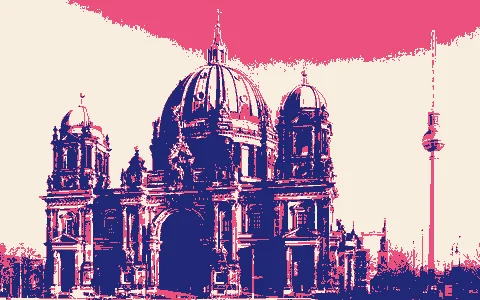
Print the Berliner Dom as a poster
Your task
Run the code (Ctrl+Enter).
Change DARK on line 4 to 60 and run.
Change it to 120 and run.
Which poster has the most blue?
What you'll makeEach pixel becomes one of three flat colours, chosen by how dark it is. It looks like a screen print.
In this lesson you will:
compare a pixel’s brightness with a number
write the rule that decides which pixels get ink
fix a rule where the blue never appears
Hint
DARK is a brightness from 0 (black) to 255 (white). Pixels darker than it get blue.
Hint
A higher DARK makes more of the photo blue. Keep it below MID (150), or the pink disappears.
Solution
Put line 4 back to DARK = 90 and run. That is the starting code, and it runs.
poster_dom.pyCtrl+Enter runs
Run your code to check it.
Output
What your code prints and draws appears here.
Concept 1 of 3 · 1 min
A photo is a grid of numbers
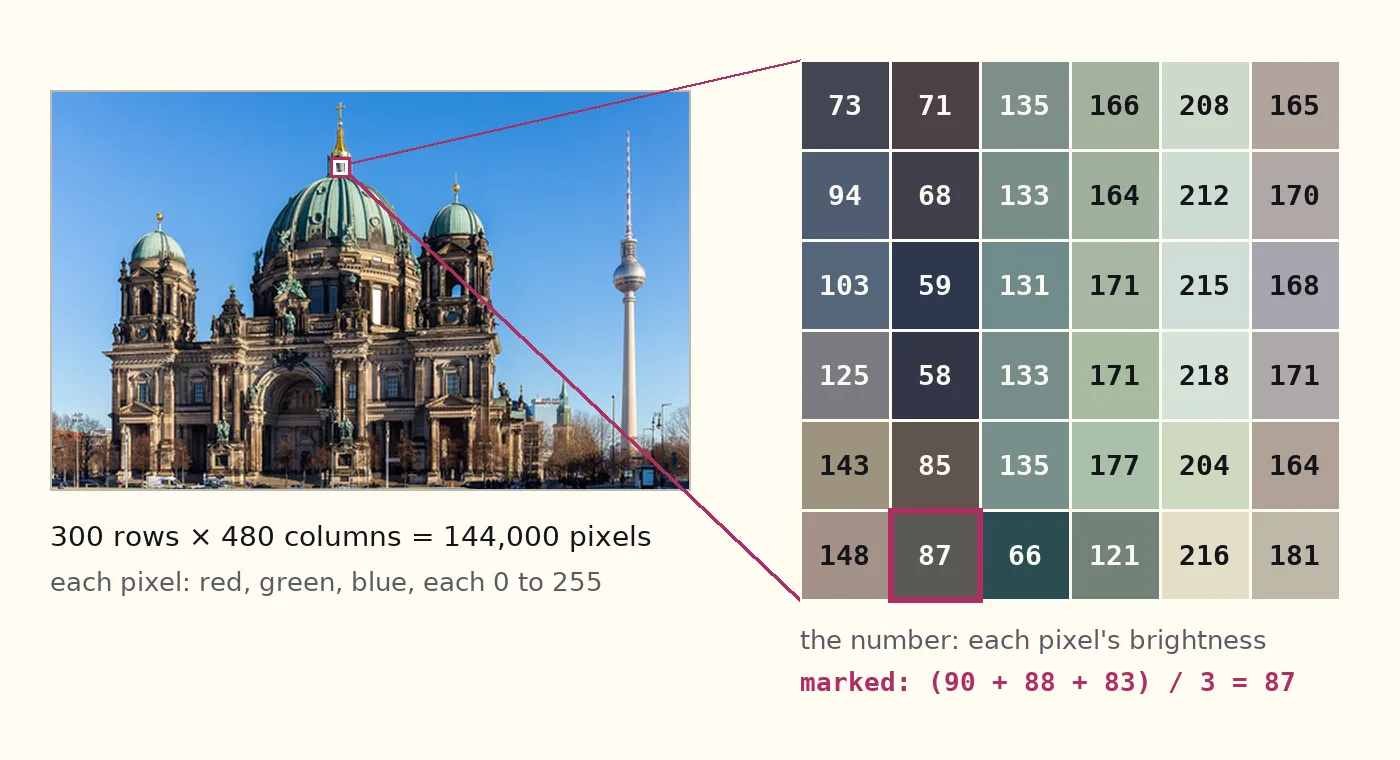
A digital photo is a grid of tiny squares called pixels: here 300 rows by 480 columns, 144,000 pixels. Each pixel stores three numbers (red, green, blue), each from 0 (none) to 255 (full). To print in three colours we need one number that says how dark a pixel is. We use the average of the three: the brightness, from 0 (black) to 255 (white). The code calls it light.
Worked example
The marked pixel is (90, 88, 83): (90 + 88 + 83) / 3 = 87, a dark grey.
Check yourself
A pixel is (90, 30, 0). What is its brightness?
Show the answer
40: (90 + 30 + 0) / 3 = 40.
A 6 × 6 patch of the Dom, enlarged. Each square is one pixel; the number is its brightness.
Step 1 · Predict · 3 min
Ask a yes/no question
Your task
Guess first: which numbers will print True?
Run.
Change THRESHOLD on line 1 so that exactly three of the four squares get ink.
Notes for step 1
Concept
A photo is a grid of numbers
Each pixel holds a red, a green and a blue number from 0 to 255; their average is its brightness.
120 < 120 is False: a pixel exactly at the threshold stays paper.
In the code:
light is a pixel’s brightness.
THRESHOLD is a number you choose.
light < THRESHOLD asks one question: is this pixel darker than that number? Python answers True or False.
The four numbers in the code are the brightness of these four pixels.Hint
30 < 100 is True; 200 < 100 is False. Do the other two the same way.
Hint
The three darkest numbers are 30, 90 and 120. The threshold must be above 120 and no more than 200.
Solution
THRESHOLD = 150
Explain it another way
Picture a ruler from 0 (black) to 255 (white). Your four numbers sit on it: 30, 90, 120 and 200.
THRESHOLD is a mark on that ruler:
left of the mark: True, gets ink
on the mark or right of it: stays paper
Where must the mark go so that three numbers are on its left?
step1_compare.pyCtrl+Enter runs
Run your code to check it.
Output
What your code prints and draws appears here.
Concept 2 of 3 · 1 min
One threshold, every pixel
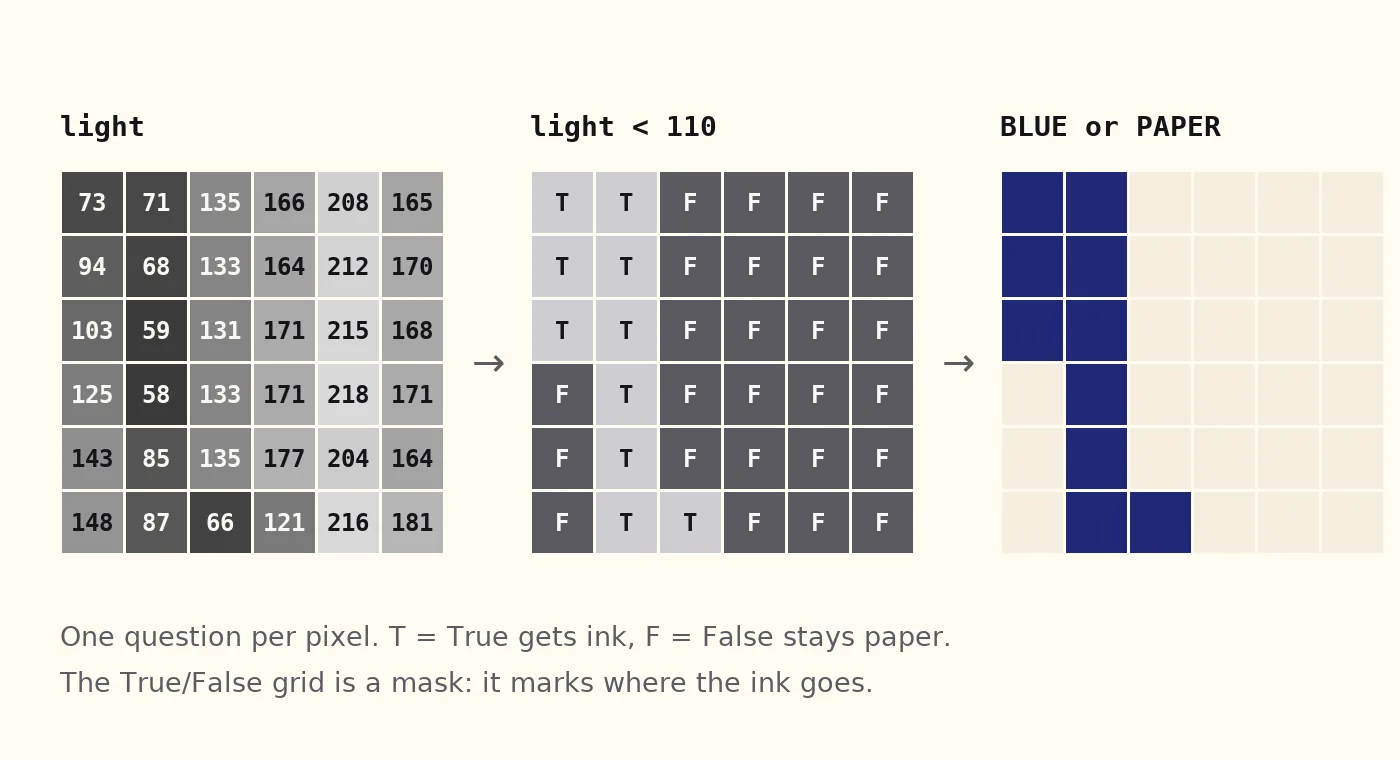
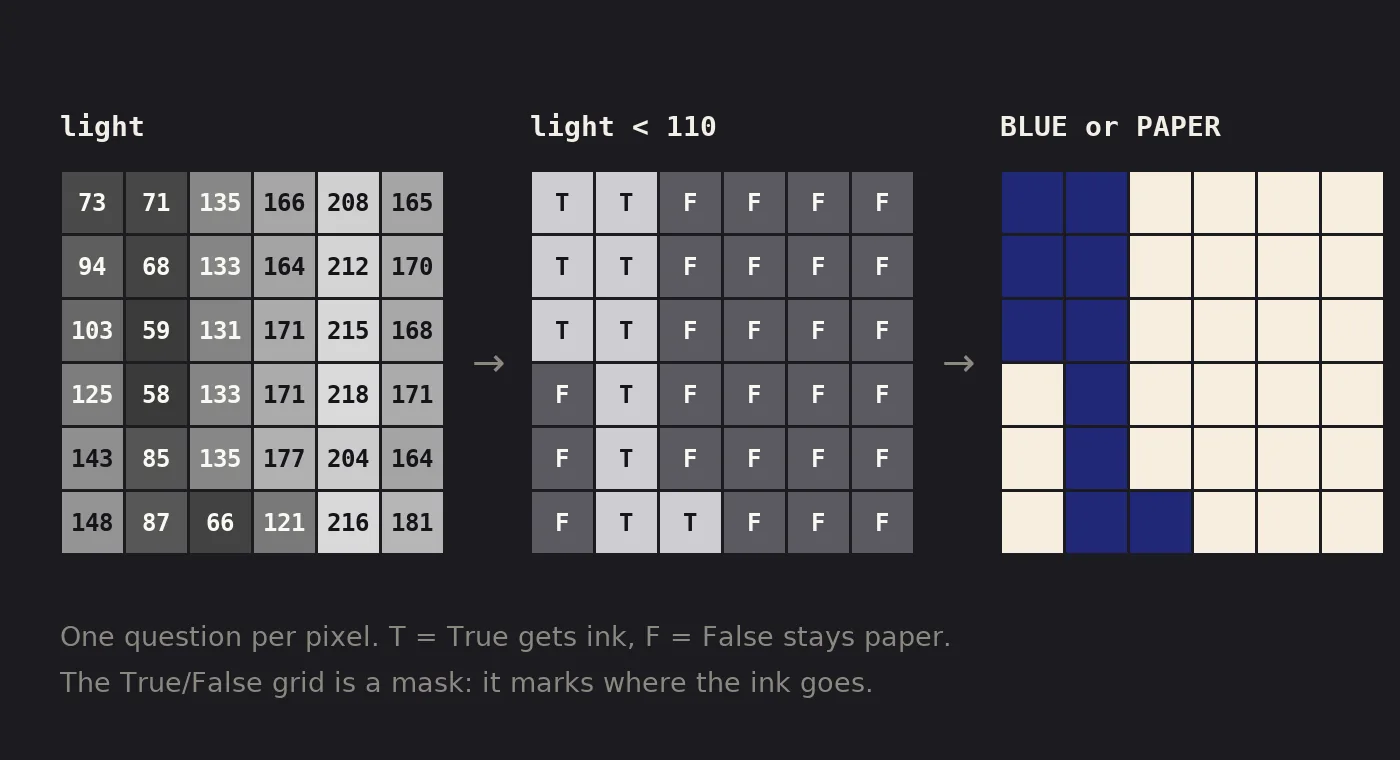
A threshold is one number on the brightness scale. The rule asks every pixel one yes/no question, light < THRESHOLD. True gets ink, False stays paper. The grid of True/False answers is called a mask: it shows where the ink goes. Splitting a picture in two like this is called thresholding. Raise the threshold and more pixels fall below it.
Worked example
The marked pixel from concept 1: 87 < 110 is True, so it gets ink. A light stone pixel: 215 < 110 is False, so it stays paper.
Check yourself
The threshold rises from 60 to 120. Does the poster get more blue or less?
Show the answer
More: More pixels fall below 120 than below 60: the inked part grows from about 19 % to 35 % of the photo.
brightness
light < 110: ink
0 black255 white
33 % of the 144,000 pixels get ink
Move the threshold: the blue grows as it rises.
The same 36 pixels three times: their brightness, the answer to light < 110, and the result in ink or paper.
Step 2 · Write · 2 min
Ink the dark pixels
Your task
Replace ___ with a comparison, so that pixels darker than THRESHOLD get BLUE.
Notes for step 2
Concept
One threshold, every pixel
Every pixel is compared with the same number: darker than it gets ink, the rest stays paper.
The rule is a Python function: it takes one brightness and returns one colour. paint calls it for every pixel, all 144,000, and builds the poster from the results.
Hint
You wrote this question in step 1. Which two names does it compare?
Hint
Line 6 names the brightness light. Line 2 sets the number to compare it with, THRESHOLD.
Solution
if light < THRESHOLD:
Explain it another way
Follow two pixels through the rule. THRESHOLD is 110.
A dark pixel: light is 87. It should get BLUE, so the if must be True.
A light stone pixel: light is 215. It should get PAPER, so the if must be False.
Which question from step 1 does that?
step2_rule.pyCtrl+Enter runs
Run your code to check it.
Output
What your code prints and draws appears here.
Concept 3 of 3 · 1 min
Two thresholds, three colours
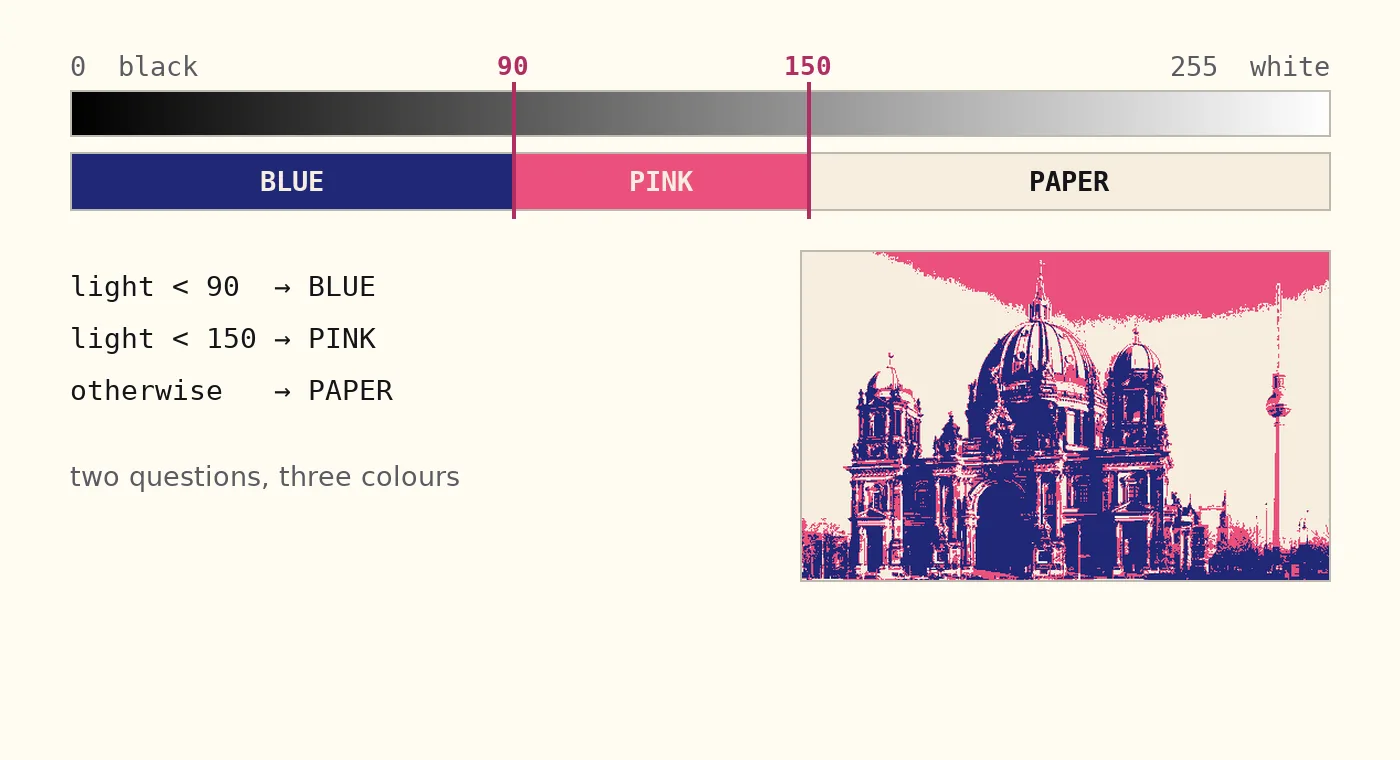
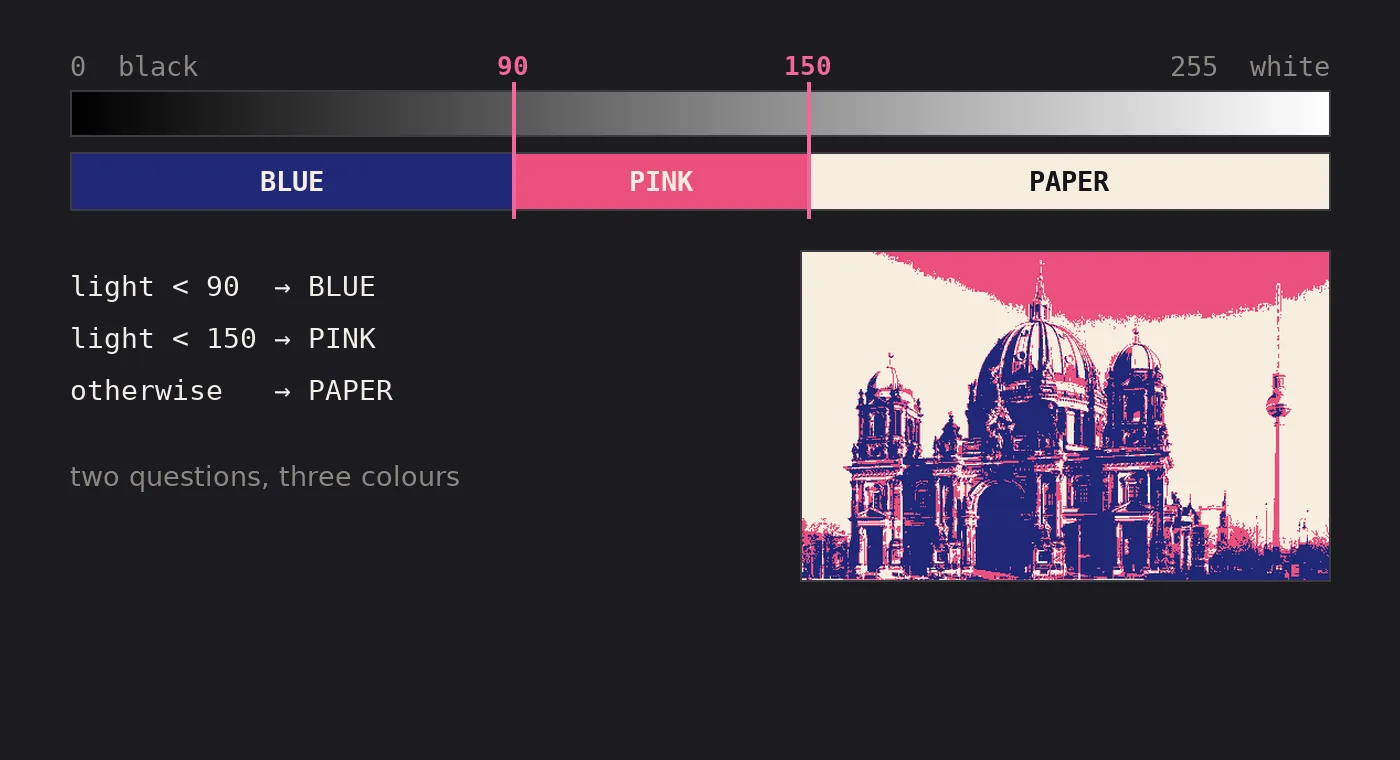
Two thresholds cut the brightness scale into three bands: below 90 blue, from 90 to 149 pink, 150 and up paper. In the rule each band is an if with a return. A return ends the rule for that pixel, so the lines below it never run. A screen print works in bands too: one stencil per colour, each printed flat.
Worked example
A pixel at 170: 170 < 90 is False, 170 < 150 is False, so the rule reaches its last line and returns PAPER.
Check yourself
The bands are at 90 and 150. Which colour does a pixel at 120 get?
Show the answer
Pink: 120 is not below 90, but it is below 150.
Two thresholds cut the ruler into three bands of colour.
Step 3 · Fix · 3 min
The blue that never shows
Your task
This rule should give three colours: blue, pink and paper. No blue shows.
Change the order of the two ifs so the blue appears.
Notes for step 3
Concept
Two thresholds, three colours
Two thresholds split the brightness scale into three bands: blue, pink and paper.
The same two ifs in both orders. A pixel at 10 stops at the first True.
In a chain of ifs the first True wins, so the narrow question (below 90, fewer pixels) goes before the wide one (below 150, more pixels).
Three colours need two questions:
below 90: blue
from 90 to 149: pink
150 and up: paper
Python reads the ifs from the top.
Hint
A pixel at 10 is below 150, so the first if already returns pink for it. Which if should come first?
Hint
Check light < 90 first, then light < 150. Keep the numbers.
Solution
Move if light < 90: and its return BLUE above if light < 150:.
Explain it another way
Picture two doors in a row, one for each if. A pixel walks through the first door that lets it in; return means it stops there.
The wide door (below 150) lets in every pixel under 150, the dark ones too.
So if it comes first, no pixel ever gets through the narrow door (below 90).
Which door must come first?
step3_fix.pyCtrl+Enter runs
Run your code to check it.
Output
What your code prints and draws appears here.
Wrap up · 2 min
What you can do now
Answer from memory first: one question for each concept. Try not to look back.
Recall 1 of 3
What is the brightness of the pixel (200, 40, 60)?
Show the answer
100: (200 + 40 + 60) / 3 = 100: the weak green and blue pull the strong red down.
Recall 2 of 3
The rule makes a pixel BLUE when light < 100. A pixel's brightness is exactly 100. Does it turn BLUE?
Show the answer
No, it stays PAPER: 100 < 100 is False, so the pixel stays PAPER.
Recall 3 of 3
Python reads these checks from the top. Which colour does a pixel at 50 get?
if light < 160:
    return PINK
if light < 80:
    return BLUE
return PAPER
Show the answer
Pink: 50 is below 160, so the first check answers and the blue check is never reached.
A pixel is three numbers; their average is its brightness, 0 to 255.
< asks a yes/no question; a function turns the answer into a colour.
In a chain of ifs the first True wins, so the narrow question comes first.
All the theory in this lesson
Concept 1
A photo is a grid of numbersEach pixel holds a red, a green and a blue number from 0 to 255; their average is its brightness.
A digital photo is a grid of tiny squares called pixels: here 300 rows by 480 columns, 144,000 pixels. Each pixel stores three numbers (red, green, blue), each from 0 (none) to 255 (full). To print in three colours we need one number that says how dark a pixel is. We use the average of the three: the brightness, from 0 (black) to 255 (white). The code calls it light.
The marked pixel is (90, 88, 83): (90 + 88 + 83) / 3 = 87, a dark grey.
Concept 2
One threshold, every pixelEvery pixel is compared with the same number: darker than it gets ink, the rest stays paper.
A threshold is one number on the brightness scale. The rule asks every pixel one yes/no question, light < THRESHOLD. True gets ink, False stays paper. The grid of True/False answers is called a mask: it shows where the ink goes. Splitting a picture in two like this is called thresholding. Raise the threshold and more pixels fall below it.
The marked pixel from concept 1: 87 < 110 is True, so it gets ink. A light stone pixel: 215 < 110 is False, so it stays paper.
Concept 3
Two thresholds, three coloursTwo thresholds split the brightness scale into three bands: blue, pink and paper.
Two thresholds cut the brightness scale into three bands: below 90 blue, from 90 to 149 pink, 150 and up paper. In the rule each band is an if with a return. A return ends the rule for that pixel, so the lines below it never run. A screen print works in bands too: one stencil per colour, each printed flat.
A pixel at 170: 170 < 90 is False, 170 < 150 is False, so the rule reaches its last line and returns PAPER.
Photo: Ansgar Koreng, Berliner Dom und Fernsehturm, 2017, CC0.
Sources (3)
Gonzalez, R. C., & Woods, R. E. (2018). Digital image processing (4th ed.). Pearson.
rng.integers gives every pixel its own number from -GRAIN to GRAIN. The code adds it to the pixel’s red, green and blue before your rule runs. np.clip keeps the sums between 0 and 255.
The target at GRAIN = 20.Hint
Your rule stays the same. Only the picture it gets changes: grainy instead of photo.
Solution
The sky is close to 150, so its pixels flip between PINK and YELLOW most.
Under PAPER, add COLOURS = [BLUE, PINK, YELLOW, PAPER].
Replace the ifs in colour_of with one line that finds band, then return COLOURS[band].
Add PURPLE = [120, 60, 140] under BLUE and put it in the list after BLUE.
len(COLOURS) is the number of colours in the list, and COLOURS[band] is the colour at that place in it, counting from 0. Your line works for any length.
The target: five colours, GRAIN = 20.Hint
With 4 colours, each band is 64 brightness numbers wide. int(...) cuts off the decimals.
Solution
Brightness times the number of colours, divided by 256, is a number from 0 up to just below len(COLOURS).




 brightness