10.1.1 Node Networks — The TouchDesigner Paradigm
Shift from sequential Python scripts to continuously-cooking node networks. Learn the four operator families (TOP, CHOP, SOP, DAT), the meaning of cooking, and why your NumPy mental model carries over almost unchanged.
Big Question — what changes when your code never stops running?
For nine modules you have written Python scripts that execute once, top to bottom, and exit. To change a parameter you edit the source, save the file, and re-run. That round-trip — edit, save, run, wait — costs seconds at best and minutes for anything heavy. In a live performance, an interactive installation, or a VJ set, that workflow is unusable. TouchDesigner, Max/MSP, Unreal Blueprints, and the rest of the node-based visual programming family solve the problem by inverting the relationship between code and time: instead of writing a script that runs once, you wire up a network of nodes that runs continuously, sixty or more times per second, forever. Move a slider, the output updates the next frame. The shift is the most significant paradigm change in this module, and once you have internalised it, every later TouchDesigner concept follows naturally.
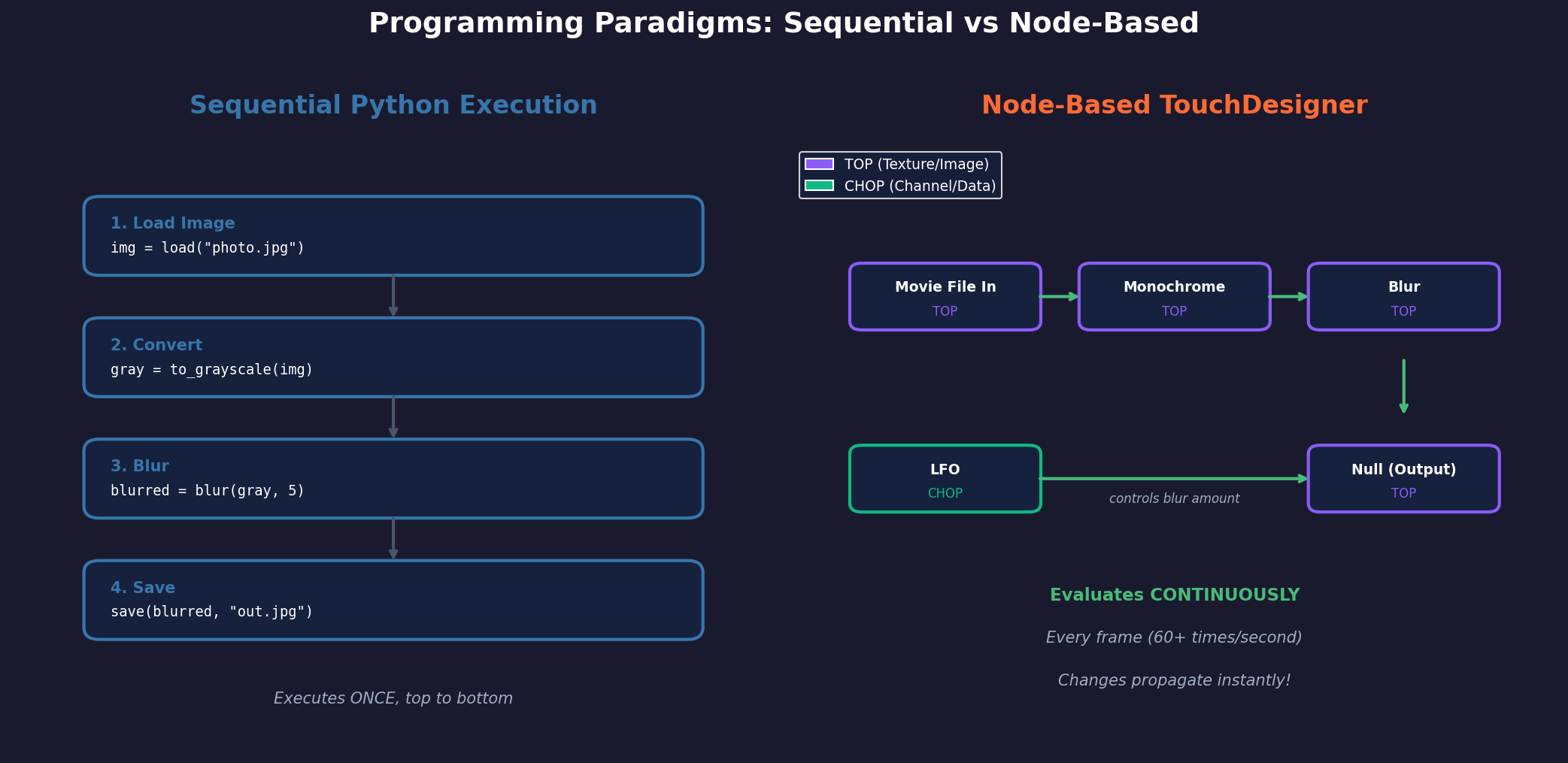
The good news for someone arriving here from Modules 1-9: your NumPy knowledge transfers almost unchanged. A TouchDesigner image isn’t a np.ndarray, but you think of it the same way. A blur operator behaves like gaussian_filter. Connecting two nodes is like assigning the output of one function to the input of another. The new ideas are the operator-family categorisation, the meaning of cooking, and the dependency-driven evaluation model. This lesson walks through all three.
Learning objectives
- Articulate why node-based programming exists — what kind of problem it solves that sequential scripting does not.
- Name the four TouchDesigner operator families (TOP, CHOP, SOP, DAT) and the data type each handles.
- Define cooking and recognise that TouchDesigner uses pull-based evaluation along a DAG of dependencies.
- Build a 3-node, 5-node, and feedback-loop network in TouchDesigner — and recognise the feedback loop as a real-time reaction-diffusion system.
Part 1 — Two paradigms, side by side
A typical Python image pipeline runs as a recipe — load image, adjust brightness, blur, save:
import numpy as np
from scipy.ndimage import gaussian_filter

noise = np.random.rand(512, 512)        # step 1
adjusted = noise * 0.5 + 0.25            # step 2
blurred = gaussian_filter(adjusted, sigma=2)  # step 3
save_image(blurred, 'output.png')        # step 4
The script executes once. To change the blur amount you edit the source, save, and re-run. The same pipeline in TouchDesigner is a chain of four operators wired together: Noise TOP → Level TOP → Blur TOP → Out TOP. Every frame, the network cooks: each operator re-reads its inputs, applies its operation, and outputs the result. The network never stops.
| Aspect | Python script | Node network |
|---|---|---|
| Execution | Runs once, then stops | Runs continuously (60+ fps) |
| Changing parameters | Edit code, save, re-run | Adjust slider, instant update |
| Data flow | Variables pass between lines | Wires connect outputs to inputs |
| Mental model | Recipe with steps | Living, breathing system |
The fundamental rule: nodes are functions that never stop running. Each node continuously watches its inputs; the moment something changes, it recalculates and pushes the new output downstream. The whole network is alive.
Part 2 — The four operator families
TouchDesigner organises every operator into one of four families, each handling a different kind of data. Knowing which family handles what is the difference between fumbling for the right node and reaching for it instinctively.
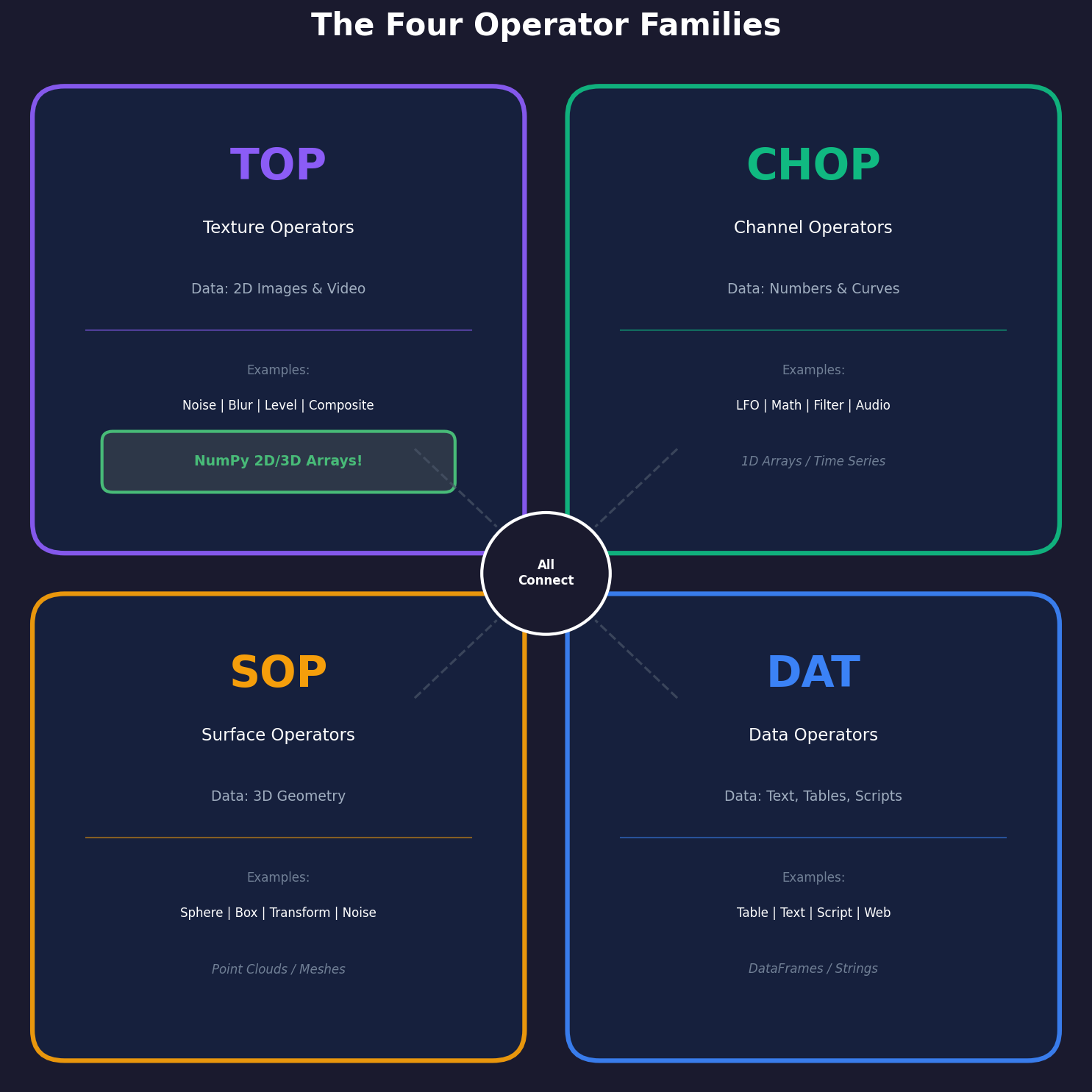
TOP — Texture Operators are pixel arrays. Think np.ndarray of shape (H, W, 4). Examples:
Noise TOP(procedural noise — yournp.randomand Perlin/Simplex from Module 6)Level TOP(brightness, contrast, gamma — array arithmetic)Blur TOP(Gaussian blur —gaussian_filter)Composite TOP(combine multiple images — array stacking, alpha blending)Null TOP(a pass-through reference point — like binding a name)
If you process images in TouchDesigner you live in TOPs. Your entire Modules 1-6 knowledge maps here.
CHOP — Channel Operators are 1D arrays of numbers that change over time. Audio, animation curves, parameter values:
LFO CHOP(sine, triangle, square — a continuous oscillator)Math CHOP(arithmetic between channels)Filter CHOP(smoothing)Audio In CHOP(live microphone)Timer CHOP(timing and sequencing)
CHOPs typically control parameters of other operators. An LFO CHOP driving a Blur TOP’s filter size produces a pulsing blur — no Python code required.
SOP — Surface Operators handle 3D geometry: vertices, edges, polygons. Sphere SOP makes a sphere, Transform SOP moves it, Particle SOP runs a particle system. Module 10.2 explores SOPs when you recreate Boids and N-body simulations in TD.
DAT — Data Operators handle text, tables, and Python scripts. The most important DAT for this module is Script DAT, which is where your Python lives. Table DAT stores spreadsheet-like data. Web DAT fetches URL content. DATs are the bridge between TouchDesigner and the outside world.
Part 3 — Cooking: continuous, pull-based, dependency-ordered
When a TouchDesigner node “cooks”, it re-reads its inputs, applies its operation, and produces an output. Cooking happens continuously — typically 60 times per second — and the framework calls this the cook rate. Three properties of cooking matter:
1. Pull-based. A node only cooks if someone downstream cares about its output: a viewer is showing it, a parameter is referencing it, or another node has wired into it. Unused branches consume nothing. This is critical for performance — you can leave a hundred dormant nodes on the canvas and they cost effectively zero.
2. Dependency-ordered. A node cannot cook until all its inputs have cooked. The whole network is a DAG (directed acyclic graph) of dependencies; source nodes (no inputs) cook first, processing nodes follow, output nodes cook last. The framework topological-sorts the DAG every frame automatically.
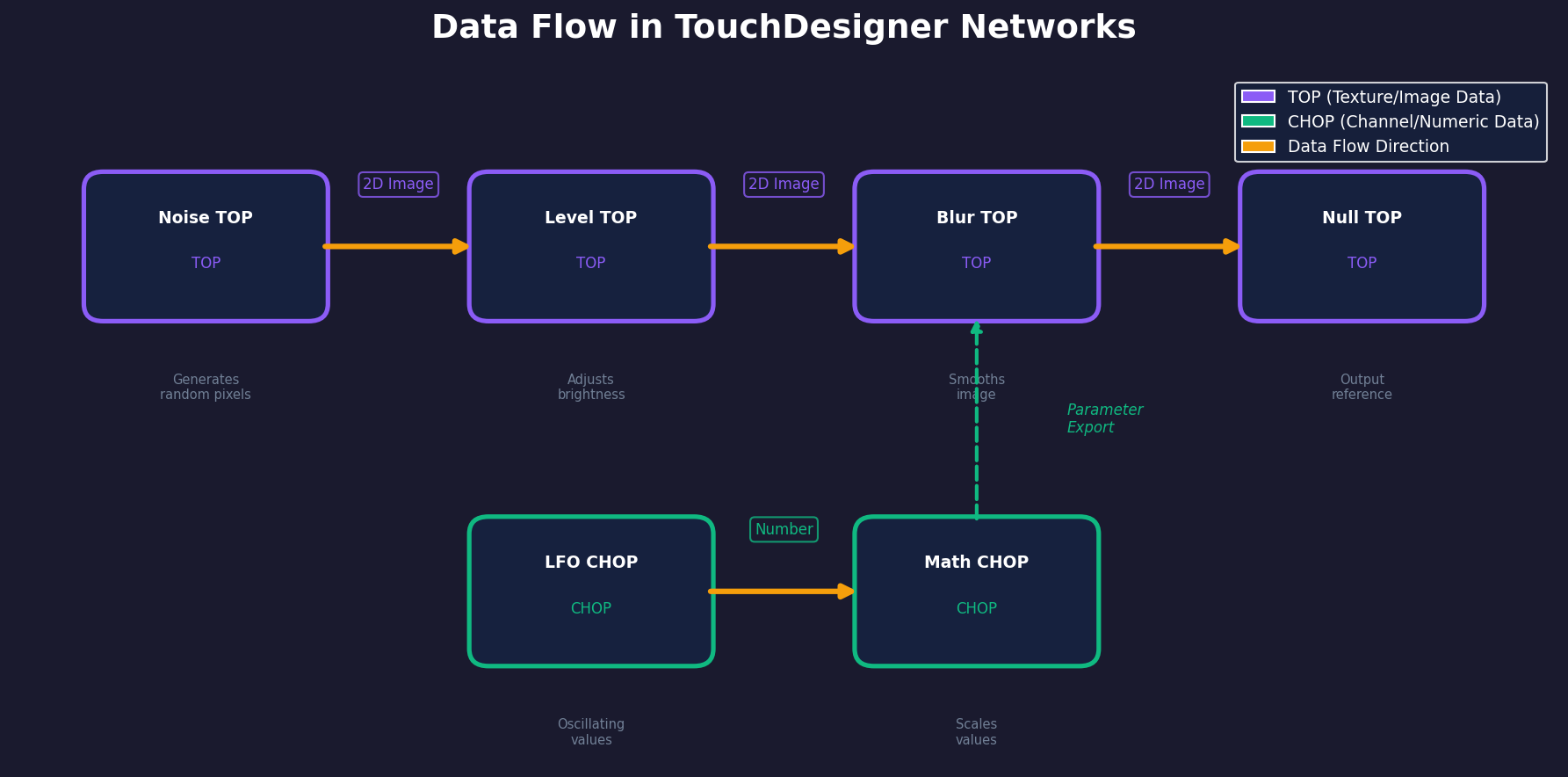
3. Automatic propagation. When a parameter changes, the change cascades through every downstream node — within a single frame for any reasonable network. In Python you would write:
parameter = 0.5
result = image * parameter     # calculated ONCE
parameter = 0.8                # changed
# 'result' is STILL the old value — Python doesn't re-run
In TouchDesigner, the equivalent wire-and-node setup is the recalculation:
Math CHOP (outputs 0.5) → Level TOP (uses 0.5 for brightness)
Change Math CHOP to 0.8 → Level TOP IMMEDIATELY shows 0.8 brightness
There is no result = ... to refresh because the wire is the dependency.
Synthesis project — three exercises, increasing in complexity
Three hands-on TouchDesigner exercises in Execute → Modify → Create order. The complete .toe file is included as a download; open it in TouchDesigner to see the finished network for all three.
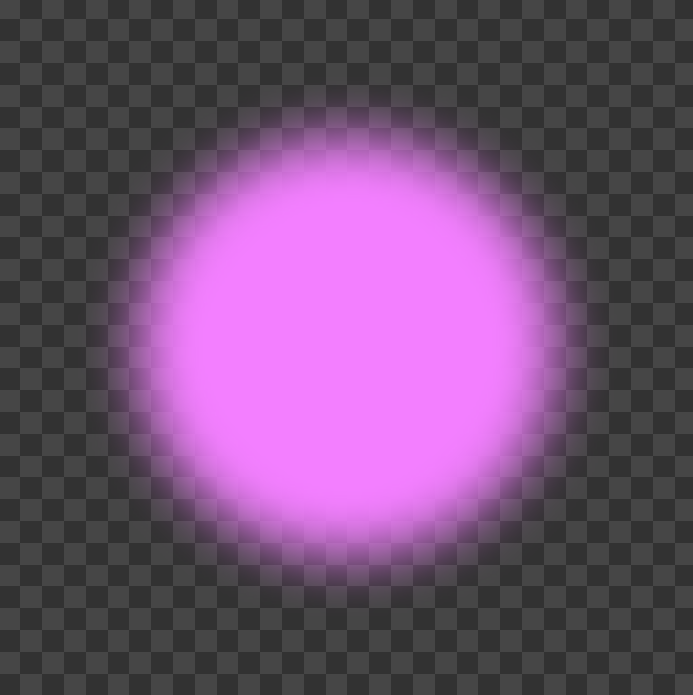
The 3-node glowing orb
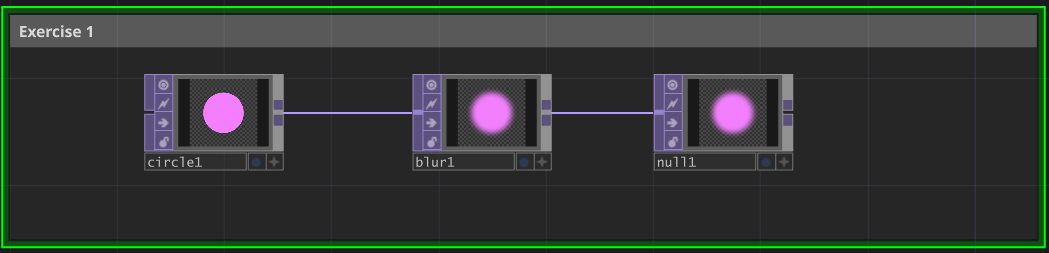
Goal: produce a soft glowing pink orb using only Circle TOP → Blur TOP → Null TOP.
Steps
- Open TouchDesigner. Press Tab → TOP → Circle. Set radius
0.3, fill colour(0.95, 0.50, 1.0). - Tab → TOP → Blur. Wire
Circle → Blur. Set Filter Size50. - Tab → TOP → Null. Wire
Blur → Null. (Null is a reference point.)
Reflection questions
- How did the output change when you adjusted the Blur TOP’s Filter Size?
- Did you need to click “run” or “execute” to see the changes?
- What happens if you change the Circle TOP’s colour while watching the Null TOP?
- How does this real-time feedback compare to running a Python script?
Answer (last one) — you adjust a slider and the result appears the same frame. In Python you would edit the source, save, re-run, and wait. The full edit-test loop in TD is measured in milliseconds; in Python it is measured in seconds-to-minutes.
Animated colour flow (5 nodes)
Goal: an animated, hue-cycling noise pattern through Noise → Level → HSV Adjust → Blur → Null. The colour cycle is driven by a built-in time variable, not by a separate Python script.
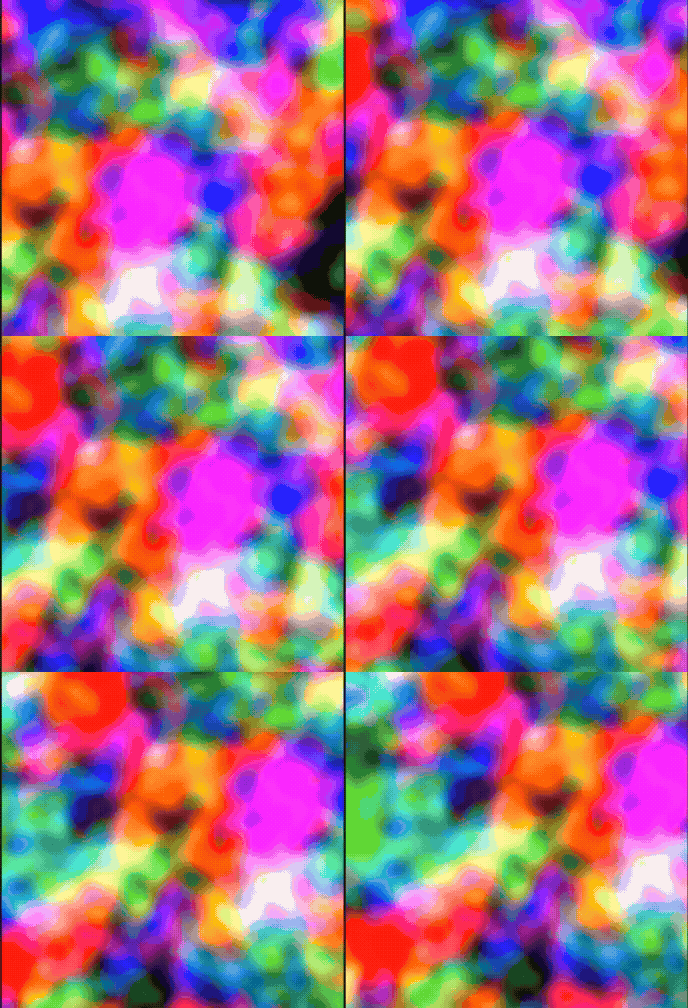
Key step — at the HSV Adjust TOP, instead of typing a constant Hue Offset, write an expression. Right-click the Hue Offset field, choose Expression, enter:
absTime.seconds * 0.1absTime.seconds is a built-in variable holding the elapsed clock time. Multiplying by 0.1 means one full rotation through the hue circle takes roughly 36 seconds. Try * 0.5 for faster cycling, * 0.05 for meditative.
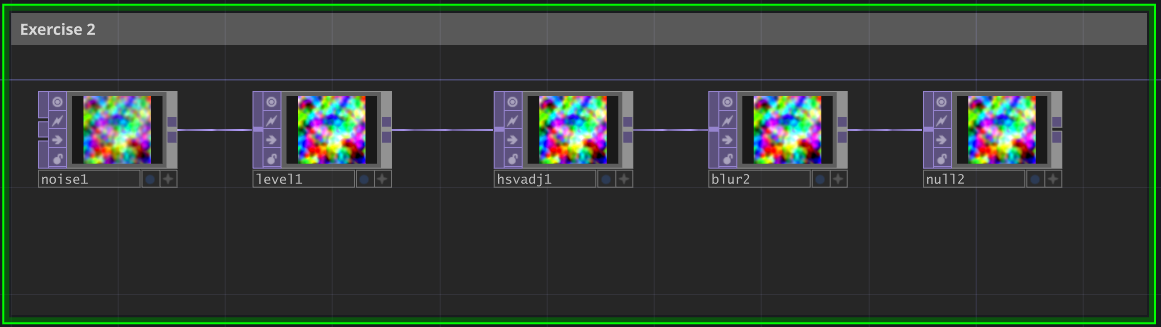
What changed conceptually: you now have animation without a script. The expression is evaluated every frame; the hue offset updates every frame; the network re-cooks every frame. Time-based behaviour is a one-line parameter expression in TD, where in Python it would require a loop with time.sleep() or a frame counter.
Cellular feedback (10 nodes)
Goal: a self-organising cellular pattern produced by a feedback loop. The network feeds its own output back into itself, creating temporal recursion: each frame depends on the previous one. The result is reaction-diffusion in node form.
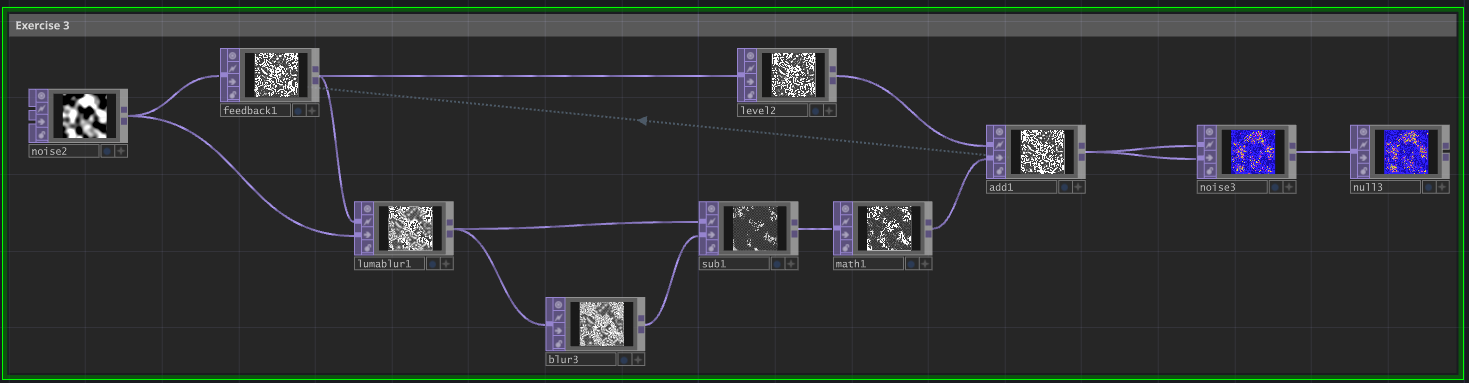
The architecture has three regions:
- Source: a Noise TOP that gives the loop a starting seed.
- Edge-detection branch:
LumaBlur → Blur → Subtractproduces a difference-of-Gaussians edge map. - Feedback core:
Mathamplifies edges,Leveldampens the recirculated signal,Addcombines them,Feedbackstores the result for next frame’s input.
The key TD-specific operator: Feedback TOP, with Target TOP parameter set to add1. Feedback continuously reads the output of add1 and stores it as its own output for one frame, completing the loop.
Why does this produce cells? Local activation (edge amplification by Math) plus lateral inhibition (dampening by Level and blur) plus temporal recursion equals Turing’s reaction-diffusion mechanism from 1952 — see lesson 5.4.4 Turing Patterns for the chemistry version. You have just built a real-time analogue computer for morphogenesis using ten node graphs and zero Python.
Challenge extensions
- Feedback Mix in the Feedback TOP — higher values (above 0.9) → slower, more persistent patterns; lower (below 0.5) → faster, more chaotic.
- Larger blur size → larger cells; smaller blur → finer detail.
- CHOP-driven Feedback Mix — wire an LFO CHOP to the Feedback Mix parameter for breathing patterns.
- Colour — add an HSV Adjust TOP after Noise2, hue-offset by
absTime.seconds * 0.1. - Parallel feedback loops — build a second feedback loop, composite both. What happens when two reaction-diffusion systems interact?
Summary
Common pitfalls to avoid
- Thinking in “run once” mode. TD networks never stop; if something looks wrong, look at the current network state, not at “running it again.”
- Cross-family wiring. Connecting a TOP to a CHOP input fails — different data types. The colour code is your safety net.
- Over-complicating early networks. A 3-node chain is enough to understand the paradigm; add complexity only when it earns its keep.
- Treating parameter expressions like Python. Expressions are evaluated each frame in TD’s expression language, which is similar to Python but not identical (no imports, no statements — only expressions).
- Forgetting the Null TOP at the end of every chain. It is a reference point that downstream nodes can wire into without modifying the upstream signal — invaluable for editing without breaking dependencies.
References
- [1] Burnett, M. M., & Baker, M. J. (1994). A classification system for visual programming languages. Journal of Visual Languages and Computing, 5(3), 287–300.
- [2] Derivative Inc. (2024). TouchDesigner Documentation. derivative.ca/UserGuide
- [3] Green, T. R. G., & Petre, M. (1996). Usability analysis of visual programming environments: A ‘cognitive dimensions’ framework. Journal of Visual Languages and Computing, 7(2), 131–174.
- [4] Reas, C., & Fry, B. (2014). Processing: A Programming Handbook for Visual Designers and Artists (2nd ed.). MIT Press.
- [5] Shneiderman, B. (1983). Direct manipulation: A step beyond programming languages. Computer, 16(8), 57–69.
- [6] Turing, A. M. (1952). The chemical basis of morphogenesis. Philosophical Transactions of the Royal Society B, 237(641), 37–72. (Exercise 3’s feedback loop is a real-time analog of Turing patterns.)
- [7] Hils, D. D. (1992). Visual languages and computing survey: Data flow visual programming languages. Journal of Visual Languages and Computing, 3(1), 69–101.