10.1.2 Python Integration — op() and Parameter Access
Wire Python into a TD network. Learn where Python lives (Script DAT/CHOP/TOP), how `op('name')` references any operator, and how `.par.X` reads or writes parameters — turning your network into a programmable instrument.
Big Question — how do you mix the visual and textual programming worlds?
Visual programming is exhilarating for the first hour and constricting by the third. Some logic is genuinely sequential — “if the audio level is high for more than two seconds, switch to scene 3 and reset the fader” — and trying to express that as a node chain takes more nodes than it saves. The pragmatic answer in every modern node-based environment is the same: embed a real text-based programming language inside the visual one. TouchDesigner embeds Python. The same Python you have written for Modules 0-9 runs inside TouchDesigner’s own interpreter, with one new function — op('name') — that returns a live reference to any operator in your network. From there your script can read parameters, change them, watch values, write data to operators, and react to events. The visual and textual paradigms become a unified instrument, where each is used for what it does best.
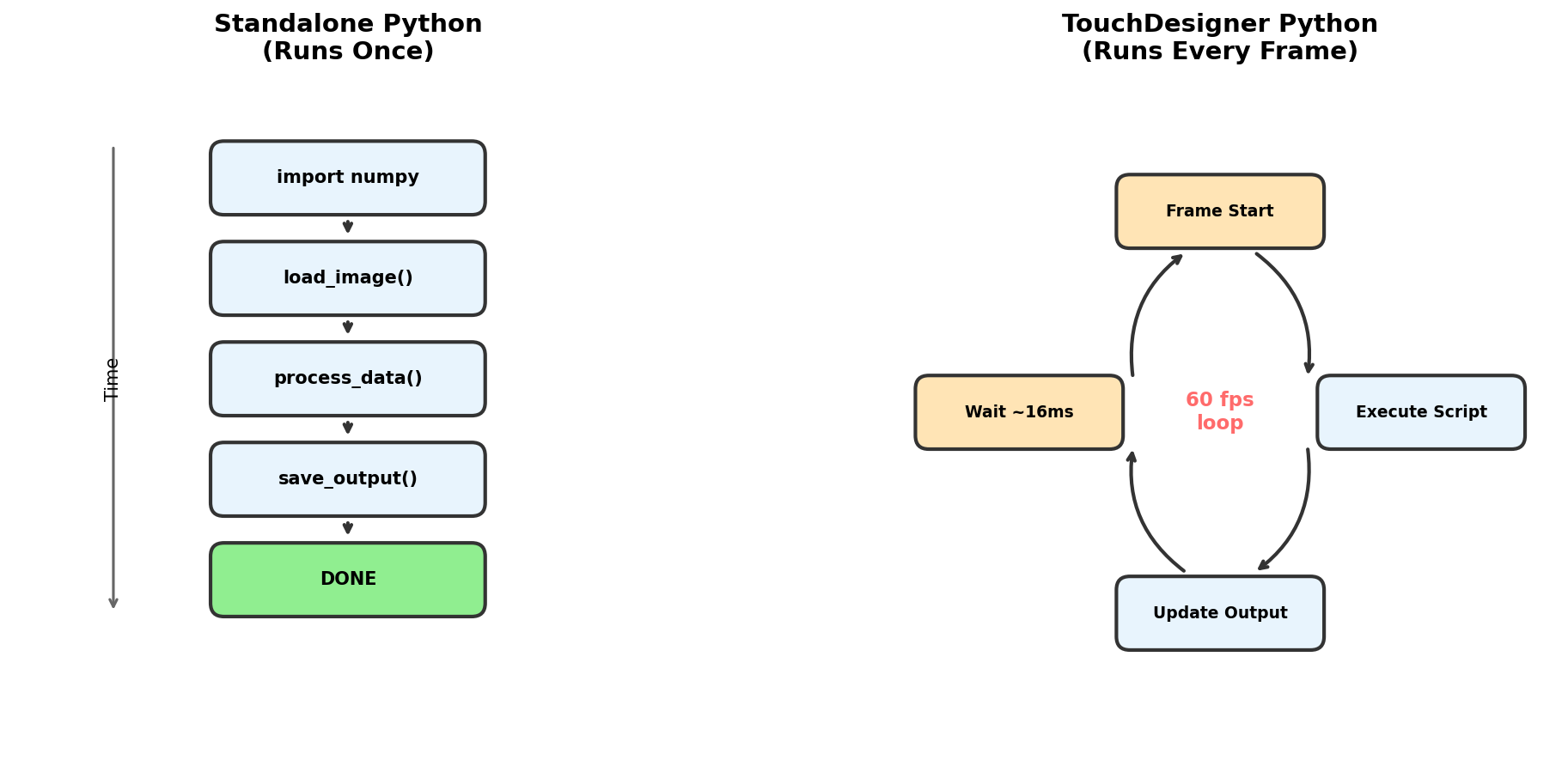
Learning objectives
- Identify where Python code lives in TouchDesigner — Script DAT, Script CHOP, Script TOP — and which to pick for which job.
- Use
op('name')to reference any operator by name, andmeto reference the current operator. - Read parameters with
.par.X.eval(); write parameters with.par.X = value; set per-frame expressions with.par.X.expr = '...'. - Apply absolute and relative paths to reference operators in different containers.
Part 1 — Where Python lives
Three operators host Python in TouchDesigner:
- Script DAT — the workhorse. Edits as a text file with full Python access. Runs once when triggered, or on parameter change, or on every frame if you wire a clock to it. Use this for control logic, automation, parameter modification, and external data integration. Default choice.
- Script CHOP — outputs numeric channels. Your code returns floats; TD displays them as a CHOP signal. Use for custom animation curves, signal generators, audio-domain math.
- Script TOP — outputs pixel data. Your code returns a NumPy array; TD shows it as an image. Use to bring your Modules 1-6 NumPy code directly into a TD network.
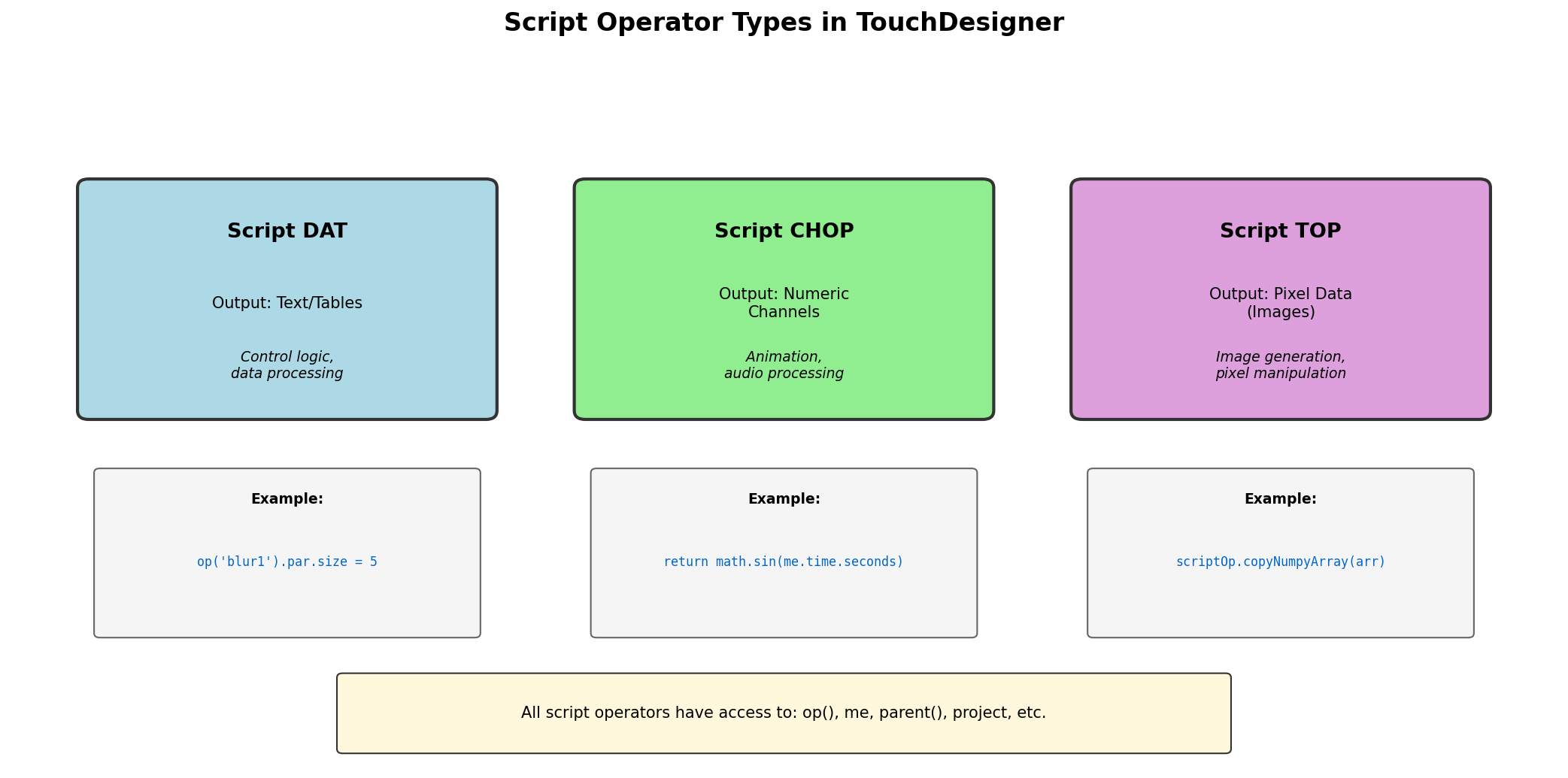
The Python interpreter is full Python 3.11 — import numpy as np, import json, import requests all work. Your code can use any package shipped with TD, plus any package you install into TD’s bundled Python environment.
Part 2 — op() and me: navigation in the network
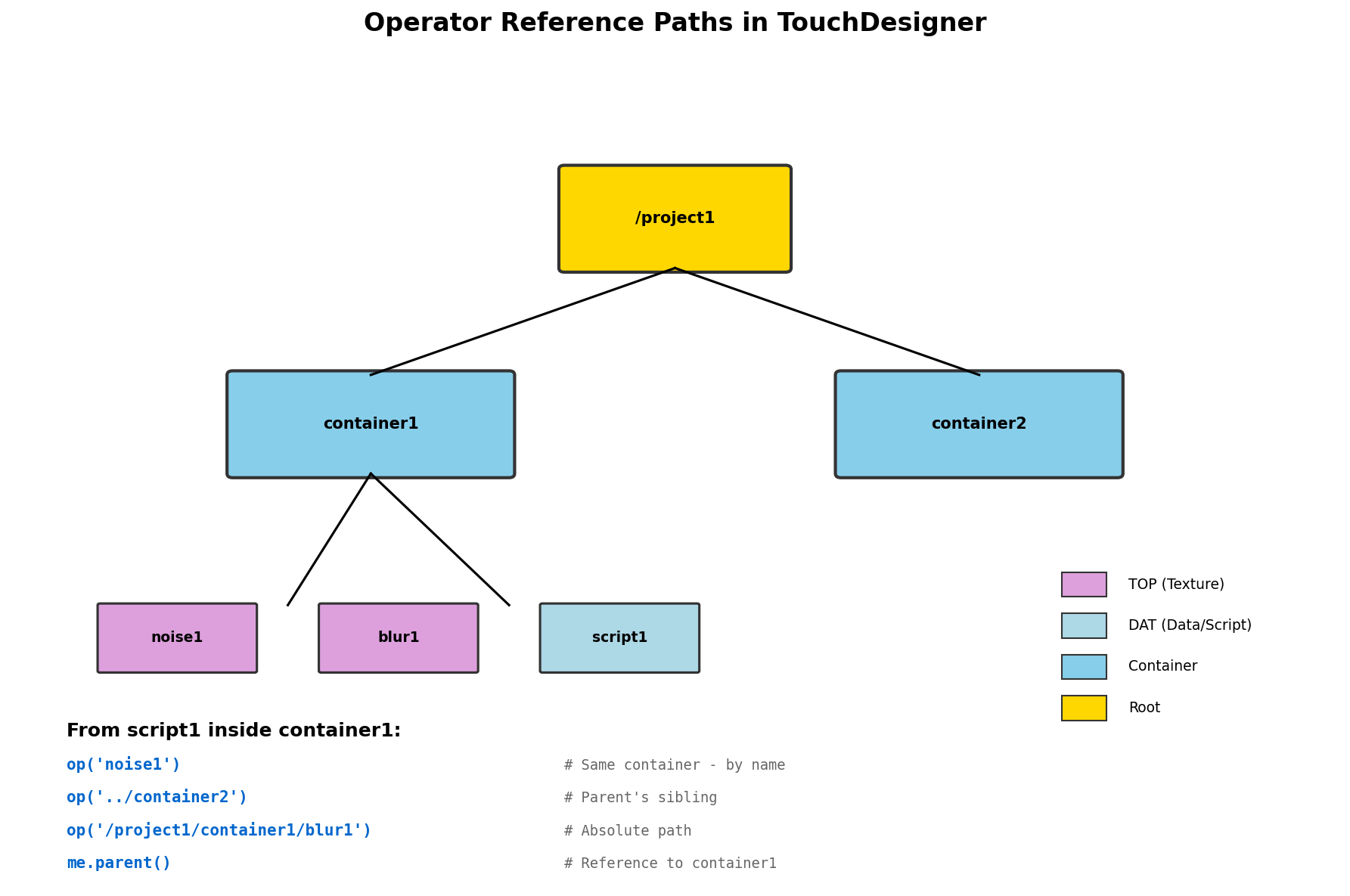
The single most important addition to Python in TouchDesigner is the op() function. It takes a name (or path) and returns a live reference to the named operator:
blur = op('blur1')                # operator in the same container
noise = op('/project1/noise1')    # absolute path from root
parent_container = op('..')       # go up one level
The returned reference is live — reading blur.width returns the current width right now, not a snapshot from when you ran the script. Setting blur.par.size = 10 changes the parameter and triggers downstream cooking instantly.
Inside any script operator, the variable me refers to the script itself:
print(me.name)        # 'script1'
print(me.type)        # 'textDAT'
print(me.path)        # '/project1/script1'
print(me.parent())    # the container that holds this script
print(me.time.seconds)  # current TD clock time in seconds
me is invaluable for code that wants to act relative to its own position. A control script in container A and the same script in container B can both reference siblings as me.parent() without caring about absolute paths.
Part 3 — Reading, writing, and animating parameters
Every operator’s parameters are accessible through .par.X where X is the parameter’s lowercase internal name. Hover over a parameter in TD to see its internal name; the visible label and the internal name can differ.
Read with .eval():
blur = op('blur1')
size = blur.par.size.eval()       # current numeric value
filter_type = blur.par.filtertype.eval()  # current string menu choice
Write by assignment:
blur.par.size = 10
blur.par.filtertype = 'gauss'

# multi-component parameters (RGB, XYZ) use suffixes:
noise = op('noise1')
noise.par.tx = 0.5    # x-translation
noise.par.colorr = 1.0  # red channel of color
noise.par.colorg = 0.5
noise.par.colorb = 0.0
Animate with .expr — sets an expression that re-evaluates every frame:
blur.par.size.expr = "absTime.seconds * 5"           # blur grows over time
noise.par.tx.expr = "sin(absTime.seconds * 2) * 0.3"  # x oscillates
The expression string is in TD’s expression language (almost Python — supports math, no statements, no imports). Once set, you do not run the script again; the expression cooks every frame on its own.
Synthesis project — Python-driven parameter modulation
Build a small TD project where one Script DAT reads time, computes a handful of sine-wave values, and writes them to parameters across five different TOPs — Noise period, Noise amplitude, Blur size, Level brightness, HSV hue offset. The result: rhythmic, coordinated animation driven by a single Python script you can edit live.
Reflection questions
- Why is using
.par.X.expr = "..."usually preferable to writing a Script DAT that re-sets.par.Xevery frame? - What happens if you
op('blur1').par.size = 10from a script that itself was triggered by the blur cooking? - Why use relative paths (
me.parent()) instead of absolute paths inside a reusable component?
Answers
Expressions vs scripts — expressions cook in C++ inside the TD core, which is faster than executing a Python script every frame. Scripts have setup and teardown cost per call; expressions are inlined. Use scripts for event-driven logic; use expressions for continuously-varying values.
Infinite cook loop — TD generally detects this and either breaks the loop or warns. But the underlying issue — a script modifying its own dependencies — is real and you should design to avoid it. Either move the writing logic to a separate Script DAT triggered by an external event, or use cook(force=False) to control when the script re-runs.
Relative paths in components — a component is meant to be copy-pasted into other projects. Absolute paths break the moment you instantiate the component in a different container. Relative paths (me.parent().op('child')) stay valid wherever the component is dropped.
Make it your own
- External control surface: read MIDI from an OSC input, map controller values to TD parameters via a Script DAT. The DJ controller becomes a live patch interface.
- Web-driven: a Web DAT periodically fetches a JSON file; a Script DAT parses it and updates parameters. The network is now controllable from a web page.
- Network-of-networks: a control container holds Python scripts that manage state; multiple visual containers expose their parameters via custom parameters; the control container reads and writes to all of them.
Summary
Common pitfalls to avoid
- Writing per-frame Python when an expression would do. Expressions are much cheaper.
- Hard-coding absolute paths inside components. Breaks the moment the component is instantiated elsewhere.
- Mistaking the parameter’s visible label for its internal name. Hover to confirm; internal names are lowercase and have no spaces.
- Re-cooking an operator inside its own script (write-after-read on the same operator). Creates an infinite cook loop in older TD versions.
- Forgetting
.eval()when reading.blur.par.sizeis the parameter object;.eval()returns its current value.
References
- [1] Derivative Inc. (2024). TouchDesigner Python Documentation. derivative.ca/UserGuide/Python
- [2] Lutz, M. (2013). Learning Python (5th ed.). O’Reilly Media.
- [3] Hils, D. D. (1992). Visual languages and computing survey: Data flow visual programming languages. Journal of Visual Languages and Computing, 3(1), 69–101.
- [4] Burnett, M. M. (2001). Visual programming. Encyclopedia of Computer Science and Engineering. Wiley.
- [5] McCarthy, M., & Wright, M. (2014). Programming Interactivity (2nd ed.). O’Reilly Media.
- [6] Reas, C., & McWilliams, C. (2010). Form+Code in Design, Art, and Architecture. Princeton Architectural Press.