4.1.3 Mandelbrot Set
Iterate $z \to z^2 + c$ on a complex grid and colour each pixel by the number of steps before it escapes. The boundary is infinite detail from one quadratic rule.
Overview
The Mandelbrot set is the most famous fractal in mathematics, but the rule that produces it is almost embarrassingly short: at every step, replace $z$ with $z$-squared plus $c$. For each point $c$ in the complex plane, start with $z_0 = 0$ and iterate. If the orbit stays bounded forever, $c$ belongs to the set; if it shoots off to infinity, $c$ is outside. Colour each pixel by how fast it escapes and the result is the iconic cardioid-and-bulbs silhouette with an infinitely complex boundary that Benoit Mandelbrot first rendered at IBM in 1980 [1].
This is the first lesson in Module 04 where the recursion lives inside the algorithm rather than inside the function call stack. The dragon curve (4.1.2) built a string by recursing in Python; the Mandelbrot iteration runs the same arithmetic on every pixel of a 512×512 grid in parallel using NumPy. Iteration replaces recursion when you need millions of evaluations.
Learning objectives
- Build a 2D grid of complex numbers with
np.meshgridand1j. - Implement the escape-time algorithm vectorised over the whole grid with a boolean mask.
- Map escape iteration counts to colours and recognise why $|z| > 2$ is the right threshold.
- Connect the Mandelbrot iteration to the quadratic map $z^2 + c$ as a dynamical system — set up for Julia sets (4.1.4) where the same map runs with a fixed $c$.
Quick start — generate the set
import numpy as np
from PIL import Image

# 1. Grid of complex numbers covering the classic Mandelbrot viewport
x = np.linspace(-2.5, 1.0, 512)
y = np.linspace(-1.5, 1.5, 512)
real, imag = np.meshgrid(x, y)
c = real + 1j * imag

# 2. Iterate z = z^2 + c, tracking how long each point survives
z = np.zeros_like(c)
iterations = np.zeros(c.shape, dtype=np.int32)
for _ in range(100):
    bounded = np.abs(z) <= 2
    z[bounded] = z[bounded]**2 + c[bounded]
    iterations[bounded] += 1

# 3. Map iteration counts to a grayscale image
gray = (iterations / 100 * 255).astype(np.uint8)
Image.fromarray(gray).save('mandelbrot_basic.png')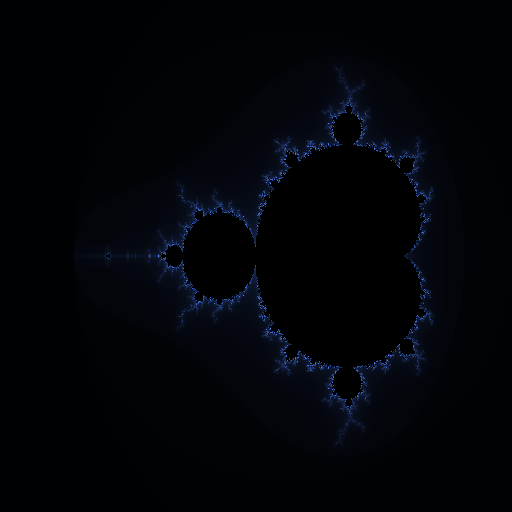
Core concepts
Concept 1 — Complex numbers as pixel coordinates
A complex number $c = a + bi$ has a real part $a$ and an imaginary part $b$, where $i$ is the square root of $-1$. Geometrically, $c$ is a point in a 2D plane: $a$ is the horizontal coordinate, $b$ the vertical. The Mandelbrot iteration runs on that 2D plane, so the very first thing you do is build a grid of complex numbers — one per pixel in the output image.
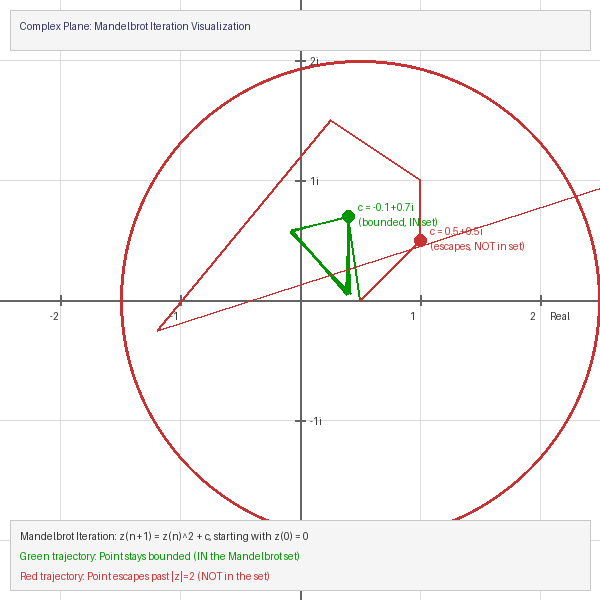
NumPy makes the grid in three lines:
real_values = np.linspace(-2.5, 1.0, 512)   # horizontal axis
imag_values = np.linspace(-1.5, 1.5, 512)   # vertical axis
real, imag = np.meshgrid(real_values, imag_values)
c = real + 1j * imag                          # 512×512 complex grid
meshgrid broadcasts the two 1D axes into matching 2D grids; 1j is Python’s syntax for the imaginary unit. Each entry c[i, j] is the complex number for the pixel at row i, column j. Change the bounds in np.linspace and you zoom into a different region of the plane — the cleanest of all viewport controls.
Concept 2 — The escape-time algorithm
The Mandelbrot iteration is one line of arithmetic — the next value of $z$ equals the current $z$ squared, plus $c$, starting from $z_0 = 0$:
$z$-next $= z^2 + c$, with $z_0 = 0$.
For a fixed $c$, you run this repeatedly. Two things can happen:
- The orbit stays bounded — $|z_n|$ never exceeds 2 — and we say $c$ belongs to the Mandelbrot set.
- The orbit escapes — $|z_n| > 2$ for some $n$ — and we say $c$ is outside the set.
The cut-off at $|z| > 2$ is not arbitrary: once $|z|$ crosses 2, the next iteration squares it (so $|z|$ doubles roughly), and the orbit is guaranteed to run away to infinity [3]. So 2 is the escape threshold for free.
The vectorised version runs the same arithmetic on every grid point in parallel, masking out the points that have already escaped so they no longer participate:
z = np.zeros_like(c, dtype=np.complex128)
iterations = np.zeros(c.shape, dtype=np.int32)

for _ in range(max_iterations):
    bounded = np.abs(z) <= 2                       # boolean mask
    z[bounded] = z[bounded] ** 2 + c[bounded]      # update only survivors
    iterations[bounded] += 1                       # count survival
After the loop, iterations[i, j] records how many steps the orbit at pixel (i, j) survived. Points still bounded after max_iterations have iterations == max_iterations — treat them as “in the set.” Everything else escaped, and the count records when.
Concept 3 — Colour from iteration count
Once you have iterations you can paint the picture however you like. The pedagogically clearest mapping is a linear ramp from the iteration count to a colour channel:
normalized = iterations / max_iterations          # 0..1 array
image = np.zeros((height, width, 3), dtype=np.uint8)

outside = iterations < max_iterations             # the fringe
image[outside, 0] = (normalized[outside] * 80).astype(np.uint8)   # red
image[outside, 1] = (normalized[outside] * 150).astype(np.uint8)  # green
image[outside, 2] = (normalized[outside] * 255).astype(np.uint8)  # blue

# Points in the set: black
image[~outside] = [0, 0, 0]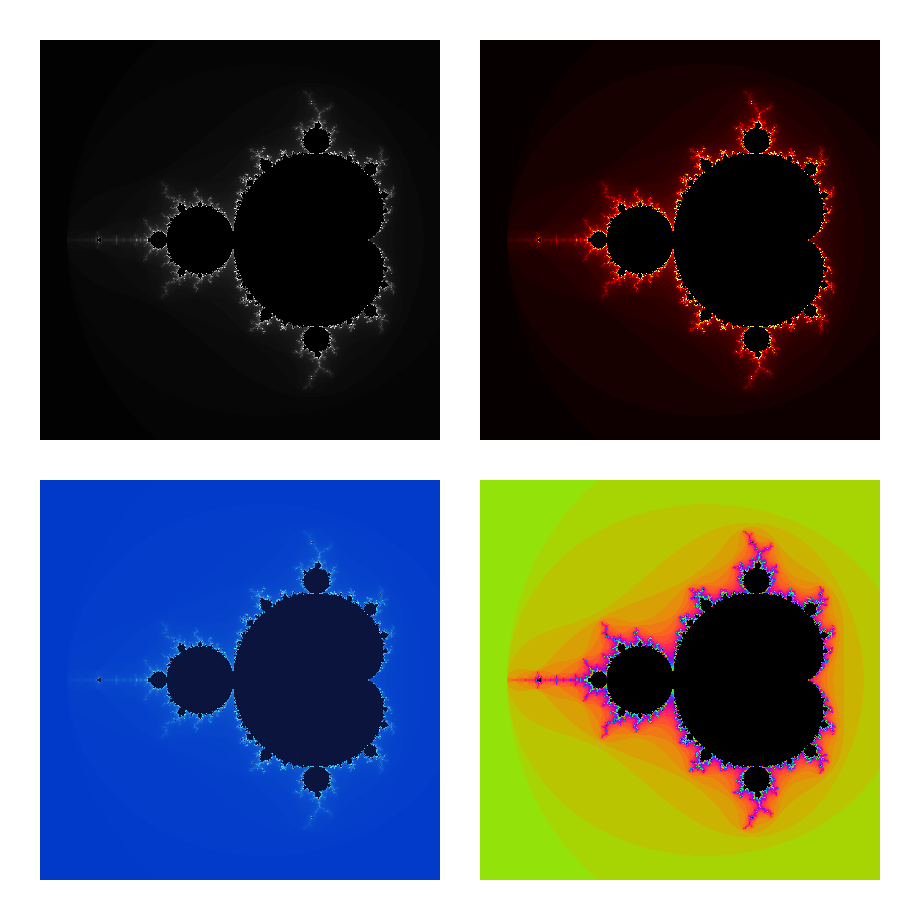
The same iterations array can be coloured with cyclic palettes (np.sin(norm * k) with phase offsets per channel) for high-contrast bands, or with a smooth matplotlib colormap like 'twilight'. The colour is a render decision; the mathematics is in iterations.
Exercises
Three exercises in Execute → Modify → Create order: run the basic Mandelbrot, retune the viewport and palette, then wrap the whole pipeline in a reusable mandelbrot_zoom function.
Render the basic set
Run mandelbrot_set.py as written and look at the output. The script renders the full viewport at 512×512 with max_iterations = 100.
Reflection questions
- Which region of the image has the darkest colour (other than black)? What does that tell you about those points’ orbits?
- Where is the most detail? Why is the boundary of the set the interesting part?
- Why does the cardioid look like a heart? What property of squaring a complex number produces that shape?
- What would change if you raised
max_iterationsfrom 100 to 500?
Answers
Darkest non-black — the dark fringe immediately outside the black region. Those points took many iterations to escape, meaning their orbits almost stayed bounded. They are the “near misses.”
The boundary is the interesting part — the inside is mathematically just “stayed bounded.” The boundary is where the set is fractal: an infinite-perimeter, finite-area curve. Every zoom reveals miniature Mandelbrot copies, swirls, “seahorses,” and “lightning.” Self-similarity (almost) — there are tiny rotated/distorted copies, but the boundary is not strictly self-similar.
The cardioid — squaring a complex number doubles its angle and squares its modulus. The set of $c$ for which the orbit of $0$ under $z \to z^2 + c$ has a stable fixed point is exactly the cardioid traced by $|c - 1/4| = 1/2 \cdot (1 - \cos\theta)$. The heart shape falls out of the algebra [2].
500 iterations — the silhouette stays the same (points inside still never escape), but the fringe gains finer gradations and dimmer “near misses” become visible. Cost: roughly 5× the runtime.
Zoom and recolour
Edit mandelbrot_set.py to produce three variants. Only the viewport and colour-mapping lines need to change.
Goals
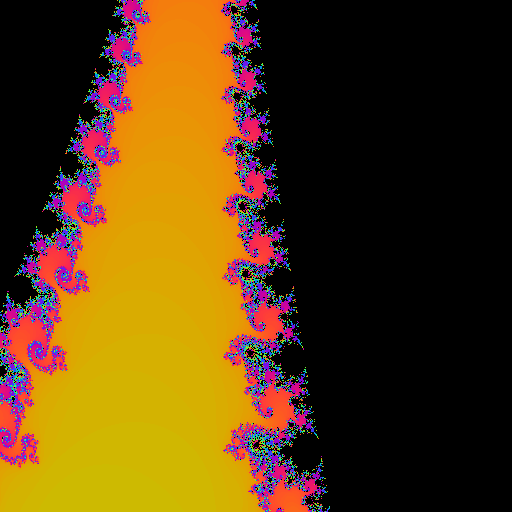
- Seahorse Valley. Zoom into the famous “seahorse valley” centred at $(-0.745, 0.113)$. Use
x_min, x_max = -0.8, -0.69andy_min, y_max = 0.05, 0.16. Raisemax_iterationsto at least 200 so the fine detail resolves. - Fire palette. Replace the blue gradient with red→orange→yellow. Drop the blue channel, raise red, keep green moderate.
- High-resolution print. Bump the canvas to 1024×1024 — same viewport, four times as many pixels. Tip: this needs no algorithmic change, only the
widthandheightconstants.
Goal 1 — what to expect
A field of “seahorses” — paired spirals all curling the same way, separated by thin necks. The seahorse fringe is one of the most-cited regions of the set because the detail is dense enough to be visually striking at any zoom level, but the iteration count required to resolve it stays manageable.
Goal 2 — what to expect
image[outside, 0] = (normalized[outside] * 255).astype(np.uint8)  # full red
image[outside, 1] = (normalized[outside] * 150).astype(np.uint8)  # mid green
image[outside, 2] = (normalized[outside] * 30).astype(np.uint8)   # almost no blue
The escape fringe glows from dark red at the boundary through orange to yellow at the edges. Visually identical to the blue version in structure; just a different temperature.
Goal 3 — what to expect
Quadruple the pixel count, same viewport. The silhouette is unchanged; the boundary just gets crisper. Memory cost is 4× and runtime is 4× because every iteration step is now operating on 4× the pixels — but it is all still vectorised, so no algorithm change is needed.
A reusable zoom function
Wrap the pipeline in a function that takes a centre point, a zoom level, and a resolution, and returns an RGB image array. Once you have this, generating a zoom animation is a one-line loop.
import numpy as np
from PIL import Image

def mandelbrot_zoom(center_x, center_y, zoom_level, size=512, max_iter=200):
    """Generate a Mandelbrot image at the specified location and zoom."""
    # TODO 1: compute x_min, x_max, y_min, y_max from centre + zoom
    #         baseline viewport is roughly 3.5 wide and 3.0 tall

    # TODO 2: build the complex grid (np.linspace + meshgrid + 1j)

    # TODO 3: run the escape-time iteration loop

    # TODO 4: map iterations to colour and return an RGB array
    pass

if __name__ == '__main__':
    img = mandelbrot_zoom(-0.745, 0.113, zoom_level=50, max_iter=300)
    Image.fromarray(img).save('my_zoom.png')
Hint 1 — viewport from centre and zoom
x_range = 3.5 / zoom_level
y_range = 3.0 / zoom_level
x_min, x_max = center_x - x_range/2, center_x + x_range/2
y_min, y_max = center_y - y_range/2, center_y + y_range/2
The baseline 3.5 × 3.0 viewport shows the whole set; dividing by zoom_level shrinks the visible window proportionally.
Hint 2 — escape-time loop, vectorised
Identical to the quick-start, just parameterised by size and max_iter:
real = np.linspace(x_min, x_max, size)
imag = np.linspace(y_min, y_max, size)
real_grid, imag_grid = np.meshgrid(real, imag)
c = real_grid + 1j * imag_grid

z = np.zeros_like(c)
iterations = np.zeros(c.shape, dtype=np.int32)
for _ in range(max_iter):
    bounded = np.abs(z) <= 2
    z[bounded] = z[bounded]**2 + c[bounded]
    iterations[bounded] += 1
Hint 3 — cyclic rainbow colouring
For a more striking look at high zoom, use a sine-based palette so the colour cycles every few iteration counts:
norm = iterations / max_iter
outside = iterations < max_iter
image = np.zeros((size, size, 3), dtype=np.uint8)
image[outside, 0] = (128 + 127*np.sin(norm[outside]*10 + 0)).astype(np.uint8)
image[outside, 1] = (128 + 127*np.sin(norm[outside]*10 + 2)).astype(np.uint8)
image[outside, 2] = (128 + 127*np.sin(norm[outside]*10 + 4)).astype(np.uint8)
The three channels share the same sine, phase-shifted by 0, 2, 4 radians — a classic phase-offset rainbow.
Complete solution
import numpy as np
from PIL import Image

def mandelbrot_zoom(center_x, center_y, zoom_level, size=512, max_iter=200):
    x_range = 3.5 / zoom_level
    y_range = 3.0 / zoom_level
    x_min, x_max = center_x - x_range/2, center_x + x_range/2
    y_min, y_max = center_y - y_range/2, center_y + y_range/2

    real = np.linspace(x_min, x_max, size)
    imag = np.linspace(y_min, y_max, size)
    real_grid, imag_grid = np.meshgrid(real, imag)
    c = real_grid + 1j * imag_grid

    z = np.zeros_like(c)
    iterations = np.zeros(c.shape, dtype=np.int32)
    for _ in range(max_iter):
        bounded = np.abs(z) <= 2
        z[bounded] = z[bounded]**2 + c[bounded]
        iterations[bounded] += 1

    norm = iterations / max_iter
    outside = iterations < max_iter
    image = np.zeros((size, size, 3), dtype=np.uint8)
    image[outside, 0] = (128 + 127*np.sin(norm[outside]*10 + 0)).astype(np.uint8)
    image[outside, 1] = (128 + 127*np.sin(norm[outside]*10 + 2)).astype(np.uint8)
    image[outside, 2] = (128 + 127*np.sin(norm[outside]*10 + 4)).astype(np.uint8)
    return image

if __name__ == '__main__':
    Image.fromarray(mandelbrot_zoom(-0.745, 0.113, 50, max_iter=300)).save('my_zoom.png')
Make it your own
- Zoom animation. Loop over
zoom_level = 1.2 ** ifori in range(60)and save each frame; combine into a GIF withimageio.mimsave(..., fps=15). Each frame doubles in zoom about every 4 frames. - Smooth shading. Add a fractional escape count: $n + 1 - \log_2 \log_2 |z|$. This removes the visible “bands” in the colour map and gives photo-realistic gradients [4].
- Hunt for mini-Mandelbrots. Try centres like $(-1.75, 0)$, $(-0.16, 1.04)$, $(-0.74366, 0.13182)$, or $(0.282, 0.531)$ at zoom 5 and above. Tiny copies of the full set appear at arbitrary depth — quasi-self-similarity in action.
Downloads
mandelbrot_set.py — Exercise 1 reference mandelbrot_colors.py — four-palette comparison mandelbrot_zoom.py — Exercise 3 reference mandelbrot.py — minimal one-file versionSummary
Common pitfalls to avoid
- Looping over pixels. A Python
forloop over the grid is hundreds of times slower than vectorised NumPy. Always operate on the whole grid with masks. - Forgetting the
boundedmask. If you computez**2 + cfor already-escaped points,zoverflows toinfand then tonan, which propagate and ruin the iteration counts. - Underiterating at zoom. Deep zooms need more iterations to resolve the boundary. Rule of thumb: double
max_iterwhenever zoom passes a factor of 10. - Hard-coding
dtype=float64forz. It silently kills the imaginary part. Usenp.zeros_like(c)to inherit the dtype.
References
- [1] Mandelbrot, B. B. (1982). The Fractal Geometry of Nature. W. H. Freeman. ISBN 978-0-7167-1186-5.
- [2] Devaney, R. L. (1989). An Introduction to Chaotic Dynamical Systems (2nd ed.). Addison-Wesley. ISBN 978-0-8133-4085-2.
- [3] Peitgen, H.-O., & Richter, P. H. (1986). The Beauty of Fractals: Images of Complex Dynamical Systems. Springer-Verlag. doi:10.1007/978-3-642-61717-1
- [4] Milnor, J. (2006). Dynamics in One Complex Variable (3rd ed.). Princeton University Press. ISBN 978-0-691-12488-9.
- [5] Gleick, J. (1987). Chaos: Making a New Science. Viking Press. ISBN 978-0-14-009250-9.
- [6] Ewing, J. H., & Schober, G. (1992). The area of the Mandelbrot set. Numerische Mathematik, 61(1), 59–72. doi:10.1007/BF01385497
- [7] Harris, C. R., Millman, K. J., van der Walt, S. J., et al. (2020). Array programming with NumPy. Nature, 585, 357–362. doi:10.1038/s41586-020-2649-2