4.3.1 Plant Generation (L-Systems)
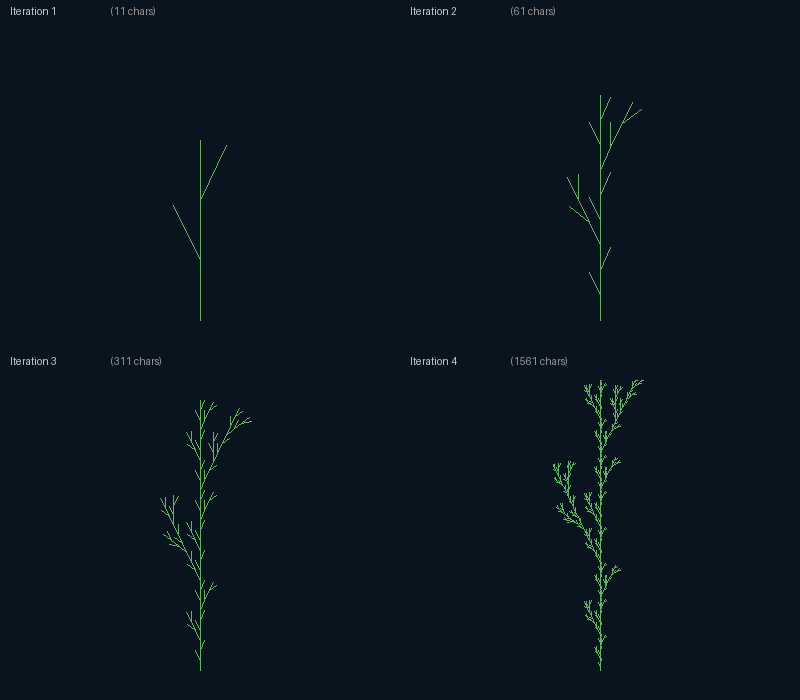
Lindenmayer systems — a string-rewriting grammar interpreted as turtle commands. One axiom, one rule, four iterations: a fractal plant. Same paradigm spans algae, ferns, and entire forests.
Overview
In 1968, biologist Aristid Lindenmayer needed a formalism to describe how multicellular organisms develop, cell by cell, from a single founding cell [1]. The result — Lindenmayer systems, or L-systems — is a parallel string-rewriting grammar in which every symbol is rewritten simultaneously according to a fixed set of production rules. Iterate the rules; the string grows. Interpret each symbol as a turtle command; the string draws.
The architecture is the same separation we have seen since the dragon curve (4.1.2): generation (the string) and interpretation (the turtle) are independent, and you can swap either one without touching the other. What is genuinely new in this lesson is that the production rules can branch. Two extra symbols — [ and ] — push and pop the turtle’s state on a stack. That tiny stack-machine addition is what lets a one-dimensional string describe a two-dimensional branching structure. With it, the same algorithm draws ferns, weeds, bushes, trees, and entire shrubbery families. Prusinkiewicz and Lindenmayer’s The Algorithmic Beauty of Plants (1990) showed that real botanical species can be reproduced from L-systems with just a handful of rules each [2].
Learning objectives
- Implement parallel string rewriting: iterate an axiom + production-rule set $n$ times.
- Implement a turtle interpreter with a push/pop stack for the bracket symbols
[and]. - Design rules to produce different plant shapes (simple weed vs. fern vs. branching bush) by tuning the rule set and the branching angle.
- Recognise L-systems as the string-encoded IFS dialect — the same paradigm as the chaos game (4.1.5) and fractal trees (4.2.1), expressed as a grammar.
Quick start — a weed in four iterations
import math
from PIL import Image, ImageDraw

AXIOM = "F"
RULES = {"F": "F[+F]F[-F]F"}
ITERATIONS = 4
ANGLE = 25.7

# Apply rules ITERATIONS times — every F becomes the rule's expansion
s = AXIOM
for _ in range(ITERATIONS):
    s = "".join(RULES.get(c, c) for c in s)

# Turtle interpretation
img = Image.new("RGB", (800, 600), (10, 20, 30))
draw = ImageDraw.Draw(img)
x, y, angle = 400, 550, -math.pi / 2          # start centre-bottom, facing up
stack = []
step = 5

for symbol in s:
    if symbol == "F":
        nx = x + step * math.cos(angle)
        ny = y + step * math.sin(angle)
        draw.line([(x, y), (nx, ny)], fill=(100, 180, 100))
        x, y = nx, ny
    elif symbol == "+": angle -= math.radians(ANGLE)
    elif symbol == "-": angle += math.radians(ANGLE)
    elif symbol == "[": stack.append((x, y, angle))
    elif symbol == "]": x, y, angle = stack.pop()

img.save("plant_basic.png")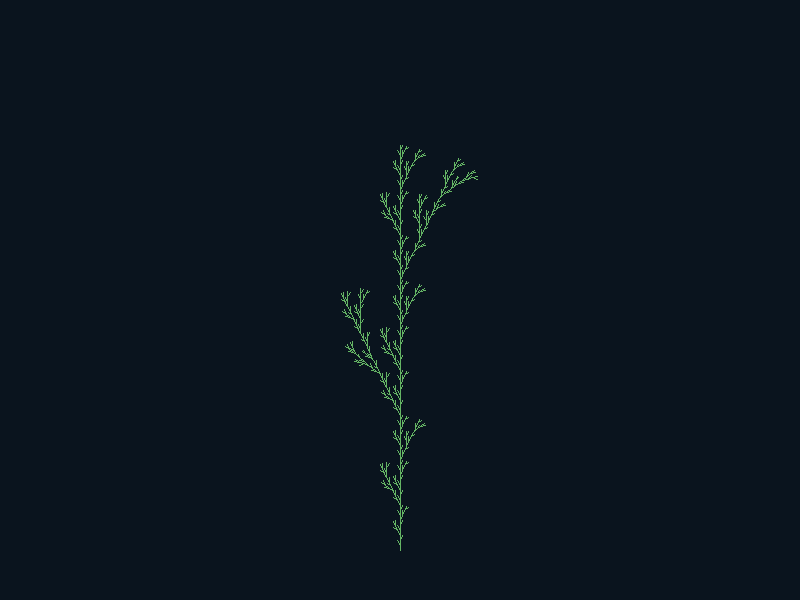
Core concepts
Concept 1 — Parallel string rewriting
An L-system has three components:
- Alphabet — the set of symbols the strings can contain (here:
F,+,-,[,]). - Axiom — the starting string. Often a single symbol like
"F". - Production rules — a map from one symbol to a replacement string.
F → F[+F]F[-F]Fmeans “every F in the string becomes this longer expansion.”
At each iteration, every symbol in the current string is replaced simultaneously. Symbols that have no rule keep themselves. That parallelism — every cell rewrites at the same time — is what makes L-systems biologically motivated: a developing organism has many cells all dividing in step, not one at a time.
Concretely:
def apply_rules(axiom, rules, iterations):
    s = axiom
    for _ in range(iterations):
        s = "".join(rules.get(c, c) for c in s)
    return s
"".join(...) is Python’s idiom for building a string from a generator: faster than += in a loop because it allocates once and avoids the quadratic copying that += causes on long strings.
Concept 2 — Turtle interpretation with a stack
The string by itself is just symbols. To draw, walk through it once and dispatch each symbol to a turtle command:
| Symbol | Action |
|---|---|
F | move forward one step, drawing a line |
+ | rotate left by ANGLE |
- | rotate right by ANGLE |
[ | push the current (x, y, angle) onto a stack |
] | pop the stack back into (x, y, angle) |
The bracket symbols are what enable branching. When the interpreter hits [, the turtle’s current state is saved. The turtle then wanders off — drawing a branch, turning, drawing again. When it hits ], it teleports back to the saved position and continues with the next symbol in the trunk. A stack is the right data structure because branches nest: a side branch can itself have side branches, and pushing/popping handles arbitrary depth.
for symbol in s:
    if symbol == "F":
        nx = x + step * math.cos(angle)
        ny = y + step * math.sin(angle)
        draw.line([(x, y), (nx, ny)], fill=(100, 180, 100))
        x, y = nx, ny
    elif symbol == "+":   angle -= math.radians(ANGLE)
    elif symbol == "-":   angle += math.radians(ANGLE)
    elif symbol == "[":   stack.append((x, y, angle))
    elif symbol == "]":   x, y, angle = stack.pop()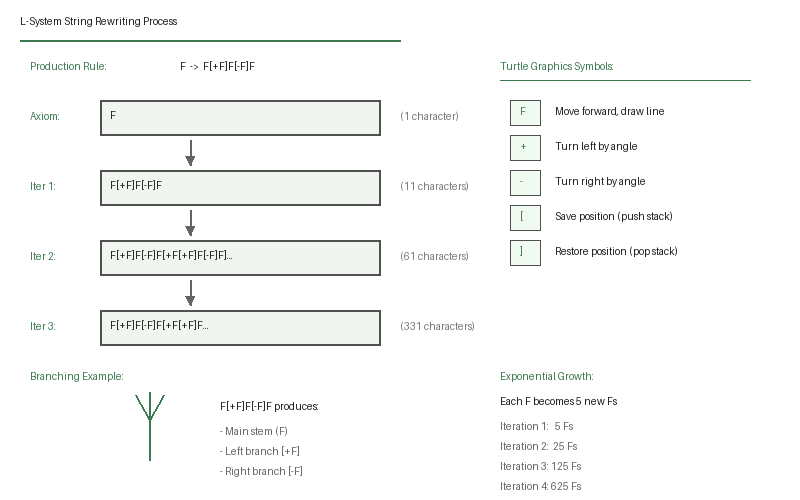
The same turtle interpreter draws any L-system; the same rewriter handles any rule set. Once you have both, generating a new species is just writing a new rule.
Concept 3 — Designing rules
The vocabulary of L-system rules grew naturally from describing real plants. A few classical patterns:
F → F[+F]F[-F]F— alternating left/right side branches, simple weed silhouette. The default inplant_basic.png.X → F+[[X]-X]-F[-FX]+X,F → FF— Prusinkiewicz’s “fern” rule [2]. Uses two symbols:Xcontrols branching structure (Xis invisible to the turtle), andFcontrols line drawing (which doubles in length each iteration). Hugely more organic.F → FF+[+F-F-F]-[-F+F+F]— symmetric three-branch bush, fills out more like an azalea.
The branching angle ANGLE is the second design parameter. With the same rule:
- 15° → narrow, columnar plant (cypress, conifer).
- 25.7° → natural-looking branching (the value used in the quick-start is the so-called “golden angle minus the angle of nature”).
- 45° → wide, spreading branches (oak).
- 90° → geometric, cross-like patterns — visually arresting but not botanical.
Exercises
Three exercises in Execute → Modify → Create order: run the simple plant, sweep angles and rules, then design a fern from scratch.
Grow the basic plant
Run plant_lsystem.py to render F[+F]F[-F]F at iteration 4.
Reflection questions
- After 4 iterations the string has 1,561 characters. Where does that number come from?
- Why is the
]symbol useless without a corresponding[somewhere earlier? What happens if you forget to push before popping? - Walking the turtle through the same instruction string twice would produce two identical-looking plants. What changes if you swap the order of two iterations — i.e. interpret the iteration-3 string with the iteration-4 rule? (Hint: this question is a trap.)
Answers
Why 1,561 — the rule F → F[+F]F[-F]F replaces each F with 5 new Fs plus brackets and signs. Starting from 1 F, iteration count grows as 1, 11, 61, 331, 1561, … — multiplied by 5 + an offset for the bracket symbols at each level. Solving the recurrence gives 1,561 at iteration 4 exactly.
Stack underflow — popping when the stack is empty raises IndexError in Python. In other languages it would be undefined behaviour. Always ensure [ and ] are balanced in your rule expansions; if you write F → F[+F]+F-]F, you have one extra ] and your interpreter crashes mid-string. Rewriting rules should preserve bracket balance — a invariant called well-formedness.
The trap — iterations are not “applied to a previous rendering”; they are applied to the previous string. The iteration-4 rule is the same iteration-3 rule; the only difference is how many times you applied it before walking the turtle. Once you have a final string, walking the turtle through it produces a single deterministic picture, regardless of how the string was constructed.
Sweep angle and rule
Edit plant_lsystem.py to produce three plant variants. Keep iterations = 4 throughout for fair comparison.
Goals
- Narrow conifer. Change
ANGLEto 12°. Same rule, same iterations. - Bushy oak. Change
ANGLEto 45° with the ruleF → FF+[+F-F-F]-[-F+F+F]. This rule has three sub-branches per node. - Triple fork. Use the rule
F → F[+F][-F]F. EachFbecomes three sub-Fs: one straight, one left, one right.
Goal 1 — what to expect
A tall, narrow plant. Branches stay close to the central stem because of the small angle — like a young cypress or columnar conifer. Small-angle rules also save you iteration depth: the same number of Fs is laid out vertically instead of being spread out laterally.
Goal 2 — what to expect
A bushier silhouette with three branches per node. The rule writes side branches in pairs of three ([+F-F-F] and [-F+F+F]), each of which itself fans out. Visually denser than the weed; less self-similar because the rule mixes more symbols.
Goal 3 — what to expect
Three-way Y-shaped branching. Cleaner than the default rule because there is no middle F between the two side branches — every node forks symmetrically into three children. Reminiscent of acacia or umbrella thorn trees.
Design a fern
Implement a fern using two-symbol L-systems. The trick: introduce a non-drawing symbol X that controls the branching topology, and let F handle the actual line drawing. The rules:
X → F+[[X]-X]-F[-FX]+X
F → FF
X is invisible to the turtle — the interpreter just skips it. But because every X expands to a long string containing more Xs, the structure of the fern is encoded in X’s rule. Meanwhile, F → FF doubles every drawn segment each iteration, so the stems grow proportionally as the structure refines.
import math
from PIL import Image, ImageDraw

AXIOM = "X"
RULES = {
    # TODO 1: define the X and F rules above
}
ANGLE = 25
ITERATIONS = 5
STEP = 3

def apply_rules(axiom, rules, n):
    s = axiom
    for _ in range(n):
        s = "".join(rules.get(c, c) for c in s)
    return s

def draw_lsystem(s, angle_deg, step, size):
    img = Image.new("RGB", size, (10, 20, 30))
    draw = ImageDraw.Draw(img)
    x, y, angle = size[0] // 4, size[1] - 40, -math.pi / 2
    stack = []
    for c in s:
        # TODO 2: handle F, +, -, [, ] correctly
        # Remember: X is silent.
        pass
    return img

s = apply_rules(AXIOM, RULES, ITERATIONS)
draw_lsystem(s, ANGLE, STEP, (800, 600)).save("my_fern.png")
Hint 1 — the two-symbol rules
RULES = {
    "X": "F+[[X]-X]-F[-FX]+X",
    "F": "FF",
}
X is the structure-encoder: it does not draw, but it recursively expands into more Xs plus branching markers. F doubles itself at every iteration, so each “stem segment” gets longer as iterations deepen.
Hint 2 — turtle dispatch
for c in s:
    if c == "F":
        nx = x + step * math.cos(angle); ny = y + step * math.sin(angle)
        draw.line([(x, y), (nx, ny)], fill=(80, 160, 80))
        x, y = nx, ny
    elif c == "+":   angle -= math.radians(angle_deg)
    elif c == "-":   angle += math.radians(angle_deg)
    elif c == "[":   stack.append((x, y, angle))
    elif c == "]":   x, y, angle = stack.pop()
    # X is silent — no case for it, the loop just falls through
Complete solution
import math
from PIL import Image, ImageDraw

AXIOM = "X"
RULES = {"X": "F+[[X]-X]-F[-FX]+X", "F": "FF"}
ANGLE = 25
ITERATIONS = 5
STEP = 3

def apply_rules(axiom, rules, n):
    s = axiom
    for _ in range(n):
        s = "".join(rules.get(c, c) for c in s)
    return s

def draw_lsystem(s, angle_deg, step, size):
    img = Image.new("RGB", size, (10, 20, 30))
    draw = ImageDraw.Draw(img)
    x, y, angle = size[0] // 4, size[1] - 40, -math.pi / 2
    stack = []
    for c in s:
        if c == "F":
            nx = x + step * math.cos(angle); ny = y + step * math.sin(angle)
            draw.line([(x, y), (nx, ny)], fill=(80, 160, 80))
            x, y = nx, ny
        elif c == "+":   angle -= math.radians(angle_deg)
        elif c == "-":   angle += math.radians(angle_deg)
        elif c == "[":   stack.append((x, y, angle))
        elif c == "]":   x, y, angle = stack.pop()
    return img

s = apply_rules(AXIOM, RULES, ITERATIONS)
draw_lsystem(s, ANGLE, STEP, (800, 600)).save("my_fern.png")
Make it your own
- Depth-based colour. Track the current stack depth in the interpreter. Set the line colour to a brown → green gradient based on depth: thick brown stems near the trunk fading to bright green twigs at the tips.
- Stochastic L-system. Pick from multiple rule expansions per symbol with weighted probability.
Fcould expand to one ofF[+F]F,F[-F]F, orFFwith probabilities 0.4/0.4/0.2. Plants come out asymmetric and organic — closer to real botany. - Animate growth. Render each iteration’s instruction string separately, save them as a sequence, and compose into a GIF. The plant visibly grows from a seed to a fern over 5–6 frames.
Downloads
plant_lsystem.py — reference implementationSummary
Common pitfalls to avoid
- Sequential rewriting. Walking through the string and replacing one symbol at a time produces wrong results because earlier replacements interfere with later ones. Build the new string from the old one as a whole with a list comprehension or
"".join(generator). - Stack underflow. Rules must produce balanced
[and]pairs. Unbalanced brackets crash the interpreter mid-string. - Too many iterations. Every iteration multiplies string length by roughly the rule’s expansion factor. 6 iterations of an “F → FF[+F][-F]F” rule produces ~16,000-character strings; 7 produces ~80,000; 8 a million. The plant doesn’t get visibly more detailed past 5–6 iterations on a 800×600 canvas — stop before things slow down.
- Step size and canvas mismatch. Long iterations need shorter step sizes. If the plant extends off-canvas, halve
STEPinstead of cropping.
References
- [1] Lindenmayer, A. (1968). Mathematical models for cellular interactions in development I. Filaments with one-sided inputs. Journal of Theoretical Biology, 18(3), 280–299. doi:10.1016/0022-5193(68)90079-9
- [2] Prusinkiewicz, P., & Lindenmayer, A. (1990). The Algorithmic Beauty of Plants. Springer-Verlag. ISBN 978-0-387-97297-8.
- [3] Rozenberg, G., & Salomaa, A. (1980). The Mathematical Theory of L Systems. Academic Press. ISBN 978-0-12-597140-8.
- [4] Smith, A. R. (1984). Plants, fractals, and formal languages. ACM SIGGRAPH Computer Graphics, 18(3), 1–10. doi:10.1145/964965.808571
- [5] Abelson, H., & diSessa, A. A. (1986). Turtle Geometry: The Computer as a Medium for Exploring Mathematics. MIT Press. ISBN 978-0-262-51037-0.
- [6] Prusinkiewicz, P., & Runions, A. (2012). Computational models of plant development and form. New Phytologist, 193(3), 549–569. doi:10.1111/j.1469-8137.2011.04009.x
- [7] Mandelbrot, B. B. (1982). The Fractal Geometry of Nature. W. H. Freeman. ISBN 978-0-7167-1186-5.