1.3.2 Repeat (Tiling Patterns)
Use nested loops and algorithmic position calculation to tile coloured squares across a canvas. Graduate from manual slicing to parametric, procedural composition.
Overview
Tiling patterns are the bridge between manual array slicing and procedural generation. In Module 1.3.1, you learned to select and modify rectangular regions using hardcoded slice positions like [0:150]. Now you will use nested loops to algorithmically calculate positions and create repeating grid patterns — the foundation of generative art.
This lesson introduces the concept of parametric variation: using formulas to create systematic changes across repeated elements. You will discover how a simple loop with a colour formula can generate gradients, checkerboards, and infinitely varying patterns.
Learning objectives
- Use nested loops to iterate through 2D grid positions.
- Calculate array slice positions algorithmically using formulas.
- Create parametric colour variations based on position coordinates.
- Understand the relationship between loop variables and pixel positions.
Quick start — create a tiling pattern
Run this script to create a 4x4 grid of coloured tiles. Each tile receives a different colour based on its position, producing a gradient effect:
import numpy as np
from PIL import Image

# Configuration parameters
N_TILES = 4          # Number of tiles per row/column
TILE_WIDTH = 125     # Width of each tile in pixels
SPACING = 15         # Gap between tiles
SIZE = TILE_WIDTH * N_TILES + SPACING

# Create blank canvas
canvas = np.zeros((SIZE, SIZE, 3), dtype=np.uint8)

# Nested loops to place tiles
for y in range(N_TILES):
    for x in range(N_TILES):
        # Calculate color based on position
        color = (50 * y + 50, 50 * x + 50, 0)

        # Calculate slice positions algorithmically
        row_start = SPACING + y * TILE_WIDTH
        row_stop = (y + 1) * TILE_WIDTH
        col_start = SPACING + x * TILE_WIDTH
        col_stop = (x + 1) * TILE_WIDTH

        # Place tile
        canvas[row_start:row_stop, col_start:col_stop] = color

# Save result
result = Image.fromarray(canvas, mode='RGB')
result.save('repeat.png')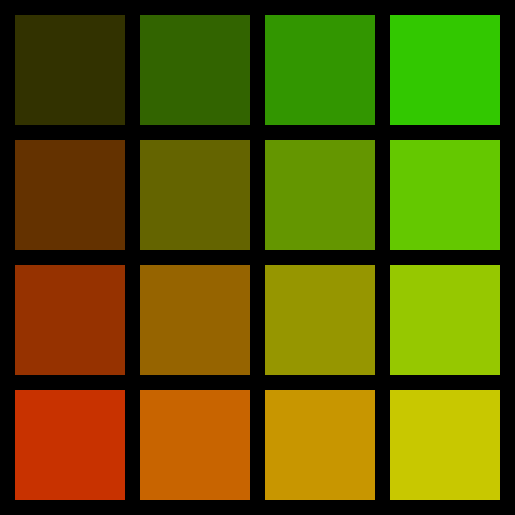
What you just created: a systematic pattern where each tile’s colour is determined by its position. The formula color = (50 * y + 50, 50 * x + 50, 0) creates a gradient: red values increase as you move down (higher y), and green values increase as you move right (higher x). This is parametric variation — using mathematical formulas to generate visual patterns.
Core concepts
Concept 1 — Algorithmic position calculation
In Module 1.3.1, you wrote slice positions manually: flag[:, 0:150] for a specific column range. But what if you need to place 10, 50, or 100 rectangles? Writing each position by hand becomes impractical.
The solution: use a formula to calculate positions based on a loop variable.
The general formula for positioning tiles in a grid is:
start = spacing + (i * tile_width)
stop = start + tile_width
Where i is the loop variable (0, 1, 2, 3, …). This formula ensures:
- Even spacing: each tile starts at a consistent offset from the previous one.
- Correct positioning: the
spacingparameter creates gaps between tiles. - Scalability: works for any number of tiles — just change the loop range.
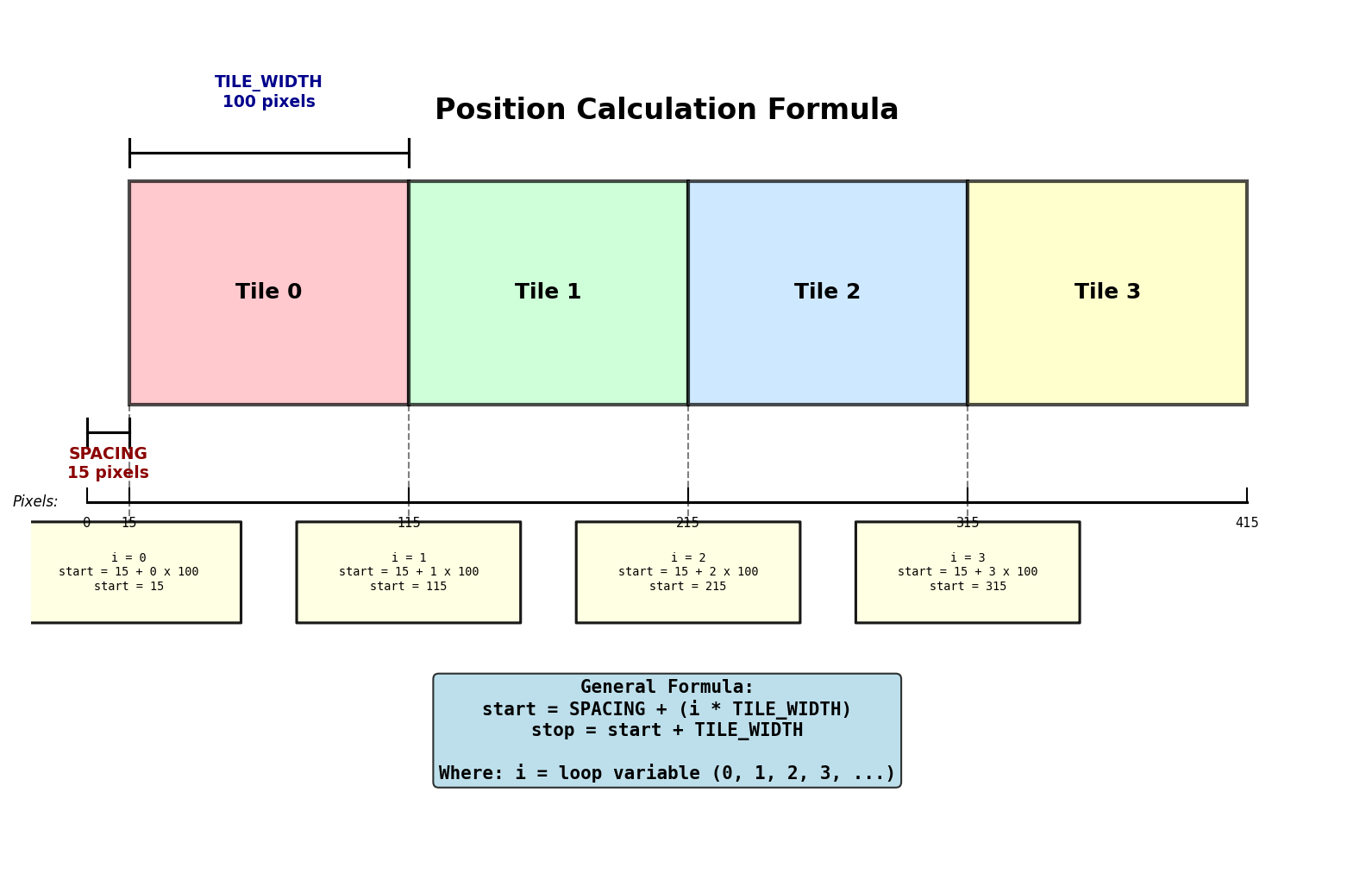
Example calculation for the second tile (i=1):
SPACING = 15
TILE_WIDTH = 125
i = 1

start = 15 + (1 * 125)  # = 140
stop = 140 + 125         # = 265

# Therefore: canvas[:, 140:265] selects the second tile's column range
This transforms static, manual slicing into dynamic, algorithmic positioning (Code.org, 2024). The same pattern extends to Truchet tiles, fractals, and procedural texture generation.
Concept 2 — Nested loops for 2D grid iteration
A nested loop is a loop inside another loop. For 2D grids, the outer loop controls rows (y-axis) and the inner loop controls columns (x-axis).
Basic structure:
for y in range(N_TILES):      # Outer loop: rows
    for x in range(N_TILES):  # Inner loop: columns
        # Process tile at position (x, y)
Execution order: the inner loop completes all its iterations before the outer loop advances. For a 4x4 grid:
- Outer loop sets
y=0. - Inner loop runs
x=0, 1, 2, 3(tiles 0—3). - Outer loop advances to
y=1. - Inner loop runs
x=0, 1, 2, 3(tiles 4—7). - This continues until all 16 tiles are placed.
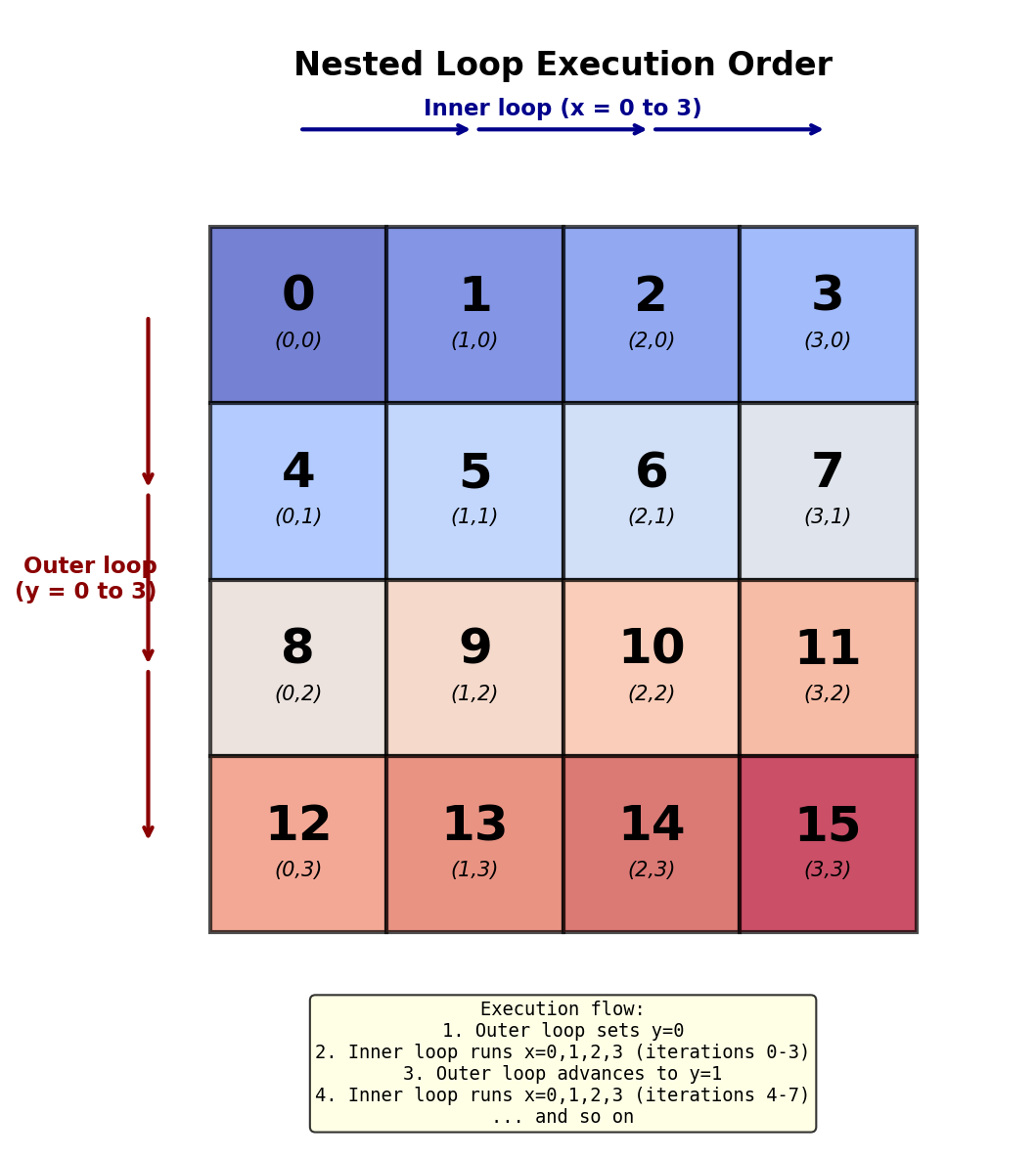
This execution pattern is critical for understanding how loops traverse 2D structures (OpenStax, 2024). Students often confuse the order, expecting tiles to be processed diagonally or in some other pattern. Visualising the iteration sequence demystifies nested loops and builds intuition for more complex algorithms.
Concept 3 — Parametric variation within patterns
Parametric variation means using formulas to create systematic changes across elements. Instead of manually assigning colours, you calculate them based on position:
color = (50 * y + 50, 50 * x + 50, 0)This formula creates:
- Red channel: increases from 50 to 200 as
ygoes from 0 to 3. - Green channel: increases from 50 to 200 as
xgoes from 0 to 3. - Blue channel: constant at 0.
The result is a two-dimensional gradient (Galanter, 2016). By changing the formula, you create entirely different patterns:
Checkerboard alternation:
if (x + y) % 2 == 0:
    color = [0, 0, 0]        # Black
else:
    color = [83, 168, 139]   # Green
Diagonal gradient:
color = (0, 0, 30 * (x + y) + 50) # Blue increases diagonallyRandom variation:
color = (np.random.randint(0, 256),
         np.random.randint(0, 256),
         np.random.randint(0, 256))
The concept of algorithms + parameters = infinite variations is the essence of generative art (Pearson, 2011). The same loop structure creates vastly different outputs by changing the colour formula. This principle extends to texture synthesis, terrain generation, and procedural content in games.
Exercises
Three progressively challenging exercises, each building on the previous using the Execute, Modify, Create approach.
Run the gradient tiling pattern
Run the tiling pattern script from the Quick Start section and observe the output. Then answer these reflection questions.
repeat.py -- gradient tiling scriptReflection questions
- How many times does the inner loop execute in total for a 4x4 grid? How do you know?
- What colour appears in the bottom-right tile? Why does it have that colour?
- If you set
SPACING = 0, what happens to the visual appearance? Try it.
Answers
1. The inner loop executes 16 times total (4 iterations x 4 outer loop cycles). For each y value (0, 1, 2, 3), the inner loop runs through all x values (0, 1, 2, 3), giving 4 x 4 = 16 executions.
2. The bottom-right tile is yellow (RGB: [200, 200, 0]). Position (x=3, y=3) produces color = (50*3+50, 50*3+50, 0) = (200, 200, 0). High red + high green + no blue creates yellow in the RGB colour space.
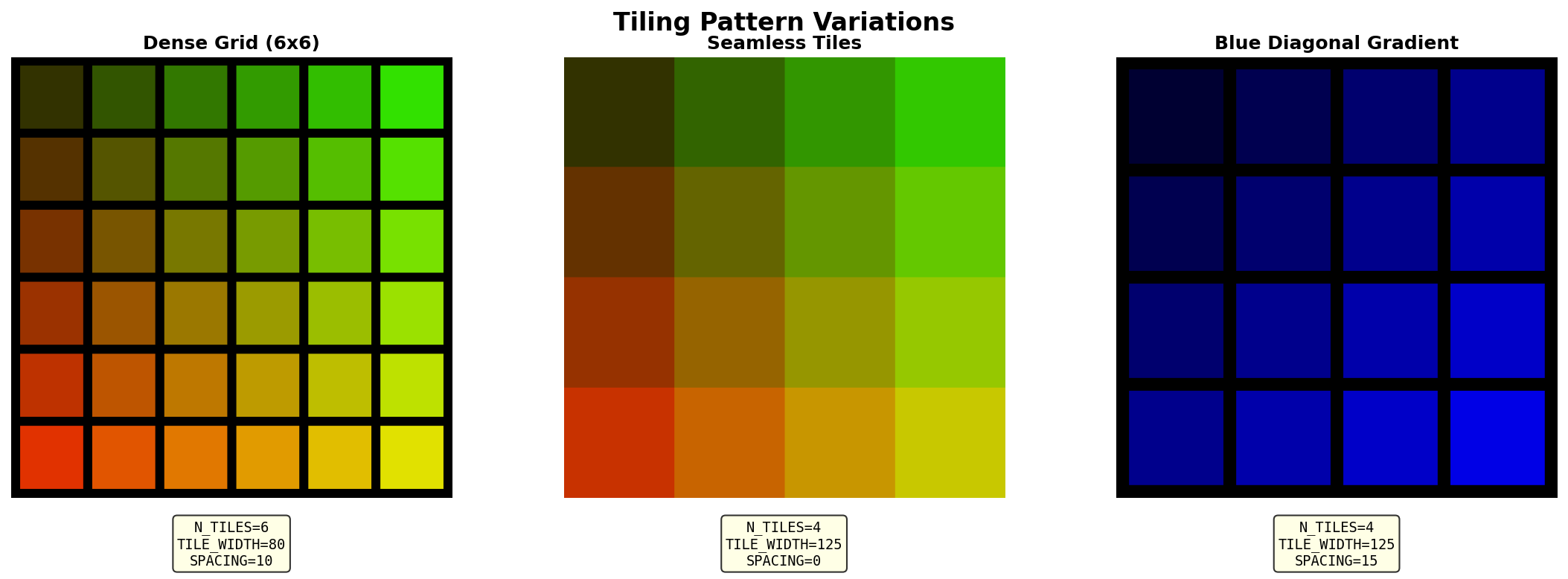
3. With SPACING = 0, tiles touch seamlessly with no gaps. The visual effect changes from separated squares to a continuous gradient grid. This preview of seamless tiling is essential for Truchet tiles (Module 1.3.3), where patterns must flow across tile boundaries.
Explore tiling parameters
Modify the tiling pattern code to create different visual effects. Complete all three tasks.
Goal 1 — Create a denser grid
Change N_TILES to 6 to create a 6x6 grid. Adjust TILE_WIDTH to fit the tiles in a 512x512 canvas.
What to expect
You should see 36 tiles instead of 16, each smaller than before, with a finer-grained colour gradient across the grid.
Hint: canvas size calculation
If you want a 512x512 canvas with 6 tiles and spacing, calculate:
TILE_WIDTH = (512 - SPACING) // N_TILES
# For SPACING=15 and N_TILES=6: (512 - 15) // 6 = 82 pixels
Goal 2 — Experiment with spacing
Try these spacing values and observe how they affect the pattern:
SPACING = 0(seamless, tiles touch)SPACING = 30(wide gaps between tiles)SPACING = 5(narrow gaps)
What to expect
SPACING = 0: creates a continuous gradient with no visual separation between tiles.SPACING = 30: creates prominent black gaps, emphasising individual tiles as distinct elements.SPACING = 5: subtle separation, balancing continuity with tile definition.
Goal 3 — Create a blue gradient
Modify the colour formula to create a diagonal blue gradient. Replace the existing formula with one that increases blue intensity diagonally from top-left to bottom-right.
Hint: diagonal direction
Use (x + y) to increase diagonally from top-left to bottom-right:
color = (0, 0, min(255, 30 * (x + y) + 50))The min(255, ...) ensures the value never exceeds 255.
Solutions
Goal 1 — Dense 6x6 grid
N_TILES = 6
TILE_WIDTH = (512 - SPACING) // N_TILES  # 82 pixels for SPACING=15
SIZE = TILE_WIDTH * N_TILES + SPACING
This creates more tiles in the same canvas size, producing a denser pattern.
Goal 2 — Spacing effects
Each value changes the visual character of the grid without altering the colour logic. The spacing parameter controls whether the composition reads as a unified gradient or a collection of individual elements.
Goal 3 — Blue diagonal gradient
color = (0, 0, min(255, 30 * (x + y) + 50))This produces a gradient from dark blue (top-left, x+y=0) to bright blue (bottom-right, x+y=6).
Build a checkerboard from scratch
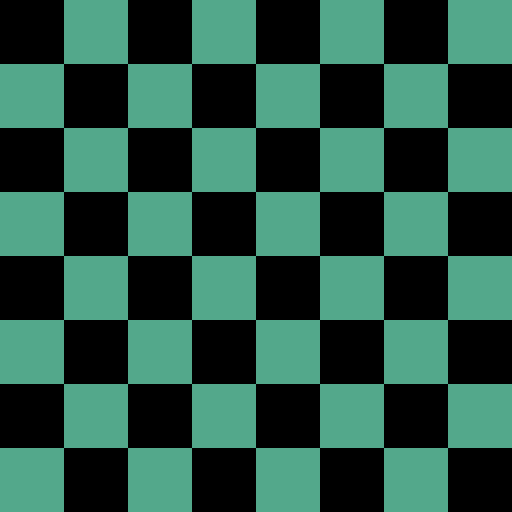
Create a classic 8x8 checkerboard pattern with alternating black and green squares. This exercise tests your understanding of nested loops, position calculation, and alternation logic.
Requirements:
- 8x8 grid (standard chess/checkers board).
- No spacing between tiles (seamless).
- 64x64 pixel tiles (creates 512x512 canvas).
- Alternating black
[0,0,0]and green[83,168,139]squares.
import numpy as np
from PIL import Image

# TODO 1: Define parameters
# What: set grid dimensions for an 8x8 board with 64px tiles
# Why: the tile size must divide evenly into 512 for seamless coverage
N_TILES = 8
TILE_SIZE = 64
SIZE = N_TILES * TILE_SIZE

# Define colors
BLACK = np.array([0, 0, 0], dtype=np.uint8)
GREEN = np.array([83, 168, 139], dtype=np.uint8)

# Create canvas
canvas = np.zeros((SIZE, SIZE, 3), dtype=np.uint8)

# TODO 2: Write nested loops to iterate over the grid
# What: loop through every (x, y) position in the 8x8 grid
# Why: nested loops let you visit each tile systematically

    # TODO 3: Determine color using alternation logic
    # What: use (x + y) % 2 to pick BLACK or GREEN
    # Why: adjacent tiles always have opposite parity (even/odd sum)

    # TODO 4: Calculate slice positions (no spacing)
    # What: compute row_start, row_stop, col_start, col_stop
    # Why: when spacing=0, the formula simplifies to i * tile_size

    # TODO 5: Place the tile on the canvas
    # What: assign the colour to the computed slice region
    # Why: NumPy broadcasting fills the entire tile with one assignment

# Save result
result = Image.fromarray(canvas, mode='RGB')
result.save('my_checkerboard.png')Hint 1 -- Alternation logic
The modulo operator % gives the remainder after division. For alternation:
(x + y) % 2 == 0— even sum — use BLACK.(x + y) % 2 == 1— odd sum — use GREEN.
This creates a checkerboard because adjacent tiles always have different sums (e.g., (0,0)=0, (1,0)=1, (0,1)=1, (1,1)=2).
Hint 2 -- Position calculation without spacing
When spacing = 0, the formula simplifies:
row_start = y * TILE_SIZE
row_stop = (y + 1) * TILE_SIZE
col_start = x * TILE_SIZE
col_stop = (x + 1) * TILE_SIZE
No spacing offset needed.
Hint 3 -- Putting it together
Combine the alternation logic with the position calculation inside your nested loops:
for y in range(N_TILES):
    for x in range(N_TILES):
        # Choose colour based on position parity
        if (x + y) % 2 == 0:
            color = BLACK
        else:
            color = GREEN

        # Calculate where to place this tile
        row_start = y * TILE_SIZE
        row_stop = (y + 1) * TILE_SIZE
        # ... continue for col_start, col_stop
Complete solution
import numpy as np
from PIL import Image

N_TILES = 8
TILE_SIZE = 64
SIZE = N_TILES * TILE_SIZE

BLACK = np.array([0, 0, 0], dtype=np.uint8)
GREEN = np.array([83, 168, 139], dtype=np.uint8)

canvas = np.zeros((SIZE, SIZE, 3), dtype=np.uint8)

for y in range(N_TILES):
    for x in range(N_TILES):
        # Alternation logic using modulo
        if (x + y) % 2 == 0:
            color = BLACK
        else:
            color = GREEN

        # Position calculation (no spacing)
        row_start = y * TILE_SIZE
        row_stop = (y + 1) * TILE_SIZE
        col_start = x * TILE_SIZE
        col_stop = (x + 1) * TILE_SIZE

        # Place tile
        canvas[row_start:row_stop, col_start:col_stop] = color

result = Image.fromarray(canvas, mode='RGB')
result.save('checkerboard.png')
Key insights:
- Alternation logic:
(x + y) % 2determines colour. This works because adjacent tiles always have opposite parity (even/odd). - Simplified positions: without spacing, the formula reduces to
i * tile_size. No offset needed. - Broadcasting: NumPy automatically expands the colour array to fill the entire tile region in a single assignment.
Make it your own
Once your checkerboard works, try these variations:
- Swap the colours: use a warm palette like
[255, 140, 0](orange) and[40, 0, 60](dark purple). - Add a third colour for the diagonal using
(x + y) % 3. - Create a 10x10 grid with random colours for each tile using
np.random.randint(0, 256).
Downloads
repeat.py -- gradient tiling script checkerboard_starter.py -- Exercise 3 starter checkerboard_solution.py -- Exercise 3 solution random_colors_challenge.py -- bonus challengeSummary
Common pitfalls to avoid
- Confusing loop execution order: the inner loop completes all iterations before the outer loop advances. Iteration count for an N x N grid is N-squared (not 2N).
- Colour value overflow: formulas like
50 * x + 50can exceed 255 for largexvalues. Usemin(255, value)to cap values, or adjust the formula coefficients. - Spacing calculation errors: when
spacingis not zero, usespacing + (i * tile_width)for the start position. Whenspacing = 0, simplify toi * tile_width. - Variable naming confusion: convention is
xfor columns (horizontal),yfor rows (vertical). This matchescanvas[y, x]array indexing.
Connection to future learning
The tiling patterns you created here are the foundation for:
- Module 4 (Fractals): replace fixed loops with recursive subdivision using the same position calculation principles.
- Module 6 (Noise and Procedural Generation): replace gradient formulas with Perlin noise sampling to create natural-looking terrain and textures.
References
- [1] Code.org. (2024). Artist: Nested Loops. Code.org Curriculum Course 2. Retrieved January 30, 2025, from https://code.org/curriculum/course2/19/Teacher
- [2] OpenStax. (2024). 5.3 Nested loops. Introduction to Python Programming. Retrieved January 30, 2025, from https://openstax.org/books/introduction-python-programming/pages/5-3-nested-loops
- [3] Creative Pinellas. (2024). Grids in Nature, Design and Generative Art. Creative Pinellas Magazine. Retrieved January 30, 2025, from https://creativepinellas.org/magazine/grids-in-nature-design-and-generative-art/
- [4] Galanter, P. (2016). Generative art theory. In C. Paul (Ed.), A Companion to Digital Art (pp. 146—180). Wiley-Blackwell. https://doi.org/10.1002/9781118475249.ch8
- [5] Pearson, M. (2011). Generative Art: A Practical Guide Using Processing. Manning Publications. ISBN: 978-1-935182-62-3.
- [6] Harris, C. R., Millman, K. J., van der Walt, S. J., Gommers, R., Virtanen, P., Cournapeau, D., Wieser, E., Taylor, J., Berg, S., Smith, N. J., Kern, R., Picus, M., Hoyer, S., van Kerkwijk, M. H., Brett, M., Haldane, A., del Rio, J. F., Wiebe, M., Peterson, P., … Oliphant, T. E. (2020). Array programming with NumPy. Nature, 585(7825), 357—362. https://doi.org/10.1038/s41586-020-2649-2
- [7] Paas, F. and van Merrienboer, J. J. G. (2020). Cognitive-Load Theory: Methods to Manage Working Memory Load in the Learning of Complex Tasks. Current Directions in Psychological Science, 29(4), 394—398. https://doi.org/10.1177/0963721420922183