8.2.1 Flower Assembly
Slice an image into tiles, scatter the tiles to random offscreen positions, then animate them flying back into place — the canonical reverse-explosion technique.
Overview
The flower assembly is the canonical “reverse-explosion” animation: an image is divided into a grid of tiles, the tiles are scattered to random positions off the canvas, and then they fly back into their correct positions to assemble the original image. It looks like a complicated effect; mechanically it is just interpolation between two known positions for each of $N^2$ tiles, with an easing curve to make the arrival look organic.
The technique is the cousin of every “logo reveal” animation in motion graphics, every text-by-text assembly in title sequences, and the visual basis of the explosion-played-backwards sequence in Christopher Nolan’s Tenet (2020). For us, it’s the first time in Module 08 that we animate many things at once — each tile is a small animation, and the composition is a render pass that composes all of them every frame.
Learning objectives
- Slice an image into a regular grid of tiles using NumPy array indexing.
- Generate per-tile random start positions in polar coordinates (angle + radius) and convert to Cartesian offsets.
- Interpolate each tile’s position from its scatter point to its home position via an ease-out cubic curve.
- Render the composite frame by blitting each translated tile into a fresh canvas.
Quick start — a 16×16 flower assembly
import numpy as np
from PIL import Image

N_TILES, N_FRAMES, SCATTER_RADIUS = 16, 60, 350

flower = np.array(Image.open('flower.png').convert('RGB'))
H, W, _ = flower.shape
th, tw = H // N_TILES, W // N_TILES

# Per-tile arrays: home position + scatter offset
home_yx = np.array([(r * th, c * tw) for r in range(N_TILES) for c in range(N_TILES)])
rng = np.random.default_rng(7)
angles = rng.uniform(0, 2 * np.pi, len(home_yx))
radii = rng.uniform(SCATTER_RADIUS * 0.5, SCATTER_RADIUS, len(home_yx))
scatter_dyx = np.stack([(radii * np.sin(angles)).astype(int),
                        (radii * np.cos(angles)).astype(int)], axis=1)

frames = []
for f in range(N_FRAMES):
    t = f / (N_FRAMES - 1)
    progress = 1 - (1 - t) ** 3                       # ease-out cubic
    offsets = (scatter_dyx * (1 - progress)).astype(int)
    canvas = np.full(flower.shape, 12, dtype=np.uint8)
    for (cy, cx), (dy, dx) in zip(home_yx, offsets):
        y, x = cy + dy, cx + dx
        if 0 <= y <= H - th and 0 <= x <= W - tw:
            canvas[y:y+th, x:x+tw] = flower[cy:cy+th, cx:cx+tw]
    frames.append(Image.fromarray(canvas))

frames[0].save('flower_assembly.gif', save_all=True,
               append_images=frames[1:], duration=50, loop=0)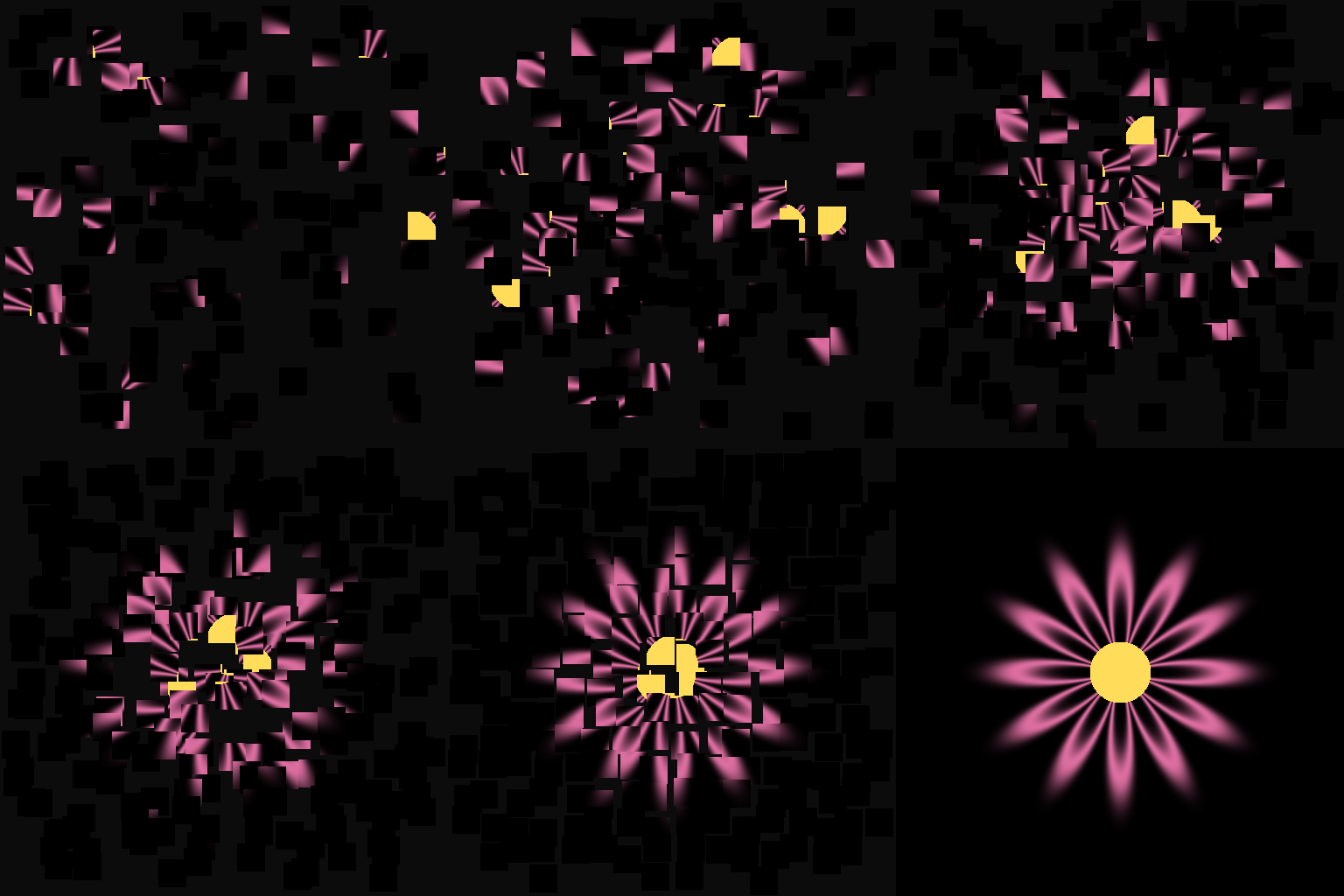
Core concepts
Concept 1 — Slicing the image into tiles
A grid of N × N tiles is N² non-overlapping rectangular crops:
tile[r, c] = image[r * th : (r+1) * th, c * tw : (c+1) * tw]
where th = H // N and tw = W // N. NumPy slicing returns views, not copies, so storing all $N²$ tiles costs nothing in memory until you write into them. For a 512×512 image at $N = 16$, each tile is 32×32 — small enough to render thousands per frame at interactive rates.
Concept 2 — Scatter offsets in polar coordinates
Random positions tend to clump in the corners of a bounding rectangle. Random directions are uniformly distributed around the circle. The polar form gives the more even-looking scatter:
angles = rng.uniform(0, 2 * np.pi, n_tiles)
radii = rng.uniform(R_min, R_max, n_tiles)
scatter_dy = (radii * np.sin(angles)).astype(int)
scatter_dx = (radii * np.cos(angles)).astype(int)
The R_min cushion prevents tiles from starting too close to their home positions (which would look static); R_max controls how far they travel. For an off-canvas scatter, R_max should exceed the canvas half-diagonal.
Concept 3 — Per-tile interpolation with ease-out
At each frame, every tile’s offset from home shrinks from scatter_offset (at t = 0) to 0 (at t = 1):
offset(t) = scatter_offset * (1 - easing(t))
Ease-out cubic — $1 - (1 - t)^3$ — is the natural choice: the tiles fly in fast and decelerate as they arrive, which looks like they have inertia. Ease-in would be wrong (slow arrival followed by sudden snap). Linear works but feels mechanical. The whole animation hinges on this easing call.
Exercises
Three exercises in Execute → Modify → Create order: render the default assembly, sweep parameters, then add per-tile rotation.
Run the flower assembly
Run flower_assembly.py. The script generates a synthetic flower if no flower.png is found, then renders the 60-frame assembly.
Reflection questions
- What happens with
N_TILES = 4instead of 16? WithN_TILES = 64? - Replace
ease_out_cubicwithlinearand re-render. How does the arrival feel? - The script holds the assembled image for 15 frames after the assembly completes. Why?
Answers
Tile-count trade-off — N_TILES = 4 produces 16 large tiles; the assembly is visually chunky and the motion is exaggerated. N_TILES = 64 produces 4,096 tiny tiles; the assembly looks finer-grained but slower to render and the per-tile motion becomes hard to see individually. Sweet spot for visual clarity is usually 12–24.
Linear arrival — the tiles move at constant speed up to the last frame, then snap to zero offset. The arrival feels mechanical and lifeless — no “settling” sensation. This is exactly why ease-out is the canonical choice for arriving motion.
Hold frames — the GIF would otherwise immediately restart the scatter animation, giving no chance to see the completed image. The 15-frame pause makes the assembly feel like it arrived somewhere, which is the perceptual cue that the animation is “complete.”
Parameter sweep
Modify the script to produce three variants.
Goals
- Vertical-only scatter. Force
anglesto be eitherπ/2or3π/2so tiles only scatter up or down. - Per-tile delay. Add a small per-tile delay so tiles arrive in a wave from one corner to the other. Use
delay = (cy + cx) / (H + W)as the per-tile delay fraction. - Longer animation. Double
N_FRAMESto 120 with the same easing.
Goal 1 — what to expect
A “vertical curtain” assembly. Tiles fall from above and rise from below to meet at their home positions. Aesthetically reads as more controlled than radial scatter.
Goal 2 — what to expect
A diagonal wave of assembly. Tiles in the top-left arrive first; tiles in the bottom-right arrive last. The effect resembles a sweep, like a wipe transition. Implement by replacing t per tile with max(0, min(1, t * (1 + delay) - delay)).
Goal 3 — what to expect
The motion looks slower but the curve shape is unchanged. As with easings (8.1.2), animations are scale-invariant in time — what matters is the ratio of velocity at start to end, not the duration.
Add per-tile rotation
Each tile currently arrives flat. Add a rotation that starts at a random angle and rotates to 0° as the tile arrives. Use PIL’s Image.rotate per tile.
# inside the frame loop, after computing progress and offsets:
for i, ((cy, cx), (dy, dx)) in enumerate(zip(home_yx, offsets)):
    y, x = cy + dy, cx + dx
    if not (0 <= y <= H - th and 0 <= x <= W - tw):
        continue

    tile_arr = flower[cy:cy+th, cx:cx+tw]
    tile_img = Image.fromarray(tile_arr)

    # TODO 1: pick a per-tile random start_rotation (e.g., uniform in [-180, 180])
    #         (store these outside the frame loop, computed once)

    # TODO 2: current rotation = start_rotation * (1 - progress)

    # TODO 3: rotate the tile and paste into the canvas (canvas is now a PIL image)
Hint 1 — pre-compute random rotations
# Before the frame loop:
start_rotations = rng.uniform(-180, 180, len(home_yx))
canvas_image = Image.new('RGB', (W, H), (12, 12, 12))
Generate the rotations once outside the loop so each tile has a stable random start angle.
Hint 2 — per-frame rotate and paste
angle = start_rotations[i] * (1 - progress)
rotated = tile_img.rotate(angle, expand=True, resample=Image.BILINEAR)
# Centre the rotated tile on its destination centre
ry, rx = y + th // 2, x + tw // 2
rh, rw = rotated.size[1], rotated.size[0]
canvas_image.paste(rotated, (rx - rw // 2, ry - rh // 2))
rotate(angle, expand=True) grows the image to fit the rotated content; pasting at (centre - rotated_size/2) keeps the rotation centred.
Complete solution
Combining the above produces a “tile-twirl” assembly: each tile starts off-canvas at a random rotation, both translates and rotates to its home position over the 60 frames. The visual is more chaotic on each individual frame but cleaner at the end. Use a slightly smaller SCATTER_RADIUS (~250) to keep the rotated tiles visible.
Make it your own
- Logo reveal. Use your own company logo as the input image. 256 tiles assembling a company brand is the canonical “logo sting” animation.
- Backward play. Reverse the frame list and play
frames[::-1]— the assembly becomes an explosion. Useful as the “exit” transition matching an earlier “enter” assembly. - Wipe scatter. Replace random angles with
angles[i] = π(all left) and a cosine-of-row scatter — the assembly becomes a sliding curtain that pulls the image into focus from one side.
Downloads
flower_assembly.py — full reference flower.png — synthetic inputSummary
Common pitfalls to avoid
- Random Cartesian scatter. Looks rectangular; biases toward the diagonals. Always use polar (angle + radius) for circular scatter.
- Ease-in for arrival. Wrong direction — the tiles slow at the start and snap home. Always ease-out for arriving motion.
- No bounds check. Tiles flying off-canvas during animation would crash the index assignment. Skip blits with out-of-range destinations.
- No held frames at the end. The viewer can’t tell the animation finished without a pause to see the completed image.
References
- [1] Nolan, C. (Director). (2020). Tenet [Film]. Warner Bros. Pictures.
- [2] Thomas, F., & Johnston, O. (1981). Disney Animation: The Illusion of Life. Abbeville Press. ISBN 978-0-89659-232-4.
- [3] Pearson, M. (2011). Generative Art: A Practical Guide Using Processing. Manning. ISBN 978-1-935182-62-5.
- [4] Penner, R. (2002). Motion, Tweening, and Easing. In Robert Penner’s Programming Macromedia Flash MX. McGraw-Hill. ISBN 978-0-07-222356-2.
- [5] Foley, J. D., van Dam, A., Feiner, S. K., & Hughes, J. F. (1990). Computer Graphics: Principles and Practice (2nd ed.). Addison-Wesley. ISBN 978-0-201-12110-0.
- [6] Lasseter, J. (1987). Principles of traditional animation applied to 3D computer animation. Proceedings of SIGGRAPH ‘87, 35–44. doi:10.1145/37402.37407
- [7] Pillow Contributors. (2024). Pillow Documentation: ImageDraw and Image.paste. pillow.readthedocs.io