8.3.2 Thank You
A four-track staggered cinematic: characters slide in, a speech bubble fades in, text rises. Independent timelines composited per frame.
Overview
A motion-graphics cinematic is rarely a single animation — it’s multiple staggered animations that compose into a sequence. This lesson builds a “thank you” closing card from four independent timelines: a left character slides in, a right character slides in, a speech bubble fades in, and a “Thank You” text rises from below. Each animation runs on its own clock; the composer picks the right element from each timeline every frame.
The architectural pattern — multiple timelines, one render pass — is the foundation of every motion-graphics package since the 1990s. Adobe After Effects calls them “tracks”; Apple Motion calls them “behaviors”; Lottie (Airbnb’s open-source mobile animation format) calls them “shapeLayer.” The Python equivalent here is a list of value sequences, one per animated parameter, indexed by frame number. No frameworks, no animation engine — just plain Python lists.
Learning objectives
- Generate per-parameter value sequences as Python lists, one per animated property.
- Use
sine_move(start, end, frames, wait_frames)to produce eased-out motion with explicit pre-roll holds. - Stagger animations so they overlap in time — characters slide in, then the bubble fades, then the text rises.
- Composite the frame by pasting each pre-positioned element in z-order — back to front.
Quick start — four-track composition
import math
from PIL import Image

def sine_move(start, end, frames, wait_frames=0):
    seq = [start] * wait_frames
    for i in range(frames):
        eased = math.sin(i / frames * math.pi / 2)
        seq.append(int(start + (end - start) * eased))
    return seq

# Stagger plan: characters in by frame 80; bubble fades 80-110; text rises 100-140
panda_xs = sine_move(-280, 200, 80) + [200] * 60
pingu_xs = sine_move(1800, 1240, 80) + [1240] * 60
bubble_alpha = [0] * 80 + sine_move(0, 255, 30) + [255] * 30
text_ys = [200] * 100 + sine_move(200, 30, 40)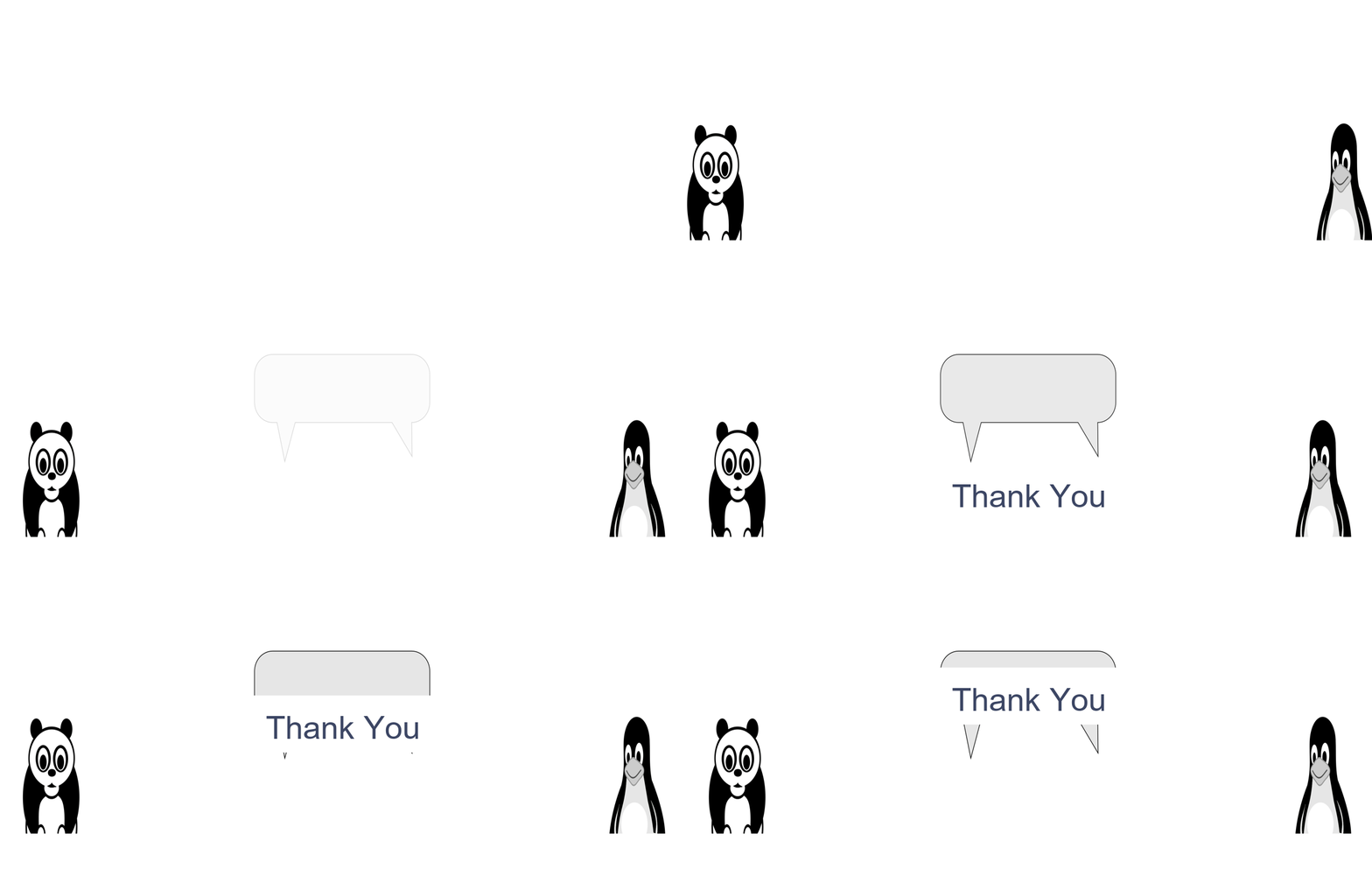
Core concepts
Concept 1 — Per-parameter value sequences
Every animated property gets a list of values, one per frame. panda_xs[42] is the panda’s x-position at frame 42. The list is pre-computed; the render loop just indexes:
for f in range(N_FRAMES):
    canvas = blank.copy()
    canvas.paste(panda, (panda_xs[f], YCHARS), panda)
    canvas.paste(pingu, (pingu_xs[f], YCHARS), pingu)
    canvas.paste(bubble.with_alpha(bubble_alpha[f]), (XBUBBLE, YBUBBLE), bubble)
    canvas.paste(text_tile, (XCENTER, YCHARS - 80 + text_ys[f]))
    frames.append(canvas)
For our four-track cinematic, four lists, all of length N_FRAMES. For a larger production — 50 tracks, 1000 frames — the pattern scales the same way. Total memory: 50,000 small numbers, negligible.
Concept 2 — sine_move with wait_frames
The same ease-out-cubic from 8.1.2, packaged as a sequence generator that supports a leading “hold at start” phase:
def sine_move(start, end, frames, wait_frames=0):
    seq = [start] * wait_frames               # hold at start
    for i in range(frames):
        eased = math.sin(i / frames * math.pi / 2)  # quarter-sine ease
        seq.append(int(start + (end - start) * eased))
    return seq
The wait_frames parameter is the canonical way to express staggered start. Sliding in the panda might be “wait 0 frames, then move from -280 to 200 over 80 frames” — sine_move(-280, 200, 80). Sliding in the speech bubble starts after the characters arrive: [255] * 80 + sine_move(0, 255, 30) — wait 80, then animate alpha 0 to 255 over 30.
Concept 3 — Z-order compositing
Each frame is composed back-to-front:
- Blank canvas (background).
- Panda + pingu (mid layer).
- Speech bubble (in front of characters, behind text).
- Text (front-most).
The order matters because each paste overwrites pixels from the layers behind. If you paste the text before the bubble, the bubble covers the text. The Pillow paste(...) method uses the alpha channel of the pasted image to blend; without alpha, it’s a hard rectangular paste.
For a more sophisticated composition, replace paste with explicit alpha compositing: result = src_alpha * src + (1 - src_alpha) * dst. Used when you need partial transparency or feathered edges.
Exercises
Three exercises in Execute → Modify → Create order: render the scene, restagger the timing, then add a fifth animation track.
Render the Thank You scene
Run thank_you.py. The script renders all 140 frames at 60 ms per frame.
Reflection questions
- The panda enters from the left, the pingu from the right. What happens if both enter from the same side?
- The bubble alpha goes from 0 to 255. What does a partial maximum (say 180) look like?
- The text starts at
y = 200(well below the bubble) and rises toy = 30. Why is it rendered withpasteonly whentext_ys[f] < 200?
Answers
Same-side entry — characters arrive at their final positions but the entry feels lopsided and uncomfortable. Both-side entries create balance; same-side entries imply one character chasing the other, useful narratively but rarely what you want for a generic “thank you” card.
Partial alpha — the bubble is half-transparent. Useful for chat-bubble overlays where the background should remain partially visible. For a final-state graphic, you want fully opaque (alpha 255).
Conditional render — at frame 0–99 the text would be off-screen anyway; rendering it would waste a paste call. The < 200 check skips the unnecessary work. For larger productions, this kind of early-out can save significant CPU time.
Restagger the timing
Modify the stagger plan to test alternative pacings.
Goals
- Simultaneous entry. Drop all
wait_framesso all four tracks start at frame 0. The animation will feel chaotic. - Slower bubble. Increase the bubble’s
framesfrom 30 to 60. The fade-in feels more deliberate. - Sequential entry. Characters slide in one at a time — left first, then right — by adding a 30-frame wait on
pingu_xs.
Goal 1 — what to expect
Everything happens at once. Without staggering, the eye doesn’t know where to look first. This is exactly why staggering exists — to direct attention.
Goal 2 — what to expect
The bubble takes longer to appear. The overall scene feels more deliberate and less rushed. Useful for “important” moments where you want viewers to focus.
Goal 3 — what to expect
A conversational feel — left character arrives, right character follows. Sequential entry is the foundation of every screenplay-style staging (one-at-a-time character introductions).
Add a fifth track — confetti rain
Add a confetti-rain effect that starts as the text rises. Use random positions and per-piece falling speeds.
import math, numpy as np
from PIL import Image, ImageDraw

def confetti_positions(rng, n_pieces, frame, n_frames):
    """Return a list of (x, y, color) tuples for one frame of confetti."""
    # TODO 1: stable seeded positions (independent of frame)
    # xs = rng.integers(0, MAXX, n_pieces)
    # colors = ... (per-piece random colour)
    # vy = ... (per-piece falling speed)

    # TODO 2: y positions depend on frame
    # ys = starting_y + vy * (frame - confetti_start_frame)
    pass
Hint 1 — stable per-piece state
rng = np.random.default_rng(42)
xs = rng.integers(0, MAXX, n_pieces)
colors = [tuple(rng.integers(60, 255, 3)) for _ in range(n_pieces)]
vys = rng.uniform(8, 18, n_pieces)
Generate positions, colours, and speeds once (using a fixed seed). Reuse for every frame.
Hint 2 — y from frame
def confetti_at_frame(frame, start=100):
    if frame < start:
        return []
    ys = -30 + vys * (frame - start)
    return [(int(x), int(y), c) for x, y, c in zip(xs, ys, colors) if y < MAXY]
Confetti starts above the screen and falls; pieces that have left the screen are skipped.
Complete solution
Add the confetti-render in the main render loop:
for piece_x, piece_y, color in confetti_at_frame(f):
    draw.rectangle([piece_x - 4, piece_y - 4, piece_x + 4, piece_y + 4],
                   fill=color)
The scene now has a celebratory confetti shower starting as the text appears. Cost: a few hundred small rectangles per frame.
Make it your own
- Sound effect. Pair with a brief audio sting on the moment the text arrives. The audio reinforces the visual climax.
- Bouncing arrival. Replace
sine_movefor the text with an ease-out-bounce from 8.1.2’s bounce easing. The text “lands” with a small bounce. - Multi-language. Render the text tile with three different “Thank You” translations and crossfade between them. Same architecture, more tracks.
Downloads
thank_you.py — staggered cinematicSummary
Common pitfalls to avoid
- Hardcoded frame counts. Make
N_FRAMESa constant and reference it throughout — easier to change the duration without re-typing. - Mismatched track lengths. All sequences must be the same length as the render loop. Pad with the final value or wrap the indexer with
min(f, len(seq) - 1). - Forgetting z-order. Pasting the text first puts it behind the bubble. Order matters; back-to-front always.
- Stagger that hides motion. If two tracks start and stop at the same time, you lose the cascading effect. Always offset by at least 5-10 frames.
References
- [1] Thomas, F., & Johnston, O. (1981). Disney Animation: The Illusion of Life. Abbeville Press. ISBN 978-0-89659-232-4.
- [2] Williams, R. (2009). The Animator’s Survival Kit. Faber & Faber. ISBN 978-0-571-23834-2.
- [3] Adobe. (2024). After Effects User Guide: Animation Workflows. helpx.adobe.com
- [4] Lottie. (2024). Lottie Animation Format Documentation. airbnb.io/lottie
- [5] Penner, R. (2002). Motion, Tweening, and Easing. In Robert Penner’s Programming Macromedia Flash MX. McGraw-Hill. ISBN 978-0-07-222356-2.
- [6] Pillow Contributors. (2024). Image.paste and alpha compositing. pillow.readthedocs.io
- [7] Lasseter, J. (1987). Principles of traditional animation applied to 3D computer animation. Proceedings of SIGGRAPH ‘87, 35–44. doi:10.1145/37402.37407