8.4.3 Animated Fractals
Add time to the Mandelbrot set: animate the view window's centre and zoom, render each frame from scratch, save as an infinitely-looping GIF that appears to dive into the fractal.
Overview
A static Mandelbrot render (4.1.3) is beautiful but is a single window into an infinitely deep mathematical object. Adding the dimension of time unlocks the fractal’s most hypnotic property: the infinite zoom. Each frame is the same Mandelbrot computation with a smaller view window centred on a fixed interesting point. With exponential interpolation of the window size, the apparent dive feels constant-velocity even though the absolute distance to the “bottom” of the well is geometrically shrinking.
This lesson is the capstone of Module 08. Every technique you have built — easing, interpolation, per-frame rendering, GIF assembly — composes here into a single 90-frame zoom animation. The destination is a 500× zoom on “Seahorse Valley” at $(-0.7436, 0.1318)$, one of the most photographed regions of the Mandelbrot boundary.
Learning objectives
- Parameterise the Mandelbrot view window as a function of frame index using exponential zoom interpolation.
- Compute the per-frame iteration limit so detail scales with zoom depth.
- Map iteration counts to RGB colour with a smooth gradient palette.
- Assemble all frames into an animated GIF with Pillow’s
save_all+append_images.
Quick start — Mandelbrot zoom
import numpy as np
from PIL import Image

def mandelbrot_frame(width, height, x_min, x_max, y_min, y_max, max_iter):
    x = np.linspace(x_min, x_max, width)
    y = np.linspace(y_min, y_max, height)
    X, Y = np.meshgrid(x, y)
    C = X + 1j * Y
    Z = np.zeros_like(C)
    iterations = np.zeros(C.shape)
    for i in range(max_iter):
        mask = np.abs(Z) <= 2
        Z[mask] = Z[mask] ** 2 + C[mask]
        iterations[mask] = i
    return iterations

cx, cy = -0.7436, 0.1318
frames = []
for f in range(60):
    progress = f / 59
    width = 3.0 * (500 ** (-progress))
    img = mandelbrot_frame(400, 400,
                            cx - width / 2, cx + width / 2,
                            cy - width / 2, cy + width / 2,
                            150)
    rgb = np.stack([img / 150 * 255,
                    (img / 150 * 128).astype(np.uint8),
                    (255 - img / 150 * 200).astype(np.uint8)], axis=-1)
    frames.append(Image.fromarray(rgb.astype(np.uint8)))

frames[0].save('zoom.gif', save_all=True, append_images=frames[1:], duration=33, loop=0)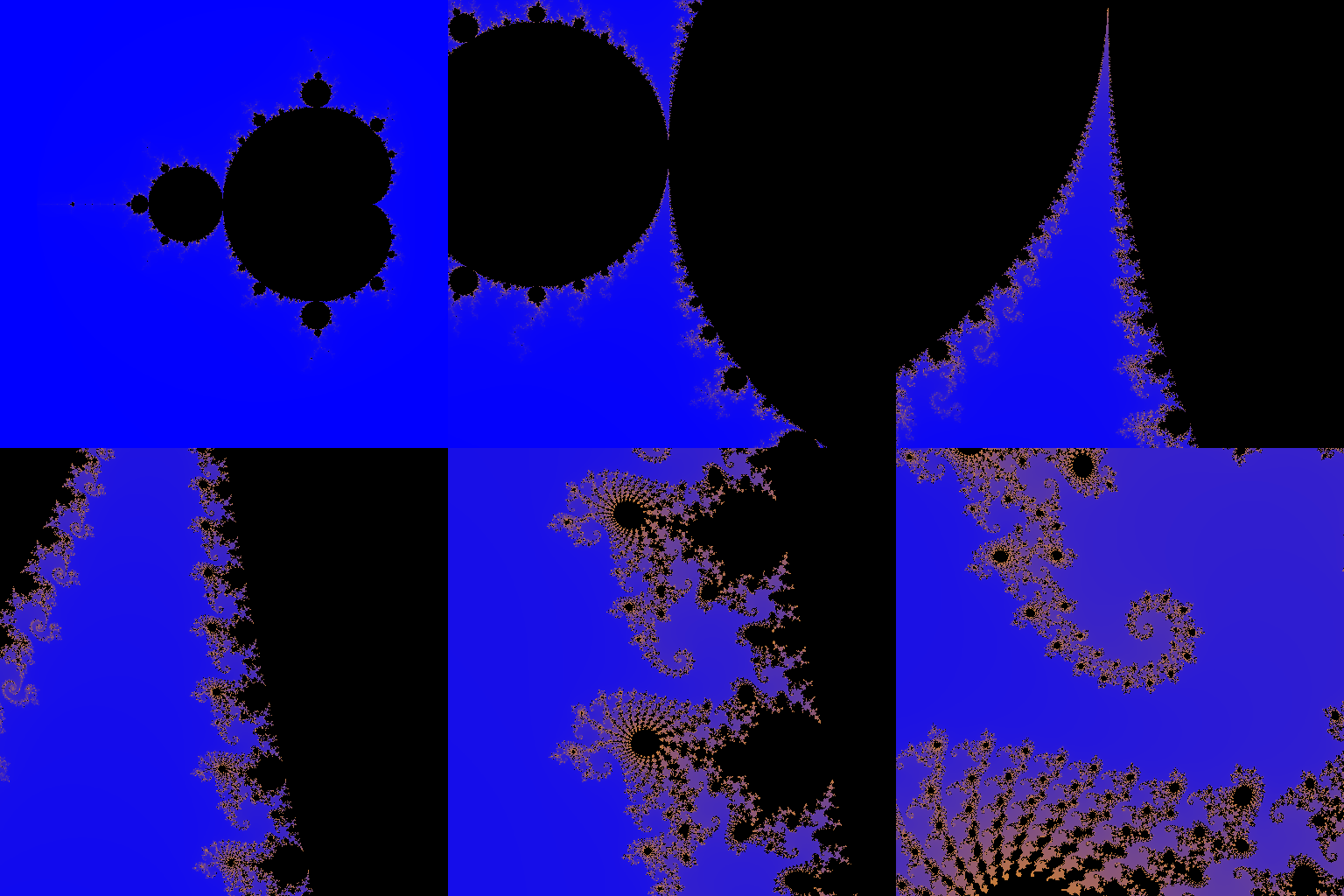
Core concepts
Concept 1 — Exponential zoom interpolation
Linear interpolation of the view window width — width = initial × (1 − progress) — produces a non-uniform perception: the early frames look like the camera is zooming slowly, the later frames feel like it’s stopping. The reason is Weber’s law of perception: equal absolute changes feel different at different magnitudes. A 5% width change at full scale feels different from a 5% change at 100× zoom.
The fix is exponential interpolation:
width(f) = initial_width × zoom_factor^(-progress)
Each frame’s window is a fixed fraction of the previous frame’s window. The eye reads this as constant velocity because each frame “feels” like the previous one with the camera one step closer. The same exponential perception applies to every zoom animation in cinema, every “endless tunnel” effect, every navigable map zoom on Google Maps.
def view_window(frame, total_frames, cx, cy, init_w, zoom):
    progress = frame / (total_frames - 1)
    w = init_w * (zoom ** -progress)
    return (cx - w / 2, cx + w / 2, cy - w / 2, cy + w / 2)
Concept 2 — Iteration depth scales with zoom
The deeper you zoom, the more iterations you need to resolve the fractal boundary. Points that escape after, say, 30 iterations are colourful at 1× zoom but look like a solid wedge at 100× zoom — because every pixel in the visible region escapes between the same handful of iteration counts.
Rule of thumb: for zoom factor $Z$, use roughly $\log_2(Z) \cdot 50$ iterations as a minimum. For a 500× zoom, that’s $\log_2(500) \cdot 50 \approx 450$ iterations. The cost grows; the visual fidelity grows with it.
You can also scale iterations per frame — start at 150 for the wide view and ramp up to 450 by the final frame. This saves CPU on the early frames where detail isn’t needed.
Concept 3 — Colour palette and rendering
Iteration counts map to colours via a per-channel gradient. A simple gradient produces the look of static Mandelbrot renders; a more sophisticated palette gives the zoom video its character:
def iterations_to_rgb(iterations, max_iter):
    normalized = iterations / max_iter
    rgb = np.zeros(iterations.shape + (3,), dtype=np.uint8)
    inside = iterations >= (max_iter - 1)
    # Cool palette: purple → cyan
    rgb[..., 0] = np.where(inside, 0, (normalized * 200).astype(np.uint8))
    rgb[..., 1] = np.where(inside, 0, (normalized * 100).astype(np.uint8))
    rgb[..., 2] = np.where(inside, 0, (255 - normalized * 200).astype(np.uint8))
    return rgb
The black region (points in the Mandelbrot set) is inside == True. Everything else gets a colour proportional to its escape rate. Try variations:
- Fire: red high, green moderate, blue low.
- Ocean: blue high, green low, red minimal.
- Cyclic rainbow:
sin(normalized * 10 + offset)per channel for a banded look that emphasises the iso-iteration curves.
Exercises
Three exercises in Execute → Modify → Create order: run the default zoom, sweep parameters, then code the rendering pipeline from scratch.
Run the Seahorse Valley zoom
Run animated_fractal.py and observe the 60-frame zoom into Seahorse Valley.
Reflection questions
- Why does the zoom feel like the camera is moving at constant speed even though the view window is shrinking 500× over 60 frames?
- The Mandelbrot iteration uses 200 iterations. What happens to the image quality if you drop to 50? Increase to 800?
- The zoom target is
(-0.7436, 0.1318). What region of the Mandelbrot set is that?
Answers
Constant-speed perception — exponential zoom shrinks the window by a constant fraction per frame (~11% per frame for 500× over 60 frames). Each frame “feels” like the previous one with the camera one step closer. Linear zoom would feel like a steep ramp.
Iteration count — 50 iterations: boundaries look pixelated, fine detail is missing. 800: smoother boundaries, more colour gradations, but 4× slower to render. 200 is the sweet spot for this zoom depth.
Seahorse Valley — a famous region of the Mandelbrot boundary near the south-west cusp of the cardioid. The spiral patterns there resemble seahorse silhouettes, hence the name. Discovered and named in the early 1980s by fractal explorers using early personal computers [2].
Different zoom targets
Three variants of the zoom destination.
Goals
- Elephant Valley. Centre on
(0.275, 0.0)for a different boundary region with elephant-trunk-like structures. - Mini Mandelbrot. Centre on
(-1.768, 0.0)for a tiny self-similar copy of the entire set. - Triple zoom factor. Increase the zoom from 500 to 5,000. You’ll need more iterations.
Goal 1 — what to expect
Smooth curving structures that look like elephant trunks. Different visual character from Seahorse Valley — fewer spirals, more wavy lines.
Goal 2 — what to expect
A complete miniature Mandelbrot set appears in the centre — proof of the self-similarity of the boundary. One of the most striking visualisations of fractal scaling.
Goal 3 — what to expect
10× deeper zoom shows finer detail but needs ~600 iterations to render cleanly. Renders slower; the visual payoff is reaching previously invisible structure.
Code the pipeline from scratch
Build the full pipeline in your own file using the starter template.
import numpy as np
from PIL import Image

def compute_mandelbrot(width, height, x_min, x_max, y_min, y_max, max_iter):
    # TODO 1: create the complex grid with meshgrid
    # TODO 2: iterate z = z² + c with boolean masking
    # TODO 3: return the iteration counts
    pass

def iterations_to_colors(iterations, max_iter):
    # TODO 4: convert counts to RGB; inside-set points are black
    pass

def zoom_window(frame, total_frames, cx, cy, init_w, zoom):
    # TODO 5: exponential interpolation of the window width
    pass

def render_animation(cx, cy, zoom, n_frames):
    frames = []
    for f in range(n_frames):
        xmin, xmax, ymin, ymax = zoom_window(f, n_frames, cx, cy, 3.0, zoom)
        iters = compute_mandelbrot(400, 400, xmin, xmax, ymin, ymax, 200)
        rgb = iterations_to_colors(iters, 200)
        frames.append(Image.fromarray(rgb))
    return frames
Hint 1 — compute_mandelbrot
def compute_mandelbrot(width, height, x_min, x_max, y_min, y_max, max_iter):
    x = np.linspace(x_min, x_max, width)
    y = np.linspace(y_min, y_max, height)
    X, Y = np.meshgrid(x, y)
    C = X + 1j * Y
    Z = np.zeros_like(C, dtype=np.complex128)
    iterations = np.zeros(C.shape, dtype=np.float64)
    for i in range(max_iter):
        mask = np.abs(Z) <= 2
        Z[mask] = Z[mask] ** 2 + C[mask]
        iterations[mask] = i
    return iterations
The standard escape-time iteration vectorised over the whole 400×400 grid.
Hint 2 — palette + zoom
def iterations_to_colors(iterations, max_iter):
    n = iterations / max_iter
    rgb = np.zeros(iterations.shape + (3,), dtype=np.uint8)
    inside = iterations >= max_iter - 1
    rgb[..., 0] = np.where(inside, 0, (n * 200).astype(np.uint8))
    rgb[..., 1] = np.where(inside, 0, (n * 100).astype(np.uint8))
    rgb[..., 2] = np.where(inside, 0, (255 - n * 200).astype(np.uint8))
    return rgb

def zoom_window(frame, total_frames, cx, cy, init_w, zoom):
    progress = frame / (total_frames - 1)
    w = init_w * (zoom ** -progress)
    return (cx - w / 2, cx + w / 2, cy - w / 2, cy + w / 2)
The full pipeline is < 30 lines.
Complete solution
The reference animated_fractal.py ties it all together and saves as a GIF with Image.save(..., save_all=True, append_images=...). Same save_all mechanism used in every other animation lesson in Module 08.
Make it your own
- Julia set morph. Instead of zooming, animate the parameter $c$ around a circle of radius 0.15 centred on $(-0.7, 0.27)$. The Julia set morphs continuously through its parameter space.
- Multi-target zoom. Zoom to Seahorse Valley, hold, then zoom out and back into Elephant Valley. A flight tour of the fractal.
- Music-reactive zoom. Combine 8.4.1’s spectrum with this lesson’s zoom: the zoom speed responds to the bass band of an audio track.
Downloads
animated_fractal.py — full reference animated_fractal_starter.py — Exercise 3 skeletonSummary
Common pitfalls to avoid
- Linear zoom. Reads as jarring acceleration. Always exponential.
- Static iteration count. Too few = blurred deep frames; too many = unnecessary cost on shallow frames. Scale with depth.
- Black-on-black palette mistakes. Points inside the Mandelbrot set should be black; check
insidemask is correct. - Per-pixel Python loops in the palette. Render times balloon. Vectorise with NumPy
np.where.
References
- [1] Auger, K. (2020). Deep Mandelbrot Zoom Rendering. deepfractal.com
- [2] Peitgen, H.-O., & Richter, P. H. (1986). The Beauty of Fractals: Images of Complex Dynamical Systems. Springer-Verlag. ISBN 978-3-540-15851-8.
- [3] Mandelbrot, B. B. (1982). The Fractal Geometry of Nature. W. H. Freeman. ISBN 978-0-7167-1186-5.
- [4] Devaney, R. L. (1992). A First Course in Chaotic Dynamical Systems: Theory and Experiment. Westview Press. ISBN 978-0-201-55406-9.
- [5] Douady, A., & Hubbard, J. H. (1984). Exploring the Mandelbrot set: The Orsay Notes. Publications Mathematiques d’Orsay, 84-02.
- [6] Falconer, K. (2003). Fractal Geometry: Mathematical Foundations and Applications (2nd ed.). Wiley. ISBN 978-0-470-84862-3.
- [7] Pillow Contributors. (2024). Pillow Documentation: Image.save and animated GIF. pillow.readthedocs.io