2.1.3 Drawing Circles
Render a circle as the set of pixels whose squared distance from a centre is below a threshold, using np.ogrid for memory-efficient coordinate grids — then stack circles into a bull's-eye and a radial gradient.
Overview
A circle is defined by one number: how far you stand from a fixed point. Move along the boundary and the radius does not change. Translated into pixel arithmetic, that single fact becomes a one-line image — compare each pixel’s squared distance from a centre to the squared radius, and the boundary falls out as a boolean mask [1]. In this lesson you will build that mask with np.ogrid, swap the colour with one assignment, then iterate the same pattern into bull’s-eyes and gradient rings.
Learning objectives
- Define a circle in terms of the Euclidean distance formula, $(x - c_x)^2 + (y - c_y)^2 < r^2$.
- Use
np.ogridto build memory-efficient coordinate grids and leverage broadcasting for whole-image arithmetic. - Apply boolean masking to colour exactly the pixels that satisfy a geometric condition.
- Layer concentric circles — drawn largest-first — to produce the classic bull’s-eye pattern.
Quick start — one orange disc
import numpy as np
from PIL import Image

CANVAS_SIZE = 512
CENTER_X, CENTER_Y = 256, 256
RADIUS = 150
CIRCLE_COLOR = [255, 128, 0]   # orange

# Open coordinate grids — Y is (512, 1), X is (1, 512)
Y, X = np.ogrid[0:CANVAS_SIZE, 0:CANVAS_SIZE]

# Squared distance from centre for every pixel
square_distance = (X - CENTER_X) ** 2 + (Y - CENTER_Y) ** 2

# Boolean mask of pixels inside the circle
inside_circle = square_distance < RADIUS ** 2

canvas = np.zeros((CANVAS_SIZE, CANVAS_SIZE, 3), dtype=np.uint8)
canvas[inside_circle] = CIRCLE_COLOR

Image.fromarray(canvas, mode='RGB').save('circle.png')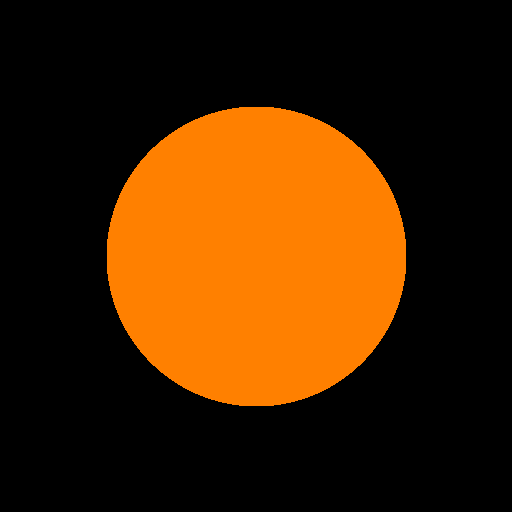
Core concepts
Concept 1 — Distance is enough
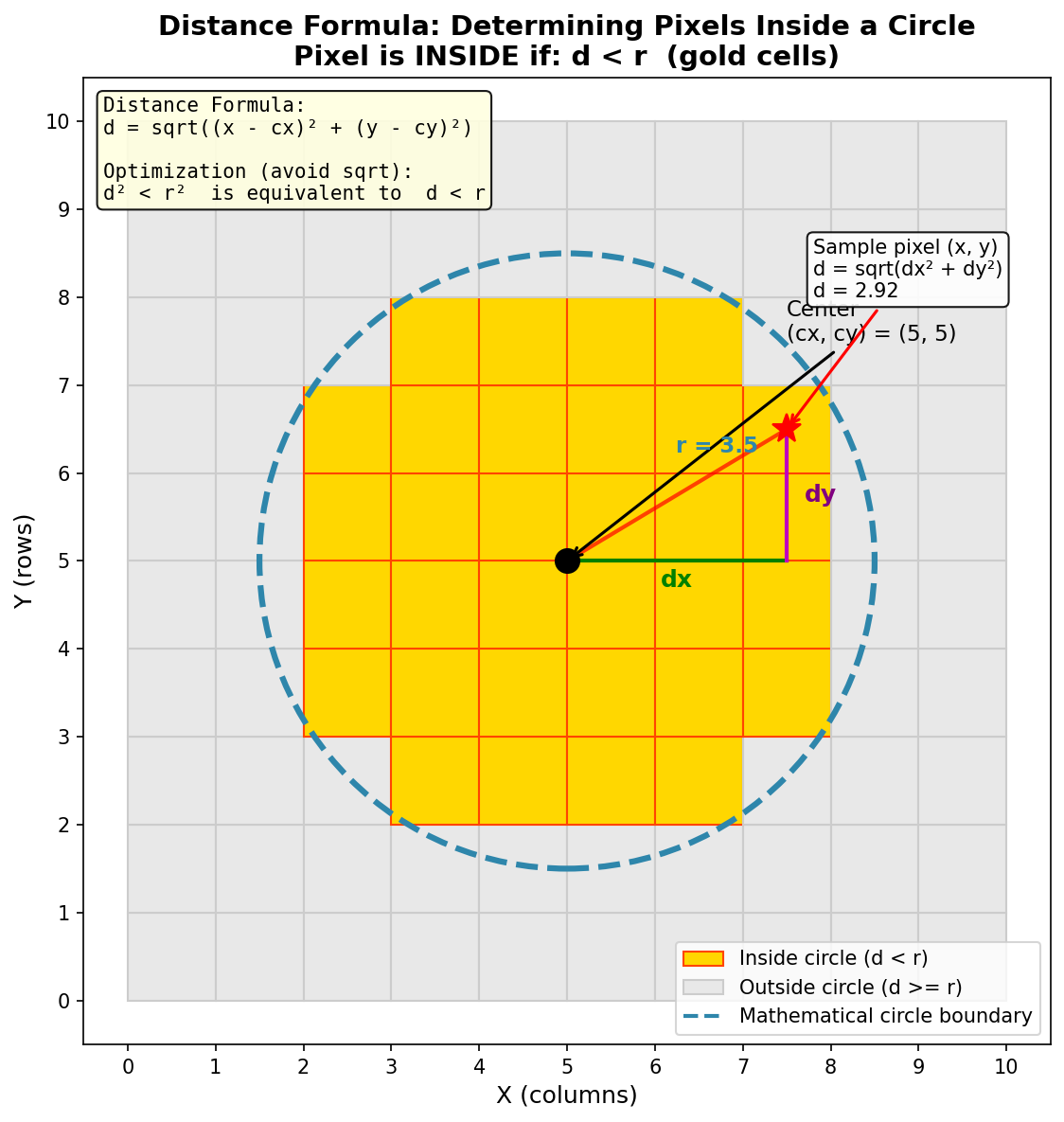
A circle is the locus of points at a fixed distance from a centre. For a centre $(c_x, c_y)$ and radius $r$, a pixel at $(x, y)$ is inside when
sqrt((x - cx)² + (y - cy)²) < r.
The square root is honest but expensive. Square both sides and the comparison becomes
(x - cx)² + (y - cy)² < r²,
which uses only multiplications and one subtraction per pixel. For the test d < r (with both sides non-negative) and d² < r² are equivalent — but the squared form is what every fast circle rasterizer reaches for, from Bresenham’s 1977 integer arc algorithm onward [2].
Concept 2 — np.ogrid is the cheap coordinate grid
To run arithmetic per pixel, you need arrays that hold each pixel’s coordinates. np.ogrid produces these as open grids — one column vector, one row vector — and lets broadcasting expand them to the full plane on demand:
import numpy as np

Y, X = np.ogrid[0:512, 0:512]
# Y.shape → (512, 1), values 0..511 as a column vector
# X.shape → (1, 512), values 0..511 as a row vector

# Broadcasting expands both to (512, 512) on demand
square_distance = (X - 256) ** 2 + (Y - 256) ** 2
# square_distance.shape → (512, 512)
The alternatives are real options but heavier. np.meshgrid materialises both arrays as full 2D grids (twice the memory). np.indices builds a 3D stack of coordinates. For circles, ogrid is the lightest tool that does the job [3].
Concept 3 — Boolean masks as paint stencils
square_distance < RADIUS ** 2 returns a 2D boolean array of the same shape as the canvas. That array is a mask — wherever it is True, the next assignment writes; wherever it is False, the original pixel survives:
canvas = np.zeros((512, 512, 3), dtype=np.uint8)
canvas[inside_circle] = [255, 128, 0]   # only True positions get coloured
This is boolean indexing (sometimes called fancy indexing). The mask broadcasts across the colour-channel axis automatically, so a 2D mask can paint into a 3D (H, W, 3) canvas without any extra reshape [4].
Exercises
Three exercises in Execute → Modify → Create order: run the basic circle, vary its parameters, then build a bull’s-eye from scratch.
Run the basic circle
Run circle.py as-is and inspect the output.
import numpy as np
from PIL import Image

CANVAS_SIZE = 512
CENTER_X, CENTER_Y = 256, 256
RADIUS = 150
CIRCLE_COLOR = [255, 128, 0]

Y, X = np.ogrid[0:CANVAS_SIZE, 0:CANVAS_SIZE]
square_distance = (X - CENTER_X) ** 2 + (Y - CENTER_Y) ** 2
inside_circle = square_distance < RADIUS ** 2

canvas = np.zeros((CANVAS_SIZE, CANVAS_SIZE, 3), dtype=np.uint8)
canvas[inside_circle] = CIRCLE_COLOR

Image.fromarray(canvas, mode='RGB').save('circle.png')
Reflection questions
- What happens visually if you change
RADIUSfrom 150 to 50? To 250? - Why compare squared distances rather than calling
np.sqrt? - How would you place the circle in the bottom-right quadrant of the canvas?
Answers
Radius changes — at 50 the disc shrinks to a small dot; at 250 it nearly fills the canvas (the centre is at 256, so the edge clips just inside). Larger than 256 and the disc starts clipping against the canvas edges.
Squared comparisons — np.sqrt is per-pixel floating-point work and is unnecessary when you only need an ordering. d² < r² is the same condition for non-negative values, with only multiplications. Modern CPUs do this faster, and GPUs benefit even more.
Moving the centre — set CENTER_X, CENTER_Y = 384, 384. The squared-distance computation re-centres automatically; nothing else changes.
Three colour and placement variations
Edit exercise1_execute.py to produce these images.
Goals
- Small top-left circle — radius 50 centred near
(100, 100). - Blue circle — same shape, but pure blue rather than orange.
- Two circles side by side — red on the left, green on the right, both radius 100.
Goal 1 — what to expect
Change two lines:
CENTER_X, CENTER_Y = 100, 100
RADIUS = 50
The disc shrinks and shifts to the upper-left corner; everything else stays the same.
Goal 2 — what to expect
Swap the colour for [0, 0, 255]. RGB is [red, green, blue], so the third channel is what controls blueness:
CIRCLE_COLOR = [0, 0, 255]Goal 3 — what to expect
Two square_distance computations and two mask assignments — one per circle. They are independent: the only shared state is the canvas they paint into.
dist1 = (X - 150) ** 2 + (Y - 256) ** 2
canvas[dist1 < 100 ** 2] = [255, 0, 0]

dist2 = (X - 360) ** 2 + (Y - 256) ** 2
canvas[dist2 < 100 ** 2] = [0, 255, 0]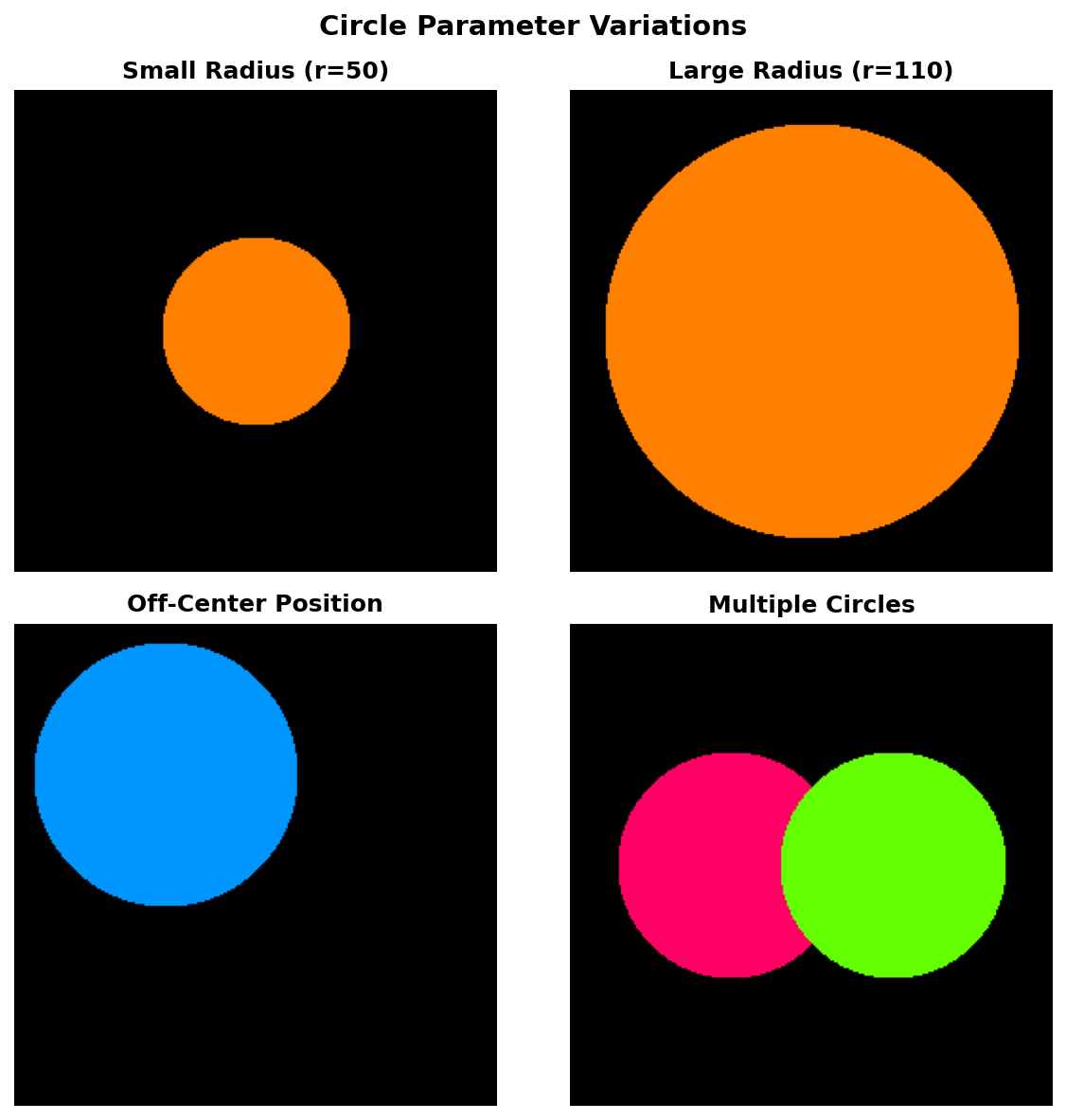
Bull's-eye with concentric rings
Build a bull’s-eye: five concentric circles, alternating red and white, drawn around a single centre.
Goal: on a 512×512 canvas centred at (256, 256), draw circles of radii 200, 160, 120, 80, 40 in the colour sequence red, white, red, white, red (outermost to innermost).
import numpy as np
from PIL import Image

CANVAS_SIZE = 512
CENTER_X, CENTER_Y = 256, 256

RADII  = [200, 160, 120, 80, 40]
RED, WHITE = [255, 0, 0], [255, 255, 255]
COLORS = [RED, WHITE, RED, WHITE, RED]

Y, X = np.ogrid[0:CANVAS_SIZE, 0:CANVAS_SIZE]
square_distance = (X - CENTER_X) ** 2 + (Y - CENTER_Y) ** 2

canvas = np.zeros((CANVAS_SIZE, CANVAS_SIZE, 3), dtype=np.uint8)

# TODO 1: loop over (radius, color) pairs from RADII and COLORS.
# TODO 2: for each pair, build the boolean mask square_distance < radius ** 2
#         and assign the colour into canvas at the mask.

# Hint: the order of the loop matters. Draw the largest circle first.

Image.fromarray(canvas, mode='RGB').save('concentric_circles.png')
Hint 1 — why largest first
Each iteration overwrites everything inside the current mask. If you draw the smallest circle first and then a larger one on top, the larger circle paints over the smaller one and you only see one ring. Painting largest-to-smallest produces the bull’s-eye automatically — same painter’s algorithm idea as in the triangle landscape.
Hint 2 — iterating two lists in lockstep
zip pairs items from each list one for one:
for radius, color in zip(RADII, COLORS):
    mask = square_distance < radius ** 2
    canvas[mask] = color
The lists are already in largest-to-smallest order, so the loop just walks them.
Complete solution
import numpy as np
from PIL import Image

CANVAS_SIZE = 512
CENTER_X, CENTER_Y = 256, 256

RADII  = [200, 160, 120, 80, 40]
RED, WHITE = [255, 0, 0], [255, 255, 255]
COLORS = [RED, WHITE, RED, WHITE, RED]

Y, X = np.ogrid[0:CANVAS_SIZE, 0:CANVAS_SIZE]
square_distance = (X - CENTER_X) ** 2 + (Y - CENTER_Y) ** 2

canvas = np.zeros((CANVAS_SIZE, CANVAS_SIZE, 3), dtype=np.uint8)
for radius, color in zip(RADII, COLORS):
    canvas[square_distance < radius ** 2] = color

Image.fromarray(canvas, mode='RGB').save('concentric_circles.png')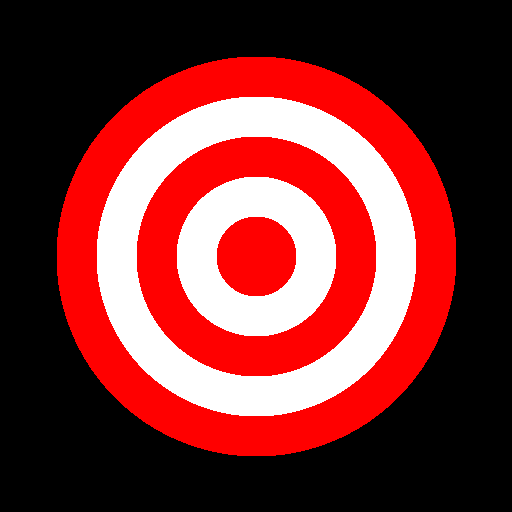
How it works:
square_distanceis computed once, outside the loop. Every iteration reuses the same scalar field.zip(RADII, COLORS)walks the two lists in parallel — radius 200 with red, then 160 with white, and so on.- Drawing in that order means each subsequent (smaller) circle overwrites the inside of the previous (larger) one, leaving an alternating ring pattern.
Make it your own
- Gradient rings. Replace the discrete
COLORSlist withnp.linspace-interpolated colours across 20+ thin rings. - Off-centre tunnel. Shift each successive circle’s centre by
(dx, dy) = (i*4, i*2)to fake a perspective tunnel. - Four-petal flower. Place four circles around a central point at the cardinal directions, all the same radius, and watch their intersections form a quatrefoil.
Downloads
circle.py — quick-start script circle_variations.py — modification reference concentric_circles_solution.py — bull's-eye referenceSummary
Common pitfalls to avoid
- Comparing
square_distance < RADIUSinstead ofRADIUS ** 2— produces a tiny dot because you forgot to square the right side. - Drawing concentric circles smallest-first — the larger circle paints over the smaller ones and the bull’s-eye collapses to one solid disc.
- Using
np.meshgridreflexively — works fine, but uses more memory thannp.ogridwhen you only need broadcasting. - Integer overflow on very large canvases —
(X - cx)**2inint32can wrap around forcx, Xnear the edges of a multi-thousand-pixel canvas; cast toint64orfloat64for safety.
References
- [1] Foley, J. D., van Dam, A., Feiner, S. K., & Hughes, J. F. (1990). Computer Graphics: Principles and Practice (2nd ed.). Addison-Wesley.
- [2] Bresenham, J. E. (1977). A linear algorithm for incremental digital display of circular arcs. Communications of the ACM, 20(2), 100–106. doi:10.1145/359423.359432
- [3] NumPy Community. (2024). numpy.ogrid. NumPy Documentation. numpy.org
- [4] Harris, C. R., et al. (2020). Array programming with NumPy. Nature, 585(7825), 357–362. doi:10.1038/s41586-020-2649-2
- [5] Gonzalez, R. C., & Woods, R. E. (2018). Digital Image Processing (4th ed.). Pearson.
- [6] Pearson, M. (2011). Generative Art: A Practical Guide Using Processing. Manning.
- [7] Paas, F., & van Merriënboer, J. J. G. (2020). Cognitive-load theory: Methods to manage working memory load in the learning of complex tasks. Current Directions in Psychological Science, 29(4), 394–398. doi:10.1177/0963721420922183