2.2.3 Vector Fields
Assign a direction to every pixel, recover its angle with `np.arctan2(dy, dx)`, then map angle to hue on the colour wheel — turning invisible flow into visible pattern.
Overview
A vector field assigns a direction to every point in space — wind across a weather map, water in a current, the gravity vector pointing back toward Earth’s centre [1]. Most of those fields are invisible. Visualising one is the inverse problem: take (dx, dy) per pixel, recover the angle with np.arctan2, then map angle to hue on the colour wheel. The result is a pattern where colour reveals direction, and combining a few simple fields — radial in, radial out, rotational — gives you vortexes, spirals, and the whole vocabulary of fluid-style flow.
Learning objectives
- Define a vector field as a function that assigns
(dx, dy)to every coordinate. - Recover direction from a vector using
np.arctan2(dy, dx), which handles all four quadrants without division-by-zero. - Map an angle in
[-π, π]to a hue in[0, 255]and render it as a colour wheel. - Compose new fields by adding radial and rotational components — the building blocks of vortexes and spirals.
Quick start — a radial vector field
import numpy as np
from PIL import Image

def hue_to_rgb(hue):
    """Map an array of hue values in [0, 1] to RGB via the standard 6-segment wheel."""
    h6 = hue * 6
    c = np.ones_like(h6)
    x = 1 - np.abs((h6 % 2) - 1)
    z = np.zeros_like(h6)
    seg = h6.astype(int)
    r = np.choose(seg % 6, [c, x, z, z, x, c])
    g = np.choose(seg % 6, [x, c, c, x, z, z])
    b = np.choose(seg % 6, [z, z, x, c, c, x])
    return (np.stack([r, g, b], axis=-1) * 255).astype(np.uint8)

H, W = 512, 512
cx, cy = W // 2, H // 2

y, x = np.ogrid[:H, :W]
dx = cx - x           # vector pointing toward centre
dy = cy - y

angle = np.arctan2(dy, dx)                  # in [-pi, pi]
hue = (angle + np.pi) / (2 * np.pi)         # in [0, 1]
rgb = hue_to_rgb(np.broadcast_to(hue, (H, W)))

Image.fromarray(rgb, mode='RGB').save('simple_vector_field.png')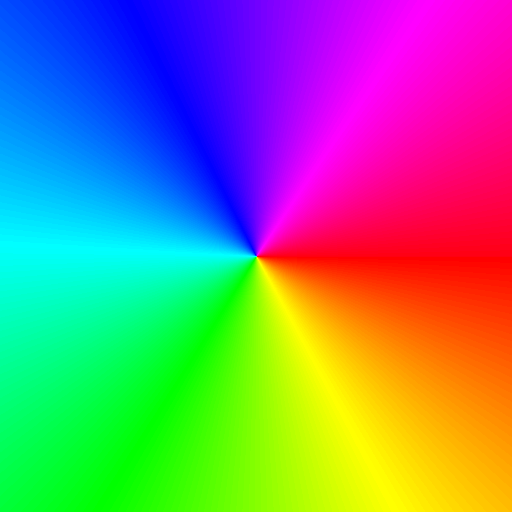
Core concepts
Concept 1 — Vector fields and arctan2
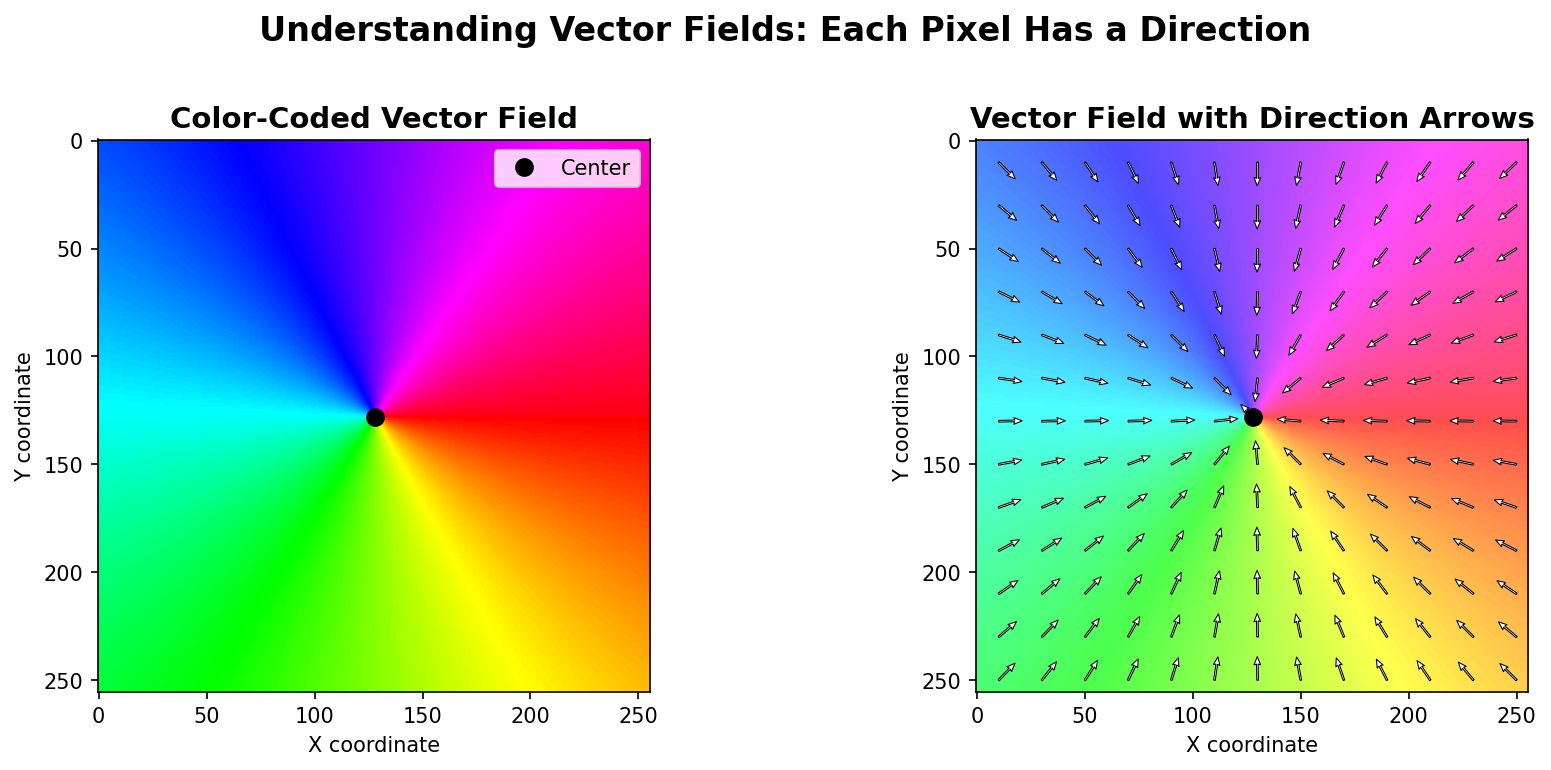
A vector field is a function F(x, y) = (dx, dy) that assigns a 2D vector to every point. The radial-in field is F(x, y) = (cx - x, cy - y): at every pixel, an arrow pointing toward the centre. The rotational field is its 90° rotation: swap and negate. Combine them and you get vortexes.
To turn a vector into a colour, you need its angle. The function for that is np.arctan2(dy, dx), which returns the angle in [-π, π] and handles every quadrant correctly:
import numpy as np

# (1, 1) → π/4 (up-right)
print(np.arctan2(1, 1))     # 0.7854

# (-1, 1) → 3π/4 (up-left)
print(np.arctan2(1, -1))    # 2.3562

# (0, 0) → 0 (undefined direction; convention picks 0)
print(np.arctan2(0, 0))     # 0.0
Crucially, arctan2(dy, dx) is not the same as arctan(dy/dx). The latter loses sign information (a 180° flip in both dx and dy gives the same ratio), throws on dx = 0, and collapses two quadrants into one. Always use arctan2 for direction calculations [3].
Concept 2 — Mapping angle to hue
arctan2 returns values in [-π, π]. The colour-wheel convention treats hue as cyclic in [0, 1] (or [0, 360°]). The mapping is two arithmetic steps:
hue = (θ + π) / (2π).
This shifts and rescales: -π goes to 0 (red), 0 goes to 0.5 (cyan), +π goes back to 1 (red again — the wheel wraps). Once you have hue in [0, 1], a small hue_to_rgb helper walks the standard six-segment HSV wheel: red → yellow → green → cyan → blue → magenta → red [4].
Concept 3 — Composing radial and rotational fields
Three primitives compose almost every flow you will see:
- Radial inward —
dx = cx - x,dy = cy - y. Vectors point at the centre. Looks like gravity. - Radial outward —
dx = x - cx,dy = y - cy. The reverse. Looks like an explosion. - Rotational — perpendicular to radial. Counterclockwise:
dx = -(y - cy),dy = (x - cx). Looks like a whirlpool’s surface.
Adding components produces vortexes:
rel_x = x - cx
rel_y = y - cy

dx_rot, dy_rot = -rel_y,  rel_x        # rotation (CCW)
dx_rad, dy_rad = -rel_x, -rel_y        # radial inward

dx = 0.7 * dx_rot + 0.3 * dx_rad
dy = 0.7 * dy_rot + 0.3 * dy_rad
The weights set the character: 100% rotation gives clean circular flow; 100% inward gives a sink; 70/30 gives the spiral pull of a draining bath or a hurricane seen from above. Maxwell’s equations describe real electromagnetic fields the same way — as superpositions of simple radial and rotational components [5].
Exercises
Three exercises in Execute → Modify → Create order: run the radial field, swap to outward and rotational, then build a weighted vortex.
Run the radial field
Run simple_vector_field.py from the quick start. Look at the output and answer these.
Reflection questions
- What colour appears at the top of the image, and what direction does that colour represent?
- What does the exact centre pixel look like, and why?
- If you trace a circle around the centre, what pattern do the colours form?
Answers
Top of the image — the vector there points downward toward the centre, which is direction (0, +). arctan2(+, 0) is π/2, halfway around the rainbow — that lands on the green/cyan band, depending on exactly which row.
Centre pixel — (dx, dy) = (0, 0), which has no well-defined direction. arctan2(0, 0) returns 0 by convention, so the centre shows the same colour as the 0-angle pixels (red). This is a singularity — a point where the field is undefined, and the convention picks an arbitrary fill colour.
Tracing a circle — the colours cycle through the entire rainbow once. At every point on the circle, the angle to the centre is different, and walking around the circle sweeps through all 360° in order.
Outward, rotational, spiral
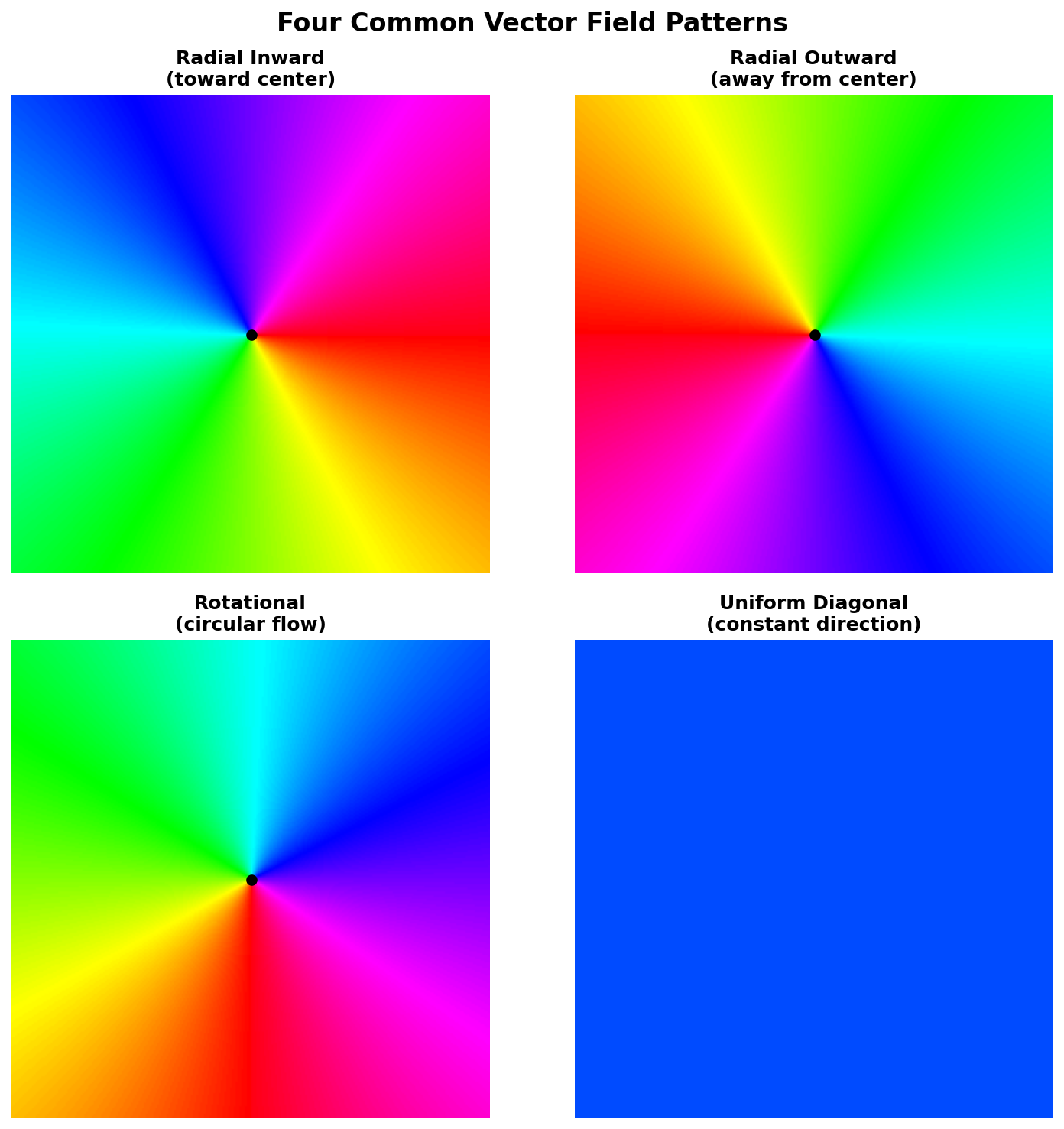
Edit the quick-start code (only the dx, dy lines) to produce these three pictures.
Goals
- Outward — vectors point away from the centre.
- Rotational (counterclockwise) — vectors are perpendicular to the radial-out direction.
- Spiral — outward + rotational combined (just add the components).
Goal 1 — what to expect
Reverse the subtraction:
dx = x - cx
dy = y - cy
Every colour appears 180° from where it did in the inward field — the rainbow rotates a half-turn around the centre.
Goal 2 — what to expect
Swap and negate one component:
rel_x = x - cx
rel_y = y - cy
dx = -rel_y
dy =  rel_x
The colours form concentric bands around the centre instead of radial wedges — the field is tangent to circles.
Goal 3 — what to expect
Add the two (dx, dy) pairs:
rel_x = x - cx
rel_y = y - cy
dx = -rel_y + rel_x         # rotation + outward
dy =  rel_x + rel_y
The colour bands twist — every step rotates as it moves outward, which is exactly the visual of a spiral.
Vortex with weighted components
Build a vortex: 70% rotation, 30% inward radial. Normalise the radial component so the inward pull is consistent across the canvas, regardless of distance from the centre.
import numpy as np
from PIL import Image

# ... hue_to_rgb helper from quick start ...

H, W = 512, 512
cx, cy = W // 2, H // 2

y, x = np.ogrid[:H, :W]
rel_x = x - cx
rel_y = y - cy

distance = np.sqrt(rel_x ** 2 + rel_y ** 2)
distance[distance == 0] = 1     # avoid 0/0 at the centre

# TODO 1: build the rotational component (perpendicular to radial)
# dx_rot, dy_rot = ...

# TODO 2: build the *normalised* radial inward component
# dx_rad = -rel_x / distance
# dy_rad = -rel_y / distance

# TODO 3: combine with 70% rotation and 30% radial. Multiply the radial
# part by `distance` in the sum so the rotation dominates near the centre.

# TODO 4: compute angle = arctan2(dy_combined, dx_combined),
# then hue and RGB as in the quick start.

Image.fromarray(rgb, mode='RGB').save('vortex_field.png')
Hint — combining the components
dx_rot, dy_rot = -rel_y, rel_x
dx_rad = -rel_x / distance
dy_rad = -rel_y / distance

w_rot, w_rad = 0.7, 0.3
dx = w_rot * dx_rot + w_rad * dx_rad * distance
dy = w_rot * dy_rot + w_rad * dy_rad * distance
The * distance on the radial term un-does the normalisation — it lets the rotation dominate near the centre (where everything is small) without exploding the radial term to enormous values far away.
Complete solution
import numpy as np
from PIL import Image

def hue_to_rgb(hue):
    h6 = hue * 6
    c = np.ones_like(h6); z = np.zeros_like(h6)
    x = 1 - np.abs((h6 % 2) - 1)
    seg = h6.astype(int)
    r = np.choose(seg % 6, [c, x, z, z, x, c])
    g = np.choose(seg % 6, [x, c, c, x, z, z])
    b = np.choose(seg % 6, [z, z, x, c, c, x])
    return (np.stack([r, g, b], axis=-1) * 255).astype(np.uint8)

H, W = 512, 512
cx, cy = W // 2, H // 2

y, x = np.ogrid[:H, :W]
rel_x = x - cx
rel_y = y - cy
distance = np.sqrt(rel_x ** 2 + rel_y ** 2)
distance[distance == 0] = 1

dx_rot, dy_rot = -rel_y, rel_x
dx_rad = -rel_x / distance
dy_rad = -rel_y / distance

w_rot, w_rad = 0.7, 0.3
dx = w_rot * dx_rot + w_rad * dx_rad * distance
dy = w_rot * dy_rot + w_rad * dy_rad * distance

angle = np.arctan2(dy, dx)
hue = (angle + np.pi) / (2 * np.pi)
rgb = hue_to_rgb(np.broadcast_to(hue, (H, W)))

Image.fromarray(rgb, mode='RGB').save('vortex_field.png')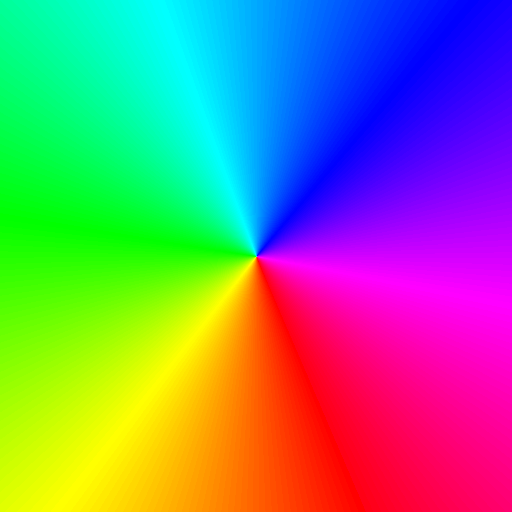
How it works:
- The rotational component (
-rel_y, rel_x) is the counterclockwise tangent. - The radial component is normalised (
/ distance), which would make the centre singular without thedistance[distance == 0] = 1guard. - Multiplying the radial part by
distancein the sum un-does the normalisation in a controlled way — this prevents the radial pull from blowing up the rotation near the edges. arctan2of the combined field gives the angle at every pixel;hue_to_rgbpaints it.
Make it your own
- 90/10 vortex. Almost pure rotation, with a barely-noticeable inward pull. The bands curl very gently — looks like a slow eddy.
- Saddle. Mix radial outward in one axis and radial inward in the other:
dx = x - cx,dy = cy - y. The colour field shows the classic four-quadrant saddle pattern from dynamical systems. - Sin/cos field. Replace
(dx, dy)with(sin(y/40), cos(x/40)). A non-radial pattern that looks like a fluid-dynamics simulation snapshot.
Downloads
simple_vector_field.py — radial inward vector_field_variations.py — four primitives vortex_field_solution.py — weighted vortexSummary
Common pitfalls to avoid
np.arctan(dy / dx)instead ofnp.arctan2(dy, dx)— drops the sign of(dx, dy), throws ondx = 0, collapses two quadrants.- Forgetting that
arctan2returns[-π, π]and not normalising before computing hue — the rainbow ends up shifted by half a turn. - Dividing by
distancewithout guardingdistance == 0— silent NaNs propagate through the entire image. - Mismatched broadcasting: if your
dx,dyaren’t both(H, W)after broadcasting,arctan2will broadcast in an unexpected direction.
References
- [1] Acheson, D. J. (1990). Elementary Fluid Dynamics. Oxford University Press.
- [2] Laidlaw, D. H., & Weickert, J. (Eds.). (2005). Visualization and Processing of Tensor Fields. Springer.
- [3] NumPy Community. (2024). numpy.arctan2. NumPy Documentation. numpy.org
- [4] Smith, A. R. (1978). Color gamut transform pairs. ACM SIGGRAPH Computer Graphics, 12(3), 12–19. doi:10.1145/965139.807361
- [5] Maxwell, J. C. (1865). A dynamical theory of the electromagnetic field. Philosophical Transactions of the Royal Society of London, 155, 459–512.
- [6] Bridson, R. (2015). Fluid Simulation for Computer Graphics (2nd ed.). CRC Press.
- [7] Harris, C. R., et al. (2020). Array programming with NumPy. Nature, 585(7825), 357–362. doi:10.1038/s41586-020-2649-2