2.2.1 Gradient Fields
Map a 1D linspace into a 2D image by tiling rows or columns, then use broadcasting to combine horizontal and vertical components into diagonal and radial gradients — the same coordinate-to-value scheme behind every procedural texture.
Overview
A gradient is the simplest possible coordinate field — a function f(x, y) that turns pixel positions into brightness values. Set f(x, y) = x and you get a horizontal gradient. Set f(x, y) = y and you get a vertical one. Set f(x, y) = (x + y) / 2 and you get a diagonal. This pattern — value as a function of position — is the conceptual seed of every procedural texture you will write later in the module: spirals, vector fields, distance fields, and the noise textures of Module 06. The mechanic for turning a 1D linspace into a 2D image is two NumPy operations: np.tile (for axis-aligned gradients) and broadcasting (for everything else) [1].
Learning objectives
- Use
np.linspaceto generate evenly-spaced grayscale values that interpolate between two endpoints. - Tile a 1D
linspaceinto 2D withnp.tile, controlling gradient direction by tiling either rows or columns. - Combine horizontal and vertical 1D components via NumPy broadcasting to build diagonal and radial gradients.
- Cast back to
uint8after floating-point combinations, keeping image data in the displayable range.
Quick start — a black-to-white horizontal gradient
import numpy as np
from PIL import Image

height, width = 300, 800

# 1D linspace: 800 evenly-spaced values between 0 and 255
gradient_values = np.linspace(0, 255, width, dtype=np.uint8)

# np.tile repeats the row `height` times to fill the canvas
gradient_image = np.tile(gradient_values, (height, 1))

Image.fromarray(gradient_image, mode='L').save('simple_gradient.png')
Core concepts
Concept 1 — np.linspace as the value generator
np.linspace(start, stop, num) returns num evenly-spaced values from start to stop, inclusive at both ends. The arithmetic per element is
value[i] = start + i · (stop - start) / (num - 1).
For grayscale image data the natural range is 0 to 255, so np.linspace(0, 255, width, dtype=np.uint8) is the canonical gradient row [2]. The dtype=np.uint8 argument is not optional — Pillow stores standard 8-bit images as unsigned bytes, and passing a float64 array can produce display oddities or silent type conversion.
import numpy as np

# 5 evenly-spaced values from 0 to 100
print(np.linspace(0, 100, 5))
# → [ 0.  25.  50.  75. 100.]

# Cast to image bytes
print(np.linspace(0, 255, 5, dtype=np.uint8))
# → [ 0  63 127 191 255]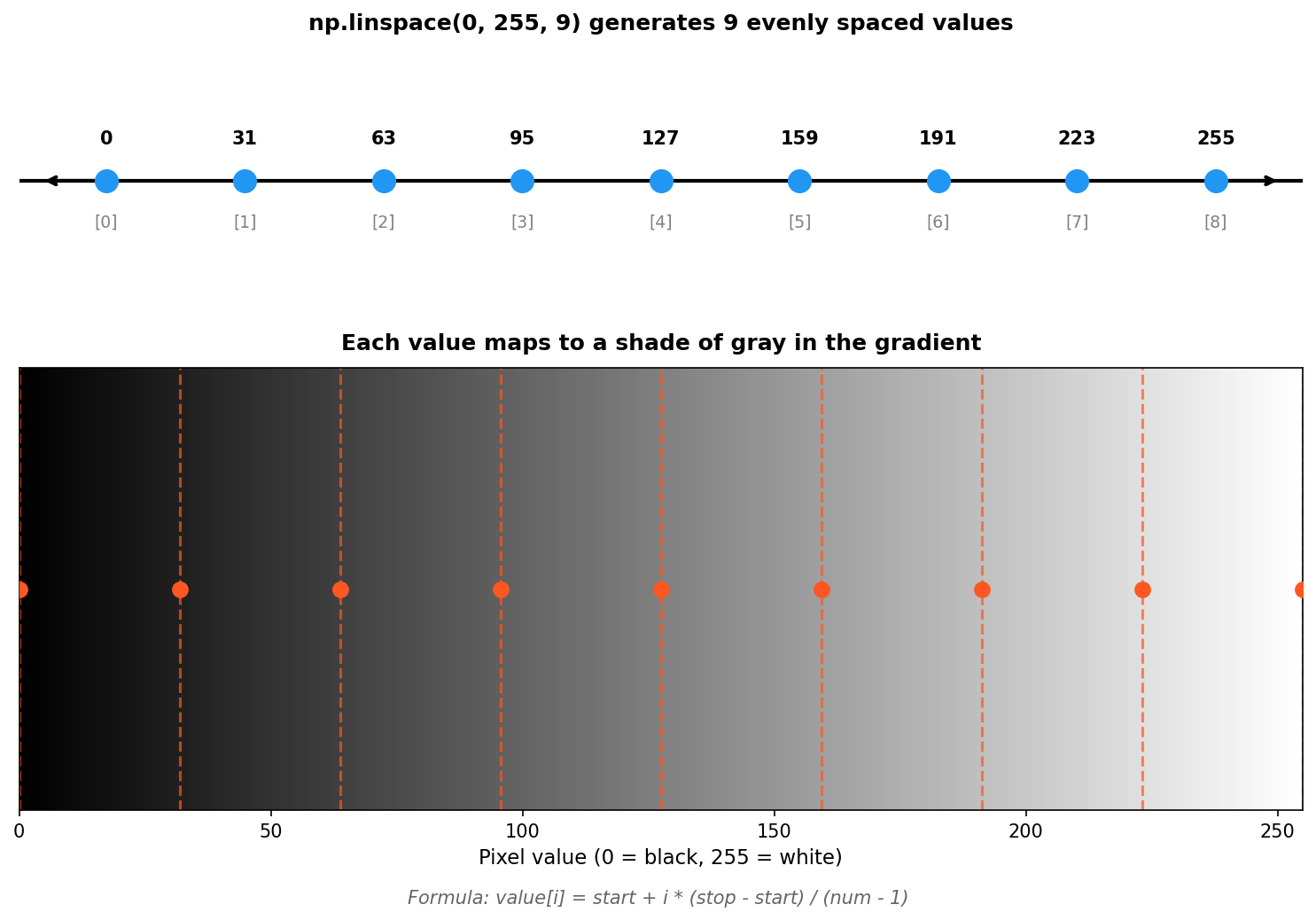
Concept 2 — Tiling and reshaping for gradient direction
np.tile(array, reps) repeats array a given number of times along each axis. The shape of reps determines the axis of repetition. For a horizontal gradient you start with a row, then tile downward; for a vertical gradient, start with a column and tile rightward [3]:
size = 200

# Horizontal: values change across columns
horizontal = np.tile(
    np.linspace(0, 255, size, dtype=np.uint8),
    (size, 1),
)

# Vertical: values change down rows
vertical = np.tile(
    np.linspace(0, 255, size, dtype=np.uint8).reshape(-1, 1),
    (1, size),
)
The reshape(-1, 1) turns a 1D (size,) array into a 2D (size, 1) column vector. The -1 tells NumPy “figure out this dimension from the array size”. After reshape, tile(..., (1, size)) clones the column across the width. The linspace direction is the same in both cases — only the axis of repetition changes.
Concept 3 — Broadcasting horizontal and vertical components
Once you have a row vector h and a column vector v, broadcasting combines them into a full 2D image without any loops. Adding shapes (size,) and (size, 1) produces a (size, size) result where element (y, x) equals h[x] + v[y] [4]:
size = 400

h = np.linspace(0, 255, size)               # shape (400,)
v = np.linspace(0, 255, size).reshape(-1, 1)  # shape (400, 1)

# Broadcast: (400,) + (400, 1) → (400, 400)
diagonal = (h + v) / 2
diagonal_image = diagonal.astype(np.uint8)
The division by 2 keeps the result in the displayable range — adding two values up to 255 each gives up to 510, which overflows uint8. Whenever you combine k linspaces, divide by k to stay safe (or np.clip if you want saturation). The final .astype(np.uint8) is necessary because (h + v) / 2 returns floats.
Exercises
Three exercises in Execute → Modify → Create order: run a horizontal gradient, change its direction and range, then combine components into a diagonal.
Run the horizontal gradient
Run simple_gradient.py and inspect the first and last few values.
import numpy as np
from PIL import Image

height = 300
width = 800
gradient_values = np.linspace(0, 255, width, dtype=np.uint8)
gradient_image = np.tile(gradient_values, (height, 1))

Image.fromarray(gradient_image, mode='L').save('simple_gradient.png')

print(f"First 5 values: {gradient_values[:5]}")
print(f"Last 5 values:  {gradient_values[-5:]}")
print(f"Middle value:   {gradient_values[width // 2]}")
Reflection questions
- What is the leftmost pixel’s value and why?
- Is the rightmost pixel exactly 255?
- What happens visually if you change
np.linspace(0, 255, ...)tonp.linspace(128, 255, ...)?
Answers
Leftmost pixel — 0, because linspace’s first parameter is the start of the range. The very left edge of the gradient is pure black.
Rightmost pixel — yes, exactly 255. linspace includes both endpoints by default (endpoint=True), so the last sample lands on the stop value.
Range (128, 255) — the gradient now starts at mid-gray and ends at white. There is no pure black on the canvas any more; the contrast range is halved. Useful for backdrops that should not pull the eye to a hard black edge.
Change direction and range
Edit exercise1_execute.py to produce these three pictures.
Goals
- Vertical gradient — dark at top, light at bottom.
- Mid-gray to white — the gradient starts at 128 instead of 0.
- Reversed — white on the left, black on the right.
Goal 1 — what to expect
Build a column instead of a row and tile across the width:
vertical_values = np.linspace(0, 255, height, dtype=np.uint8).reshape(-1, 1)
gradient_image = np.tile(vertical_values, (1, width))
The picture brightens top-to-bottom.
Goal 2 — what to expect
Change the linspace start:
gradient_values = np.linspace(128, 255, width, dtype=np.uint8)The whole image lifts into the upper half of the brightness range — no pure blacks remain.
Goal 3 — what to expect
Two equivalent ways:
# Swap the range
gradient_values = np.linspace(255, 0, width, dtype=np.uint8)

# Or reverse the array
gradient_values = np.linspace(0, 255, width, dtype=np.uint8)[::-1]
Both produce identical output. The first is more readable; the second is handy when you already have an array on hand.
Diagonal gradient via broadcasting
Build a 400×400 diagonal gradient: pure black at the top-left corner, pure white at the bottom-right, mid-gray (~127) at the centre.
import numpy as np
from PIL import Image

size = 400

# TODO 1: build a horizontal 1D linspace from 0 to 255 with `size` values
# horizontal = ...

# TODO 2: build a vertical column vector with the same values
# vertical = ...

# TODO 3: combine them via broadcasting; divide by 2 to stay in [0, 255]
# diagonal = ...

# TODO 4: cast to uint8 before saving
# gradient_image = ...

Image.fromarray(gradient_image, mode='L').save('diagonal_gradient.png')
Hint 1 — the two 1D components
linspace for both, but reshape the vertical one:
horizontal = np.linspace(0, 255, size)
vertical = np.linspace(0, 255, size).reshape(-1, 1)
Notice the floats here — you will average them, then cast at the end.
Hint 2 — broadcasting and the divide
diagonal = (horizontal + vertical) / 2The (size,) plus (size, 1) broadcast produces a (size, size) 2D array. The / 2 is what keeps the maximum at 255 instead of 510.
Hint 3 — back to uint8
After the division you have float values. Pillow needs uint8:
gradient_image = diagonal.astype(np.uint8)This truncates rather than rounds — a single-pixel difference at most for image data, which is invisible.
Complete solution
import numpy as np
from PIL import Image

size = 400

horizontal = np.linspace(0, 255, size)
vertical = np.linspace(0, 255, size).reshape(-1, 1)

diagonal = (horizontal + vertical) / 2
gradient_image = diagonal.astype(np.uint8)

Image.fromarray(gradient_image, mode='L').save('diagonal_gradient.png')
How it works:
horizontalis a(400,)row vector;verticalis a(400, 1)column vector.- Adding them triggers broadcasting: NumPy treats the singleton axes as “stretch me”, and the sum has shape
(400, 400)with element(y, x) = horizontal[x] + vertical[y]. - The division by 2 keeps values in
[0, 255]. The corners come out to0,127.5,127.5,255. - The final cast turns floats into displayable bytes.
Make it your own
- Anti-diagonal. Swap to
(horizontal + vertical[::-1, :]) / 2(or reverse the vertical linspace) and the bright corner moves to the bottom-left. - Radial gradient. Replace
(h + v) / 2withnp.sqrt((h - 127.5)**2 + (v - 127.5)**2)for a circular falloff from the centre. - Colour gradient. Build three different linspaces (one per channel) and stack with
np.stack([r, g, b], axis=-1)for a smooth hue transition.
Downloads
simple_gradient.py — quick start gradient_variations.py — direction panel diagonal_gradient_solution.py — Exercise 3 referenceSummary
Common pitfalls to avoid
- Forgetting
dtype=np.uint8and ending up with float images that Pillow misinterprets. - Adding horizontal + vertical without dividing by 2 — values clip to 255 across the bright half of the canvas.
- Mixing up
(size,)and(size, 1)shapes — broadcasting still produces a 2D array, but along the wrong axis. - Reshaping with the wrong dimension order:
.reshape(1, -1)makes a row,.reshape(-1, 1)makes a column. The minus sign tells NumPy which dimension to infer.
References
- [1] Galanter, P. (2016). Generative art theory. In C. Paul (Ed.), A Companion to Digital Art (pp. 146–180). Wiley-Blackwell. doi:10.1002/9781118475249.ch8
- [2] NumPy Community. (2024). numpy.linspace. NumPy Documentation. numpy.org
- [3] NumPy Community. (2024). numpy.tile. NumPy Documentation. numpy.org
- [4] Harris, C. R., et al. (2020). Array programming with NumPy. Nature, 585(7825), 357–362. doi:10.1038/s41586-020-2649-2
- [5] Gonzalez, R. C., & Woods, R. E. (2018). Digital Image Processing (4th ed.). Pearson.
- [6] Pearson, M. (2011). Generative Art: A Practical Guide Using Processing. Manning.
- [7] Sweller, J., van Merriënboer, J. J. G., & Paas, F. (2020). Cognitive architecture and instructional design: 20 years later. Educational Psychology Review, 31(2), 261–292.