2.1.4 Creating Star Fields
Place individual pixels with integer array indexing instead of geometric primitives, then swap the random distribution (uniform → Gaussian) to turn a scatter into a star cluster — the indexing pattern behind every particle system.
Overview
Filled shapes work pixel-by-pixel through a condition — boolean masks for circles, edge tests for triangles. Particle systems work pixel-by-pixel through a coordinate list: you say exactly where each pixel goes. The mechanic NumPy uses for this is integer array indexing, and it is one line: canvas[y_coords, x_coords] = brightness. Change the distribution that generated those coordinates — uniform vs. Gaussian — and the same line draws either an evenly-scattered starfield or a clustered galaxy core [1]. In this lesson you will scatter 150 pixels, swap the distribution to draw a cluster, then layer multiple clusters into a galaxy.
Learning objectives
- Use integer array indexing to place individual pixels at arbitrary coordinates in one vectorised step.
- Generate point sets with
np.random.randint(uniform) andnp.random.normal(Gaussian), and understand why each produces a distinct visual. - Clip out-of-range Gaussian samples with
np.clipand cast safely tointfor array indexing. - Compose multi-cluster scenes by adding the same per-cluster routine repeatedly with different centres and spreads.
Quick start — scatter 150 stars
import numpy as np
from PIL import Image

CANVAS_SIZE = 400
NUM_STARS = 150

canvas = np.zeros((CANVAS_SIZE, CANVAS_SIZE), dtype=np.uint8)

# Uniformly random (x, y) for each star
x_coords = np.random.randint(0, CANVAS_SIZE, size=NUM_STARS)
y_coords = np.random.randint(0, CANVAS_SIZE, size=NUM_STARS)

# Integer array indexing — paint all 150 pixels in one assignment
canvas[y_coords, x_coords] = 255

Image.fromarray(canvas, mode='L').save('simple_star.png')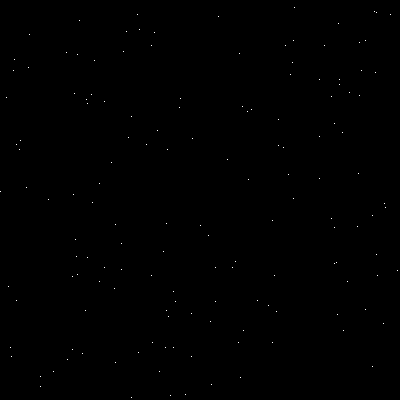
Core concepts
Concept 1 — Integer array indexing
You have already seen two ways to address pixels in this module: slicing (rectangular regions), and boolean masking (shape-defined regions). The third — integer array indexing — addresses pixels by coordinate list. When you write
canvas[y_coords, x_coords] = 255NumPy interprets it as: for each i, set the pixel at (y_coords[i], x_coords[i]) to 255 [2]. The two coordinate arrays have the same length, and they are walked in lockstep. The whole operation is vectorised — no explicit loop in Python.
| Indexing form | Best for | Example |
|---|---|---|
| Slicing | Rectangular regions | canvas[0:100, 0:200] = 255 |
| Boolean masking | Shape-defined regions | canvas[dist < r] = color |
| Integer indexing | Individual points | canvas[y, x] = 255 |
Concept 2 — Uniform vs. Gaussian distributions
A scatter of 150 pixels can look very different depending on how the coordinates were drawn.
Uniform — np.random.randint(low, high, size=n) returns integers in [low, high) with equal probability. Every pixel is equally likely, so the result is flat — “white noise” at the pixel level [3]:
x = np.random.randint(0, CANVAS_SIZE, size=NUM_STARS)
y = np.random.randint(0, CANVAS_SIZE, size=NUM_STARS)
Gaussian — np.random.normal(mean, std, size=n) returns floats clustered around mean, with about 68% inside one standard deviation. Stars bunch around the centre and thin out with a bell-curve falloff [4]:
x = np.random.normal(CENTER_X, spread, size=NUM_STARS)
y = np.random.normal(CENTER_Y, spread, size=NUM_STARS)

# Gaussian samples are floats and can go outside the canvas
x = np.clip(x, 0, CANVAS_SIZE - 1).astype(int)
y = np.clip(y, 0, CANVAS_SIZE - 1).astype(int)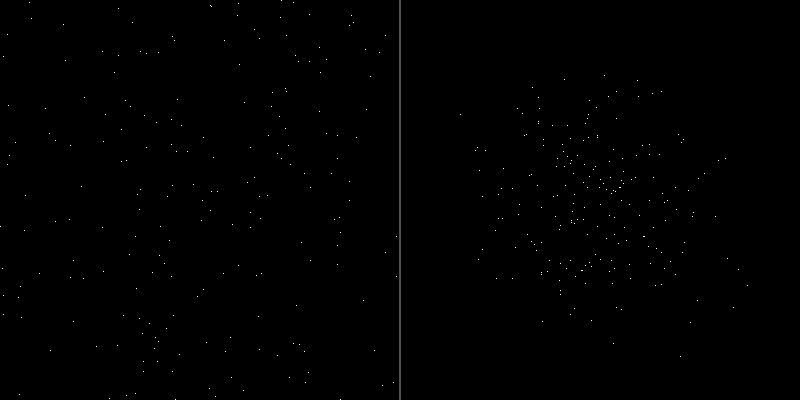
The two steps after a Gaussian draw — np.clip then .astype(int) — are not cosmetic. np.random.normal returns floats (array indexing needs ints) and can produce values well outside the canvas (because Gaussian tails are unbounded). Skipping either step throws IndexError or TypeError.
Concept 3 — Layering for depth
A single cluster reads as flat. Stacking several clusters at different centres, sizes, and spreads gives the visual depth that science-fiction starfields rely on, going back to Atari’s Star Raiders in 1979 [6]. The recipe:
- Big diffuse cluster — many stars, wide spread, large canvas-scale presence (galactic core).
- Medium clusters — fewer stars, tighter spread, off to one side (satellite groupings).
- Background fill — a Gaussian with very large spread acts as a sparse all-over background, since the bell curve flattens when the standard deviation approaches the canvas size.
Encapsulate one cluster in a function and the scene is a handful of calls:
def add_cluster(canvas, cx, cy, num_stars, spread):
    x = np.random.normal(cx, spread, size=num_stars)
    y = np.random.normal(cy, spread, size=num_stars)
    x = np.clip(x, 0, canvas.shape[1] - 1).astype(int)
    y = np.clip(y, 0, canvas.shape[0] - 1).astype(int)
    canvas[y, x] = 255
Exercises
Three exercises in Execute → Modify → Create order: scatter uniform stars, swap to Gaussian and add a second cluster, then build a multi-cluster galaxy.
Run the uniform star field
Run simple_star.py and inspect the result.
import numpy as np
from PIL import Image

CANVAS_SIZE = 400
NUM_STARS = 150

canvas = np.zeros((CANVAS_SIZE, CANVAS_SIZE), dtype=np.uint8)

x_coords = np.random.randint(0, CANVAS_SIZE, size=NUM_STARS)
y_coords = np.random.randint(0, CANVAS_SIZE, size=NUM_STARS)

canvas[y_coords, x_coords] = 255

Image.fromarray(canvas, mode='L').save('simple_star.png')
Reflection questions
- Why
canvas[y_coords, x_coords]and notcanvas[x_coords, y_coords]? - What happens if a coordinate falls outside the canvas range?
- How would you produce twice as many stars? Half as many?
Answers
y before x — NumPy stores 2D arrays in row-major order, so canvas[a, b] is “row a, column b”. In image coordinates that is [y, x]. Flipping the order produces a transposed picture.
Out-of-range coordinates — NumPy raises IndexError. With np.random.randint(0, CANVAS_SIZE, ...) the range is already [0, CANVAS_SIZE), so you are safe. With Gaussian samples you need np.clip before indexing.
Star count — change NUM_STARS. Both random calls and the assignment scale with it automatically.
Cluster, then double it
Edit exercise1_execute.py to produce these two pictures.
Goals
- One Gaussian cluster at
(200, 200)withspread = 60and 200 stars. - Two clusters — the one above, plus a tight 80-star cluster at
(100, 300)withspread = 30.
Goal 1 — what to expect
Swap randint for normal, then clip and cast:
x_coords = np.random.normal(200, 60, size=200)
y_coords = np.random.normal(200, 60, size=200)
x_coords = np.clip(x_coords, 0, CANVAS_SIZE - 1).astype(int)
y_coords = np.clip(y_coords, 0, CANVAS_SIZE - 1).astype(int)
canvas[y_coords, x_coords] = 255
The result is a dense central blob fading to nothing at the edges.
Goal 2 — what to expect
Run the same routine twice with different centres and spreads, into the same canvas:
# second cluster
x2 = np.random.normal(100, 30, size=80)
y2 = np.random.normal(300, 30, size=80)
x2 = np.clip(x2, 0, CANVAS_SIZE - 1).astype(int)
y2 = np.clip(y2, 0, CANVAS_SIZE - 1).astype(int)
canvas[y2, x2] = 255
The second cluster is tighter (smaller spread, fewer stars) and lives in the lower-left.
Multi-cluster galaxy
Build a galaxy-like scene on a 512×512 canvas — at least three Gaussian clusters with different centres, counts, and spreads, plus a sparse “background” cluster that scatters stars across the whole canvas.
import numpy as np
from PIL import Image

CANVAS_SIZE = 512
canvas = np.zeros((CANVAS_SIZE, CANVAS_SIZE), dtype=np.uint8)

def add_cluster(canvas, cx, cy, num_stars, spread):
    """Drop num_stars stars centred at (cx, cy) with the given Gaussian spread."""
    # TODO 1: draw Gaussian samples for x and y
    # TODO 2: clip to canvas bounds and cast to int
    # TODO 3: assign brightness 255 at the (y, x) coordinates
    pass

# TODO 4: call add_cluster at least three times with different centres,
#         counts (50–300), and spreads (20–100). End with a very wide cluster
#         centred near the middle to act as background stars.

Image.fromarray(canvas, mode='L').save('multi_cluster.png')
Hint 1 — implementing add_cluster
def add_cluster(canvas, cx, cy, num_stars, spread):
    x = np.random.normal(cx, spread, size=num_stars)
    y = np.random.normal(cy, spread, size=num_stars)
    x = np.clip(x, 0, canvas.shape[1] - 1).astype(int)
    y = np.clip(y, 0, canvas.shape[0] - 1).astype(int)
    canvas[y, x] = 255
Every cluster reuses the same body; only the parameters differ between calls.
Hint 2 — background sparseness
A “background” cluster is just a normal cluster with a huge spread. The bell curve flattens out enough that the samples spread evenly across the canvas with no perceptible peak:
add_cluster(canvas, cx=256, cy=256, num_stars=100, spread=200)Complete solution
import numpy as np
from PIL import Image

CANVAS_SIZE = 512
canvas = np.zeros((CANVAS_SIZE, CANVAS_SIZE), dtype=np.uint8)

def add_cluster(canvas, cx, cy, num_stars, spread):
    x = np.random.normal(cx, spread, size=num_stars)
    y = np.random.normal(cy, spread, size=num_stars)
    x = np.clip(x, 0, canvas.shape[1] - 1).astype(int)
    y = np.clip(y, 0, canvas.shape[0] - 1).astype(int)
    canvas[y, x] = 255

# Galactic core
add_cluster(canvas, cx=256, cy=256, num_stars=300, spread=80)

# Satellite clusters
add_cluster(canvas, cx=100, cy=120, num_stars=80,  spread=30)
add_cluster(canvas, cx=400, cy=380, num_stars=120, spread=45)
add_cluster(canvas, cx=380, cy=100, num_stars=60,  spread=20)

# Sparse background fill
add_cluster(canvas, cx=256, cy=256, num_stars=100, spread=200)

Image.fromarray(canvas, mode='L').save('multi_cluster.png')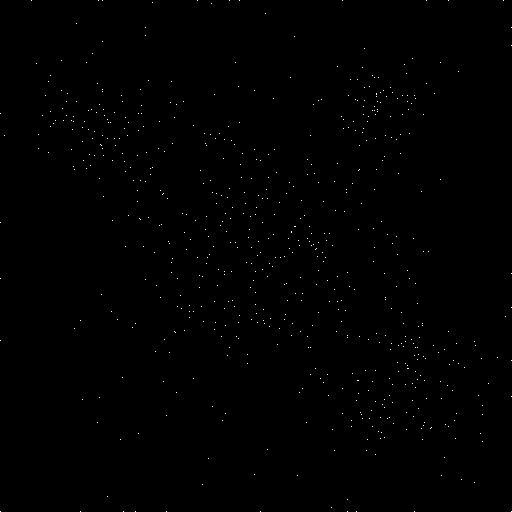
How it works:
add_clusterencapsulates one Gaussian-sampled scatter. The only thing that changes between calls is the four parameters.- Putting the wide-spread call last is fine because every cluster paints the same brightness value — there is no overdraw issue here.
- The number of stars per cluster and the spreads determine the visual hierarchy: the largest cluster reads as the main subject, satellites as accents.
Make it your own
- Brightness variation. Replace the constant
255withnp.random.randint(50, 256, size=num_stars)to give each star its own brightness — distant stars dimmer, near stars brighter. - Cross-shaped foreground stars. For 10 chosen “near” stars, draw a small
+shape (centre at 255, four neighbours at 200) instead of a single pixel. - Colour. Switch the canvas to RGB and tint each cluster — slight blue for hot stars, slight red for cool — by writing a 3-tuple into the canvas instead of a scalar.
Downloads
simple_star.py — uniform scatter gaussian_cluster.py — single cluster multi_cluster_solution.py — galaxy referenceSummary
Common pitfalls to avoid
canvas[x, y]instead ofcanvas[y, x]— your scene appears transposed.- Skipping
np.clipafternp.random.normal— Gaussian tails can land at-3or530, triggeringIndexError. - Skipping
.astype(int)after clipping — array indices must be integer; floats throwTypeError. - Reusing a random seed across calls and wondering why two “different” clusters look identical — set the seed once at the top, or not at all.
References
- [1] Pearson, M. (2011). Generative Art: A Practical Guide Using Processing. Manning.
- [2] Harris, C. R., et al. (2020). Array programming with NumPy. Nature, 585(7825), 357–362. doi:10.1038/s41586-020-2649-2
- [3] NumPy Community. (2024). Random sampling (numpy.random). NumPy Documentation. numpy.org
- [4] Ross, S. M. (2014). Introduction to Probability and Statistics for Engineers and Scientists (5th ed.). Academic Press.
- [5] Binney, J., & Tremaine, S. (2008). Galactic Dynamics (2nd ed.). Princeton University Press.
- [6] Maher, J. (2012). The Future Was Here: The Commodore Amiga. MIT Press.
- [7] Clark, A., et al. (2024). Pillow Documentation. pillow.readthedocs.io