2.3.2 Rose Curves
Trace the polar equation `r = a·cos(k·θ)` to render flower-like rhodonea curves. Then learn the odd-k / even-k rule that controls petal count and colour each petal individually.
Overview
The rose curve — Guido Grandi’s rhodonea, 1723 — is a polar curve so compact that the whole flower fits in one equation:
$$r = a \cos(k\theta).$$
A controls the petal length; k controls everything else. The most surprising result, and the one Grandi noticed first, is the parity rule: if k is odd, the curve has exactly k petals; if k is even, it has 2k petals [1]. In this lesson you will draw rhodonea curves in NumPy using the same polar-to-Cartesian conversion from the spiral lesson, see the parity rule for yourself across a panel of k values, then colour each petal individually by mapping the angle to a palette index.
Learning objectives
- Implement the rose-curve polar equation
r = a · cos(k · θ)and trace it on a pixel canvas. - Predict the petal count from k using the odd/even parity rule (odd k → k petals, even k → 2k petals).
- Convert each polar
(r, θ)to Cartesian(x, y)pixel coordinates withcos/sin. - Colour each petal individually by mapping the current angle to a palette index.
Quick start — a 5-petal rose
import numpy as np
from PIL import Image, ImageDraw

CANVAS_SIZE = 512
CENTER = CANVAS_SIZE // 2
K = 5
AMPLITUDE = 180

image = Image.new('RGB', (CANVAS_SIZE, CANVAS_SIZE), (15, 15, 25))
draw = ImageDraw.Draw(image)

# r = a · cos(k · θ)
theta = np.linspace(0, 2 * np.pi, 1000)
r = AMPLITUDE * np.cos(K * theta)

# Polar → Cartesian
x = CENTER + r * np.cos(theta)
y = CENTER + r * np.sin(theta)

points = list(zip(x.astype(int), y.astype(int)))
draw.line(points, fill=(255, 100, 150), width=2)

image.save('simple_rose.png')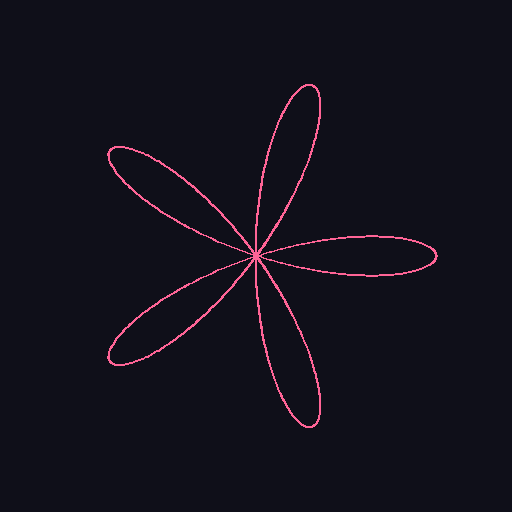
Core concepts
Concept 1 — The rose curve equation
The rose (or rhodonea) curve is the polar curve
$$r = a \cos(k\theta).$$
a is the amplitude — the petal length. k decides the petal count (next concept). To plot on a pixel canvas, the same polar-to-Cartesian transform from the spiral lesson:
$$x(\theta) = c_x + r(\theta) \cos\theta, \qquad y(\theta) = c_y + r(\theta) \sin\theta.$$
A sine version r = a sin(kθ) exists too — same shape, rotated by 90°. The mechanism is identical for both [2].
theta = np.linspace(0, 2 * np.pi, 1000)
r = amplitude * np.cos(k * theta)

x = center + r * np.cos(theta)
y = center + r * np.sin(theta)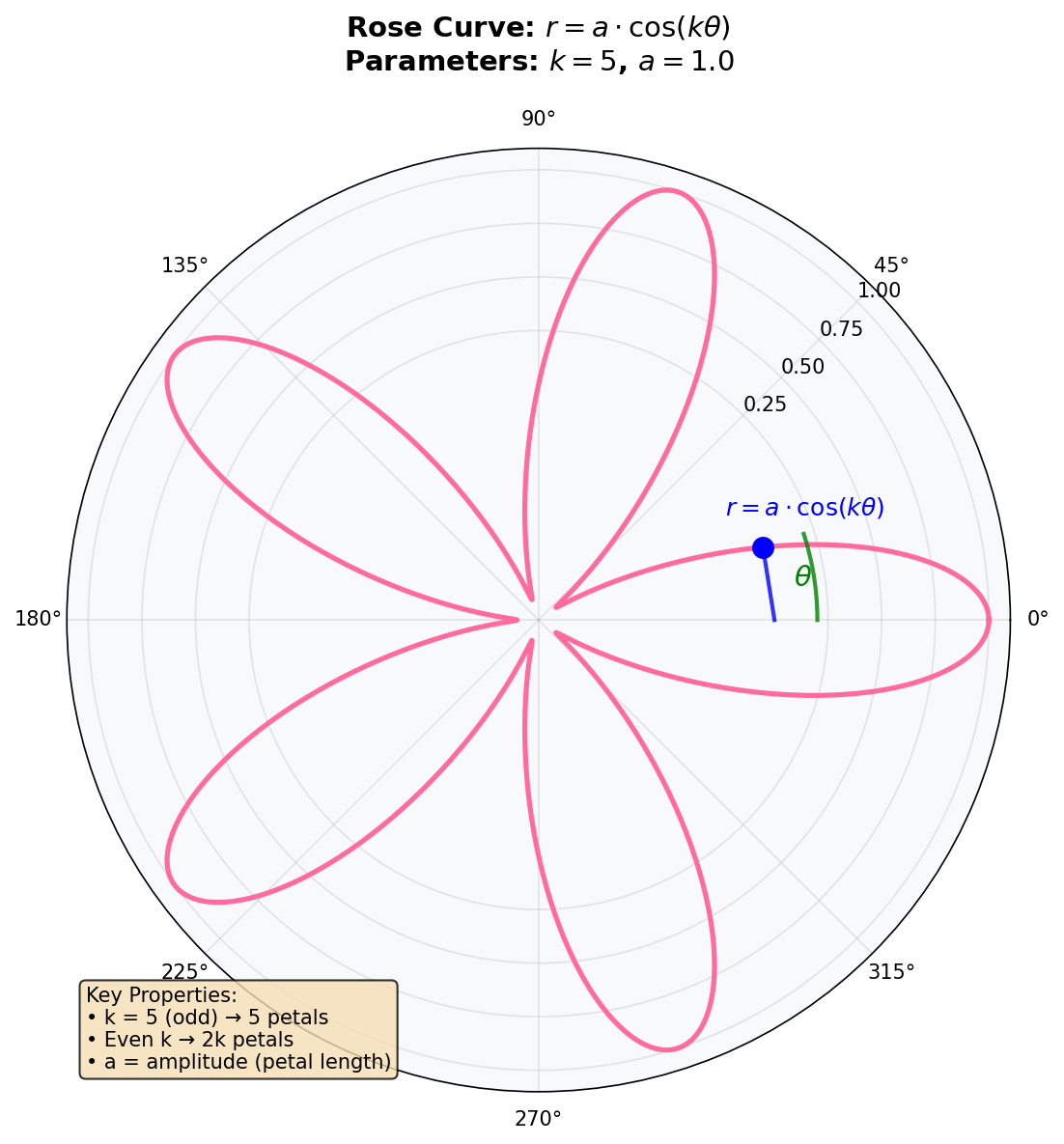
Concept 2 — The parity rule for petal counts
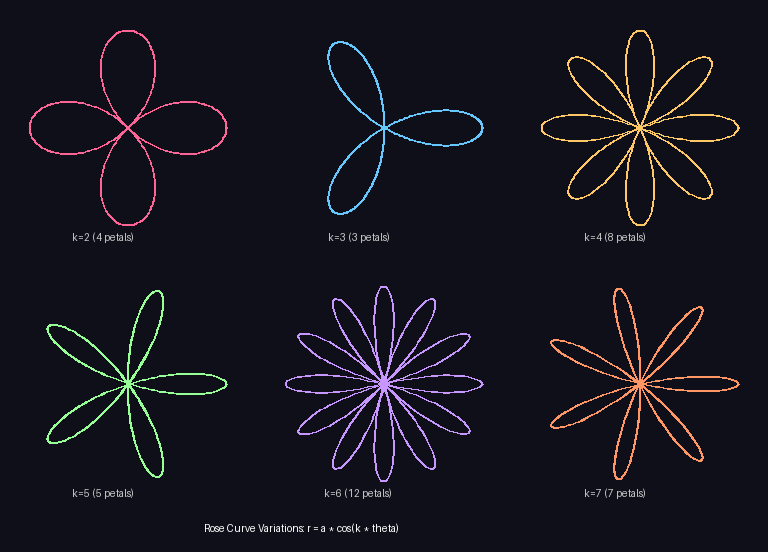
The strangest property of the rose: the number of petals depends on whether k is odd or even.
- Odd k — exactly k petals.
- Even k — exactly 2k petals.
Why? Look at what cos(k·θ) does as θ sweeps [0, 2π]. The argument k·θ makes k full cycles of cosine, with k positive humps and k negative humps. A positive r traces a petal in direction θ. A negative r traces a petal in the opposite direction (θ + π).
- When k is odd, each negative-r petal lands on top of an earlier positive-r petal — every petal is traced twice and you see
kdistinct petals. - When k is even, positive-r and negative-r petals interleave around the circle without overlapping. You see
2kdistinct petals [1, 3].
Concept 3 — Per-petal colour by angle mapping
To colour each petal independently, map the current angle θ to a petal index, then index into a palette. The angular width of one petal is π / k for the cos version with odd k (each petal is traced over half a cosine cycle), which gives:
PETAL_COLORS = [
    (255, 100, 100),  # red
    (255, 200, 100),  # orange
    (255, 255, 100),  # yellow
    (100, 255, 100),  # green
    (100, 100, 255),  # blue
]

def petal_color(theta_value, k):
    petal_index = int(theta_value * k / np.pi) % len(PETAL_COLORS)
    return PETAL_COLORS[petal_index]
The % len(PETAL_COLORS) makes the function robust if the palette has fewer entries than petals — it cycles. Drawing per-segment then becomes the standard parametric pattern: for each t, query the petal colour and draw the line segment between the previous and current (x, y).
Exercises
Three exercises in Execute → Modify → Create order: run a 5-petal rose, change the parameters to see the parity rule, then build a multi-coloured rose.
Run the basic rose
Run simple_rose.py and inspect the output.
import numpy as np
from PIL import Image, ImageDraw

CANVAS_SIZE = 512
CENTER = CANVAS_SIZE // 2
K_PARAMETER = 5
AMPLITUDE = 180

image = Image.new('RGB', (CANVAS_SIZE, CANVAS_SIZE), (15, 15, 25))
draw = ImageDraw.Draw(image)

theta = np.linspace(0, 2 * np.pi, 1000)
r = AMPLITUDE * np.cos(K_PARAMETER * theta)

x = CENTER + r * np.cos(theta)
y = CENTER + r * np.sin(theta)

points = list(zip(x.astype(int), y.astype(int)))
draw.line(points, fill=(255, 100, 150), width=2)

image.save('simple_rose.png')
Reflection questions
- How many petals does the figure have? Why?
- Where do the petals meet, and what is the value of
rat that point? - What would happen if you reduced
num_pointsin the linspace from 1000 to 50?
Answers
Petal count — 5, because K_PARAMETER = 5 is odd. The parity rule sets the count to k for odd values.
Petals meet at the centre — r = a · cos(k · θ) is zero whenever cos(k · θ) = 0, which is when k · θ = π/2, 3π/2, .... At those angles the curve passes through the origin. Adjacent petals share this single point.
Reducing num_points — the polyline becomes coarse. With 50 points spread over 5 petals, you only get ~10 segments per petal — visibly angular instead of smooth. The frequency content of cos(5θ) is too high to sample at 50 points without aliasing.
See the parity rule
Edit the quick-start to produce these three pictures.
Goals
- 4 petals — pick a k that gives exactly 4 petals (think parity).
- 8 petals — pick a k for 8 petals.
- Larger flower — keep the same k=5 but increase
AMPLITUDE. Watch the canvas bounds.
Goal 1 — what to expect
Even k doubles the petal count, so you need k = 2 (2 · 2 = 4 petals). With k = 4 (the “obvious” choice) you would get 8 petals, not 4.
Goal 2 — what to expect
k = 4 gives 2 · 4 = 8 petals. Equivalently, k = 7 would give 7 petals (odd) — close but different.
Goal 3 — what to expect
Try AMPLITUDE = 220. The petals are longer; just stay below CANVAS_SIZE // 2 minus a small margin (about 250) to keep the petal tips inside the canvas. Above that, petals clip against the edge.
Per-petal colours
Render a 5-petal rose with each petal in a different colour. Use a 5-entry palette and the angle-to-index helper from Concept 3.
import numpy as np
from PIL import Image, ImageDraw

CANVAS_SIZE = 512
CENTER = CANVAS_SIZE // 2
K = 5
AMPLITUDE = 180

PETAL_COLORS = [
    (255, 100, 100),
    (255, 200, 100),
    (255, 255, 100),
    (100, 255, 100),
    (100, 100, 255),
]

def petal_color(theta_value, k):
    # TODO 1: return a colour from PETAL_COLORS based on the angle.
    # The petal index for cos(k·θ) is roughly int(θ · k / π) % len(PETAL_COLORS).
    return PETAL_COLORS[0]

image = Image.new('RGB', (CANVAS_SIZE, CANVAS_SIZE), (15, 15, 25))
draw = ImageDraw.Draw(image)

theta = np.linspace(0, 2 * np.pi, 1000)
r = AMPLITUDE * np.cos(K * theta)
x = (CENTER + r * np.cos(theta)).astype(int)
y = (CENTER + r * np.sin(theta)).astype(int)

# TODO 2: draw line segments between consecutive points; use petal_color
# at theta[i] (or the midpoint of theta[i-1] and theta[i]) for each.

image.save('colored_rose.png')
Hint 1 — angle to petal index
def petal_color(theta_value, k):
    petal_index = int(theta_value * k / np.pi) % len(PETAL_COLORS)
    return PETAL_COLORS[petal_index]
theta · k / π advances by 1 every time θ advances by π/k, which is roughly one petal’s worth of angle.
Hint 2 — drawing per-segment
for i in range(1, len(theta)):
    color = petal_color(theta[i], K)
    draw.line([(x[i - 1], y[i - 1]), (x[i], y[i])], fill=color, width=2)
Per-segment drawing is the cost of per-segment colour — one Pillow call per pair of adjacent points instead of one for the whole polyline.
Complete solution
import numpy as np
from PIL import Image, ImageDraw

CANVAS_SIZE = 512
CENTER = CANVAS_SIZE // 2
K = 5
AMPLITUDE = 180

PETAL_COLORS = [
    (255, 100, 100), (255, 200, 100), (255, 255, 100),
    (100, 255, 100), (100, 100, 255),
]

def petal_color(theta_value, k):
    petal_index = int(theta_value * k / np.pi) % len(PETAL_COLORS)
    return PETAL_COLORS[petal_index]

image = Image.new('RGB', (CANVAS_SIZE, CANVAS_SIZE), (15, 15, 25))
draw = ImageDraw.Draw(image)

theta = np.linspace(0, 2 * np.pi, 1000)
r = AMPLITUDE * np.cos(K * theta)
x = (CENTER + r * np.cos(theta)).astype(int)
y = (CENTER + r * np.sin(theta)).astype(int)

for i in range(1, len(theta)):
    color = petal_color(theta[i], K)
    draw.line([(x[i - 1], y[i - 1]), (x[i], y[i])], fill=color, width=2)

image.save('colored_rose.png')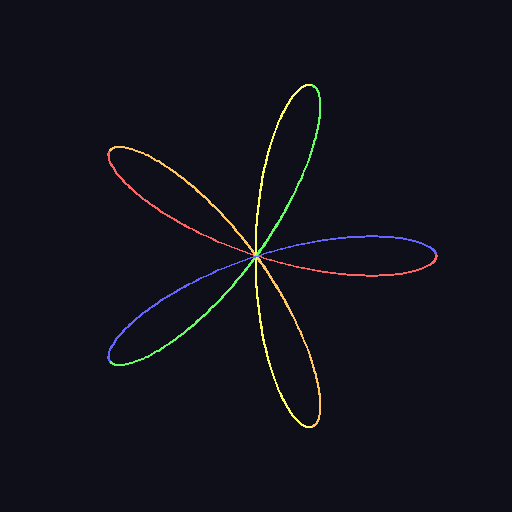
How it works:
petal_colordivides the angle range into bands of widthπ/kand indexes into the palette.- The per-segment drawing loop calls
draw.lineonce per pair of adjacent points so each segment can have its own colour. - The modulo in
int(theta * k / np.pi) % len(PETAL_COLORS)lets the palette cycle if it has fewer entries than petals.
Make it your own
- Nested roses. Draw
k = 3,k = 5,k = 7at the same centre with different amplitudes and colours. - Gradient petals. Replace the discrete palette with a hue cycle:
color = hue_to_rgb((theta[i] * k / (2 * np.pi)) % 1). - Rose garden. Place 5 roses at scattered positions, each with a different k. The page reads as a small algorithmic floral arrangement.
Downloads
simple_rose.py — 5-petal quick start rose_variations.py — parity-rule panel colored_rose_solution.py — per-petal colour referenceSummary
Common pitfalls to avoid
- Setting k to the desired petal count for even values — you will get twice as many petals.
- Sampling too few points — high k aliases. Bump
num_pointsuntil the curve is smooth. - Amplitude too large — petal tips clip the canvas. Keep
AMPLITUDEunderCANVAS_SIZE // 2 - margin. - Forgetting the centre offset —
x = r · cos(θ)(without+ CENTER) renders in the top-left corner.
References
- [1] Grandi, G. (1723). Flores geometrici ex Rhodonearum, et Cloeliarum curvarum descriptione resultantes. Florence.
- [2] Lockwood, E. H. (1961). A Book of Curves. Cambridge University Press.
- [3] Weisstein, E. W. (2024). Rose. MathWorld — A Wolfram Web Resource. mathworld.wolfram.com/Rose
- [4] NumPy Community. (2024). Trigonometric functions. NumPy Documentation. numpy.org
- [5] Clark, A., et al. (2024). Pillow Documentation. pillow.readthedocs.io
- [6] Pearson, M. (2011). Generative Art: A Practical Guide Using Processing. Manning.
- [7] Foley, J. D., van Dam, A., Feiner, S. K., & Hughes, J. F. (1990). Computer Graphics: Principles and Practice (2nd ed.). Addison-Wesley.