3.1.2 Affine Transformations
Move beyond a single rotation into the four affine building blocks — translate, scale, rotate, shear — expressed as one 3×3 matrix and composed with `@` to build a spiral of 24 squares from a single base shape.
Overview
Rotation was one library call. The full set of geometric transformations that preserve straight lines and parallelism — affine transformations — is four building blocks: translate, scale, rotate, shear. The trick that makes them practical is a notational sleight of hand: a 2D point gets a phantom third coordinate set to 1, and all four operations collapse into a single 3×3 matrix multiplication. Once that is true, composing transformations is just multiplying matrices, and a spiral of 24 squares becomes a single loop with one combined matrix per step [1]. This lesson is the foundation for every geometric transformation in the rest of the module.
Learning objectives
- Read the structure of a 3×3 affine matrix: a 2×2 linear block on the top-left, a translation column on the right, and
[0, 0, 1]along the bottom. - Build the four basic transformation matrices — translate, scale, rotate, shear — and apply them to a NumPy array of points.
- Compose transformations with
@and predict the result by reading the chain right-to-left. - Use a composed matrix in a loop to draw a 24-square spiral from a single base square.
Quick start — scale and translate one square
import numpy as np
from PIL import Image, ImageDraw

canvas = np.zeros((400, 400, 3), dtype=np.uint8) + np.array([30, 30, 40], dtype=np.uint8)

square = np.array(
    [[-50, -50], [50, -50], [50, 50], [-50, 50]],
    dtype=np.float64,
)

# 2×3 affine: scale by 1.5, translate (+200, 0)
affine = np.array([
    [1.5, 0.0, 200.0],
    [0.0, 1.5,   0.0],
])

ones = np.ones((square.shape[0], 1))
homogeneous = np.hstack([square, ones])           # shape (4, 3)
transformed = (affine @ homogeneous.T).T          # shape (4, 2)

# Place both squares on the canvas
left  = (square      + np.array([100, 200])).astype(int)
right = (transformed + np.array([100, 200])).astype(int)

img = Image.fromarray(canvas)
draw = ImageDraw.Draw(img)
draw.polygon([tuple(p) for p in left],  fill=(70, 130, 200))
draw.polygon([tuple(p) for p in right], fill=(230, 150, 50))
img.save('simple_affine.png')
Core concepts
Concept 1 — The 3×3 matrix and homogeneous coordinates
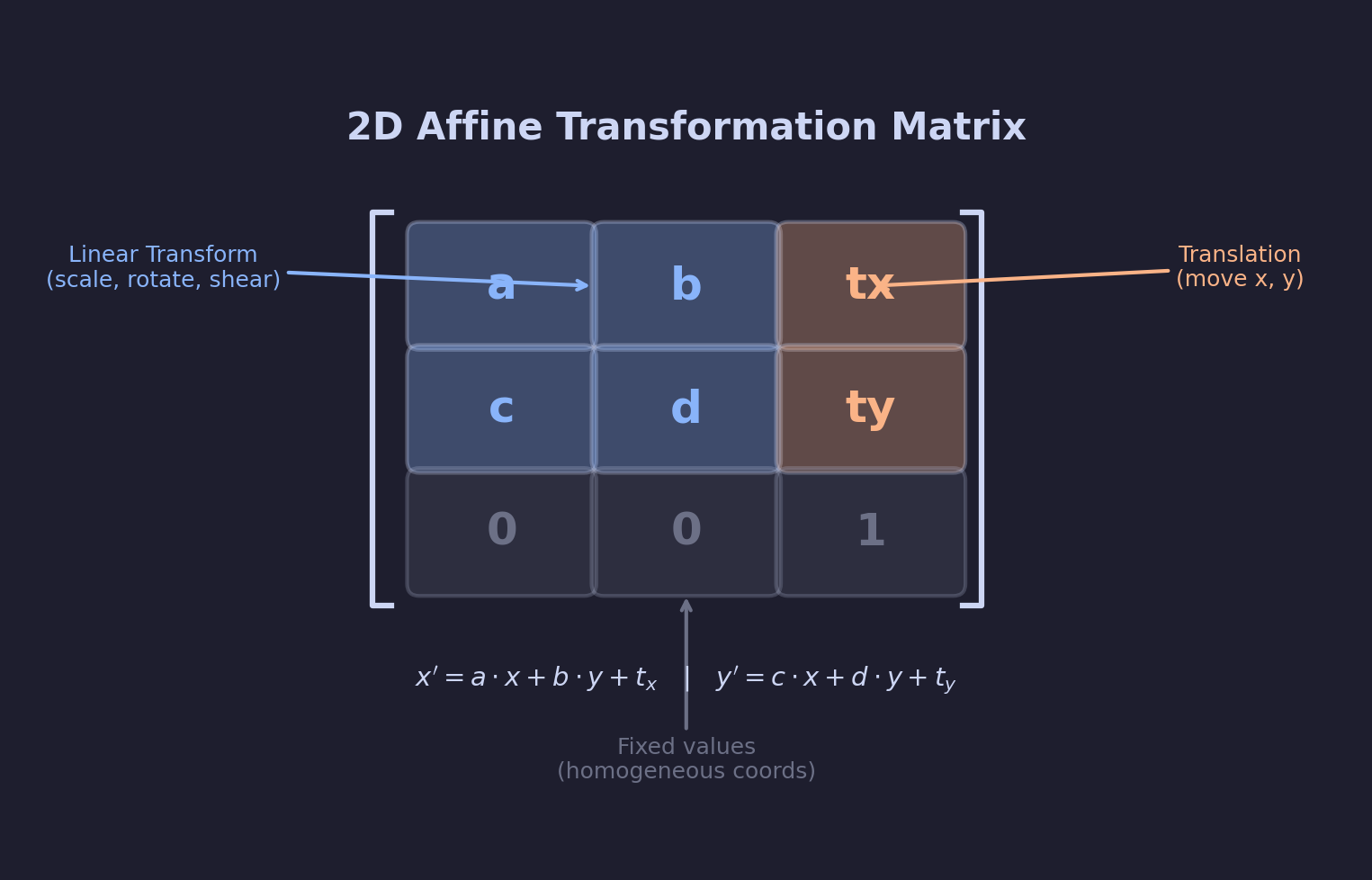
An affine transformation is anything that preserves straight lines and parallelism. That excludes perspective (which bends parallel lines toward a vanishing point) but includes every transformation in this lesson [1]. The general form is a 3×3 matrix acting on a homogeneous column vector:
| x' |   | a  b  tx | | x |
| y' | = | c  d  ty | | y |
| 1  |   | 0  0   1 | | 1 |
The top-left 2×2 block [[a, b], [c, d]] handles every linear part — scale, rotation, shear. The right column (tx, ty) handles translation. The bottom row stays [0, 0, 1] forever; the day it changes, you are doing perspective projection instead of affine [2].
Concept 2 — The four building blocks
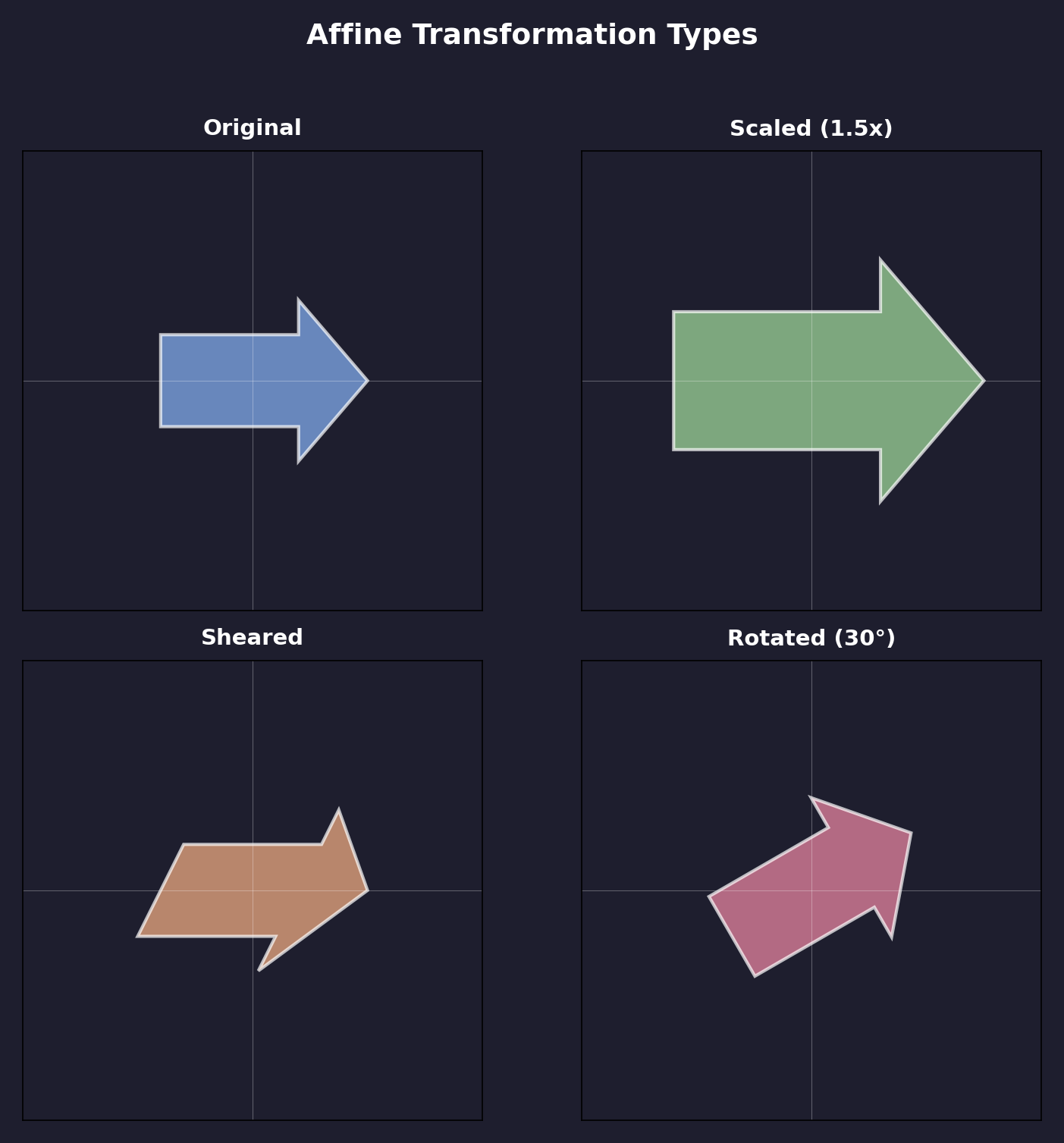
Every affine transformation is some product of four primitives.
import numpy as np

def translate(tx, ty):
    return np.array([[1, 0, tx], [0, 1, ty], [0, 0, 1]], dtype=np.float64)

def scale(sx, sy=None):
    if sy is None: sy = sx
    return np.array([[sx, 0, 0], [0, sy, 0], [0, 0, 1]], dtype=np.float64)

def rotate(angle_deg):
    t = np.radians(angle_deg)
    c, s = np.cos(t), np.sin(t)
    return np.array([[c, -s, 0], [s, c, 0], [0, 0, 1]], dtype=np.float64)

def shear(kx, ky=0):
return np.array([[1, kx, 0], [ky, 1, 0], [0, 0, 1]], dtype=np.float64)- Translate offsets every point by
(tx, ty). It is the only one of the four that needs the homogeneous trick — it cannot be expressed as a 2×2 matrix [2]. - Scale multiplies coordinates by
sx, sy. Equal factors give uniform scaling; unequal factors stretch and squash. - Rotate spins around the origin using the same matrix as 3.1.1.
- Shear adds a fraction of one axis to the other. A square becomes a parallelogram.
Concept 3 — Composition with @, right-to-left
Matrix multiplication is associative but not commutative: A @ B and B @ A are usually different matrices. The order in which you multiply is the order in which transformations apply, reading right to left — the rightmost matrix touches the point first [4].
# Apply: rotation first, then scale, then translation
combined = translate(100, 50) @ scale(1.5) @ rotate(30)

# One matrix to transform any number of points
points = np.array([[0, 0], [100, 0], [100, 100], [0, 100]], dtype=np.float64)
homo = np.hstack([points, np.ones((4, 1))])
out = (combined @ homo.T).T[:, :2]
Swapping translate(100, 50) and rotate(30) gives a different output — translating first puts the corner of the square at (100, 50), then rotating spins the result around the origin, dragging the square along an arc. Rotating first spins the square in place, then translates the (already rotated) square to (100, 50). The matrix algebra captures this exactly: R @ T and T @ R are not the same matrix [1].
Exercises
Three exercises in Execute → Modify → Create order: run a simple comparison, swap matrix values to match a goal, then build a 24-square spiral.
Run the simple scale demo
Run simple_affine.py from the downloads. It draws the blue/orange pair from Figure 1 — same square, scaled and translated.
Reflection questions
- The scale factor is
1.5. Why does the orange square look more than 1.5× the visual area of the blue square? - What part of the affine matrix would you change to make the orange square smaller than the blue one?
- If you set
[1.5, 0, 200]to[1.5, 0, -200], where does the orange square end up?
Answers
Area scales by 1.5² — scaling multiplies each side length by 1.5, so the area grows by 1.5 × 1.5 = 2.25. This catches people out: a scale factor below 1 shrinks area proportionally faster than it shrinks side lengths.
Smaller orange — change the scale factor on the diagonal: [[0.5, 0, 200], [0, 0.5, 0]] makes the orange square half-size and still offset to the right.
Translation x = −200 — the orange square is drawn to the left of the blue one. In the script the squares get a fixed + np.array([100, 200]) for placement, so the orange one lands at x ≈ 100 − 200 + 100 = 0; the polygon clips the canvas’s left edge.
Hit three transformation goals
Start from the 2×3 identity matrix [[1, 0, 0], [0, 1, 0]] applied to a centred 80×80 square. Edit the matrix to satisfy each goal.
Goals
- Half size — uniform 0.5× scale.
- Horizontal shear by 0.5 — turn the square into a parallelogram leaning right.
- 45° rotation — rotate the square in place.
Goal 1 — what to expect
transform = np.array([
    [0.5, 0.0, 0.0],
    [0.0, 0.5, 0.0],
])
Both diagonal entries drop to 0.5. Square turns into a smaller square in the same place.
Goal 2 — what to expect
transform = np.array([
    [1.0, 0.5, 0.0],   # x' = x + 0.5*y
    [0.0, 1.0, 0.0],
])
The [0, 1] slot is the horizontal-shear factor. A square becomes a rightward-leaning parallelogram; the top edge slides right relative to the bottom edge.
Goal 3 — what to expect
t = np.radians(45)
transform = np.array([
    [np.cos(t), -np.sin(t), 0.0],
    [np.sin(t),  np.cos(t), 0.0],
])
Standard rotation matrix. The square becomes a diamond (still a square — affine preserves angles for rotation specifically).
A 24-square spiral
Build a spiral of 24 squares. Each square should be (a) rotated slightly more than the last, (b) scaled slightly smaller, and (c) translated to a point along an outward-spiralling polar trajectory.
import numpy as np
from PIL import Image, ImageDraw

def translate(tx, ty):
    return np.array([[1, 0, tx], [0, 1, ty], [0, 0, 1]], dtype=np.float64)

def scale(s):
    return np.array([[s, 0, 0], [0, s, 0], [0, 0, 1]], dtype=np.float64)

def rotate(deg):
    t = np.radians(deg); c, s = np.cos(t), np.sin(t)
    return np.array([[c, -s, 0], [s, c, 0], [0, 0, 1]], dtype=np.float64)

def apply(points, m):
    homo = np.hstack([points, np.ones((len(points), 1))])
    return (m @ homo.T).T[:, :2]

SIZE = 500; CENTER = SIZE // 2
canvas = np.zeros((SIZE, SIZE, 3), dtype=np.uint8) + 20
img = Image.fromarray(canvas); draw = ImageDraw.Draw(img)

base = np.array([[-15, -15], [15, -15], [15, 15], [-15, 15]], dtype=np.float64)

for i in range(24):
    # TODO 1: derive angle, shrink factor, and outward distance from i.
    # angle = ...; shrink = ...; distance = ...

    # TODO 2: target position along a spiral (polar → cartesian).
    # tx = CENTER + distance * cos(2 * angle in radians)
    # ty = CENTER + distance * sin(2 * angle in radians)

    # TODO 3: compose the matrix and apply it to base.
    # combined = translate(tx, ty) @ scale(shrink) @ rotate(angle)

    # TODO 4: pick a colour from a blue → orange gradient and draw the polygon.

img.save('spiral.png')
Hint 1 — the spiral parameters
A simple linear progression works:
angle    = i * 15           # 15° more rotation per step
shrink   = max(1.0 - 0.025 * i, 0.3)   # gradually smaller, floor at 0.3
distance = 50 + 6 * i        # gradually outward
The max(..., 0.3) floor keeps the last few squares visible. Without it they collapse to a single pixel.
Hint 2 — the polar target
spiral_angle = np.radians(2 * angle)
tx = CENTER + distance * np.cos(spiral_angle)
ty = CENTER + distance * np.sin(spiral_angle)
2 * angle makes the spiral wind twice as fast as the per-square rotation, which gives the cleanest visual.
Hint 3 — colour gradient
t = i / 23
color = (int(70 + 180 * t), int(130 - 50 * t), int(200 - 150 * t))
t = 0 → blue (70, 130, 200); t = 1 → orange (250, 80, 50). Linear interp between two RGB triples — same approach as 2.1.2’s mountain sky.
Complete solution
import numpy as np
from PIL import Image, ImageDraw

def translate(tx, ty):
    return np.array([[1, 0, tx], [0, 1, ty], [0, 0, 1]], dtype=np.float64)
def scale(s):
    return np.array([[s, 0, 0], [0, s, 0], [0, 0, 1]], dtype=np.float64)
def rotate(deg):
    t = np.radians(deg); c, s = np.cos(t), np.sin(t)
    return np.array([[c, -s, 0], [s, c, 0], [0, 0, 1]], dtype=np.float64)
def apply(points, m):
    homo = np.hstack([points, np.ones((len(points), 1))])
    return (m @ homo.T).T[:, :2]

SIZE = 500; CENTER = SIZE // 2
canvas = np.zeros((SIZE, SIZE, 3), dtype=np.uint8) + 20
img = Image.fromarray(canvas); draw = ImageDraw.Draw(img)

base = np.array([[-15, -15], [15, -15], [15, 15], [-15, 15]], dtype=np.float64)

for i in range(24):
    angle    = i * 15
    shrink   = max(1.0 - 0.025 * i, 0.3)
    distance = 50 + 6 * i

    spiral = np.radians(2 * angle)
    tx = CENTER + distance * np.cos(spiral)
    ty = CENTER + distance * np.sin(spiral)

    combined = translate(tx, ty) @ scale(shrink) @ rotate(angle)
    pts = apply(base, combined).astype(int)

    t = i / 23
    color = (int(70 + 180 * t), int(130 - 50 * t), int(200 - 150 * t))
    draw.polygon([tuple(p) for p in pts], fill=color, outline=(255, 255, 255))

img.save('spiral.png')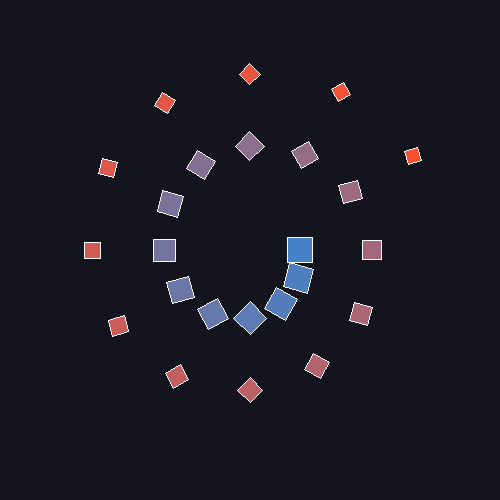
How it works:
translate @ scale @ rotatemeans: rotate the base square in place around the origin, scale it down, then translate it to its target.- The spiral shape comes from the polar
(distance, spiral_angle)parametrisation oftx, ty— affine matrices on their own do not draw curves; they place a shape on a curve. - The colour gradient is independent of the matrix work — it is a function of
i / 23and would look identical with any transformation chain.
Make it your own
- Swap
basefor a triangle or a pentagon. The pipeline does not care about the shape; it transforms 2D points. - Change
rotate(angle)torotate(-angle)and watch the spiral wind the other way. - Reverse the multiplication order:
rotate(angle) @ scale(shrink) @ translate(tx, ty). The first square stays in place; subsequent squares orbit the origin instead of spiralling out.
Downloads
simple_affine.py — quick-start scale + translate transformation_comparison.py — four-primitive grid combined_transform_solution.py — Exercise 3 referenceSummary
Common pitfalls to avoid
- Forgetting the homogeneous
1— points have to be(x, y, 1)for translation to take effect. - Reading the matrix chain left-to-right; the rightmost matrix applies first.
- Building matrices with
np.array([[1, 0, tx], ...])wheretxis anint— NumPy infers an integer dtype and silently truncates sub-pixel translations. Usedtype=np.float64or write1.0everywhere. - Scaling around a non-origin pivot without translating first; the shape will drift instead of staying put.
- Trying to invert an affine by transposing the 3×3. The transpose works for rotation matrices, but scaling and translation need a proper
np.linalg.inv.
References
- [1] Foley, J. D., van Dam, A., Feiner, S. K., & Hughes, J. F. (1995). Computer Graphics: Principles and Practice (2nd ed.). Addison-Wesley.
- [2] Hearn, D., & Baker, M. P. (2011). Computer Graphics with OpenGL (4th ed.). Pearson.
- [3] Shirley, P., & Marschner, S. (2015). Fundamentals of Computer Graphics (4th ed.). CRC Press.
- [4] Gonzalez, R. C., & Woods, R. E. (2018). Digital Image Processing (4th ed.). Pearson.
- [5] Rogers, D. F., & Adams, J. A. (1990). Mathematical Elements for Computer Graphics (2nd ed.). McGraw-Hill.
- [6] Harris, C. R., Millman, K. J., van der Walt, S. J., et al. (2020). Array programming with NumPy. Nature, 585, 357–362. doi:10.1038/s41586-020-2649-2