3.3.2 Puzzle — Array Concatenation
Use `np.vstack` and `np.hstack` to assemble image fragments — first as obedient jigsaw pieces with matching dimensions, then as an artistic shuffle that turns a single photo into an abstract puzzle.
Overview
np.vstack glues arrays top-to-bottom; np.hstack glues them side-by-side. Together they are NumPy’s “assemble images from pieces” pair — the same machinery that powers panorama stitching, contact sheets, and the diagnostic grids you have already built in this module [1, 2]. The mental model in this lesson is the jigsaw puzzle: every piece carries its own (h, w, 3) shape, and the dimension facing the seam must match for the stack to succeed. Once that constraint clicks, you can slice any image into quadrants, shuffle the pieces, and reassemble them — turning a documentary photo into an abstract collage with three NumPy calls.
Learning objectives
- Predict the output shape of
np.vstackandnp.hstackfrom the input shapes. - Read NumPy’s error message when a stack fails — “all the input array dimensions except for the concatenation axis must match exactly” — and fix it.
- Build rows with
hstack, then stack the rows withvstack, to compose any rectangular grid. - Slice a photo into quadrants and reassemble them in scrambled order for an artistic puzzle.
Quick start — combine two puzzle pieces
import numpy as np
from PIL import Image

a = np.array(Image.open('a.png'))    # shape (133, 300, 3)
b = np.array(Image.open('b.png'))    # shape (133, 300, 3)

print('A:', a.shape, 'B:', b.shape)

row = np.hstack([a, b])               # heights match → widths add
print('Row:', row.shape)              # (133, 600, 3)

Image.fromarray(row).save('quick_start_output.png')
Core concepts
Concept 1 — vstack and hstack shape rules
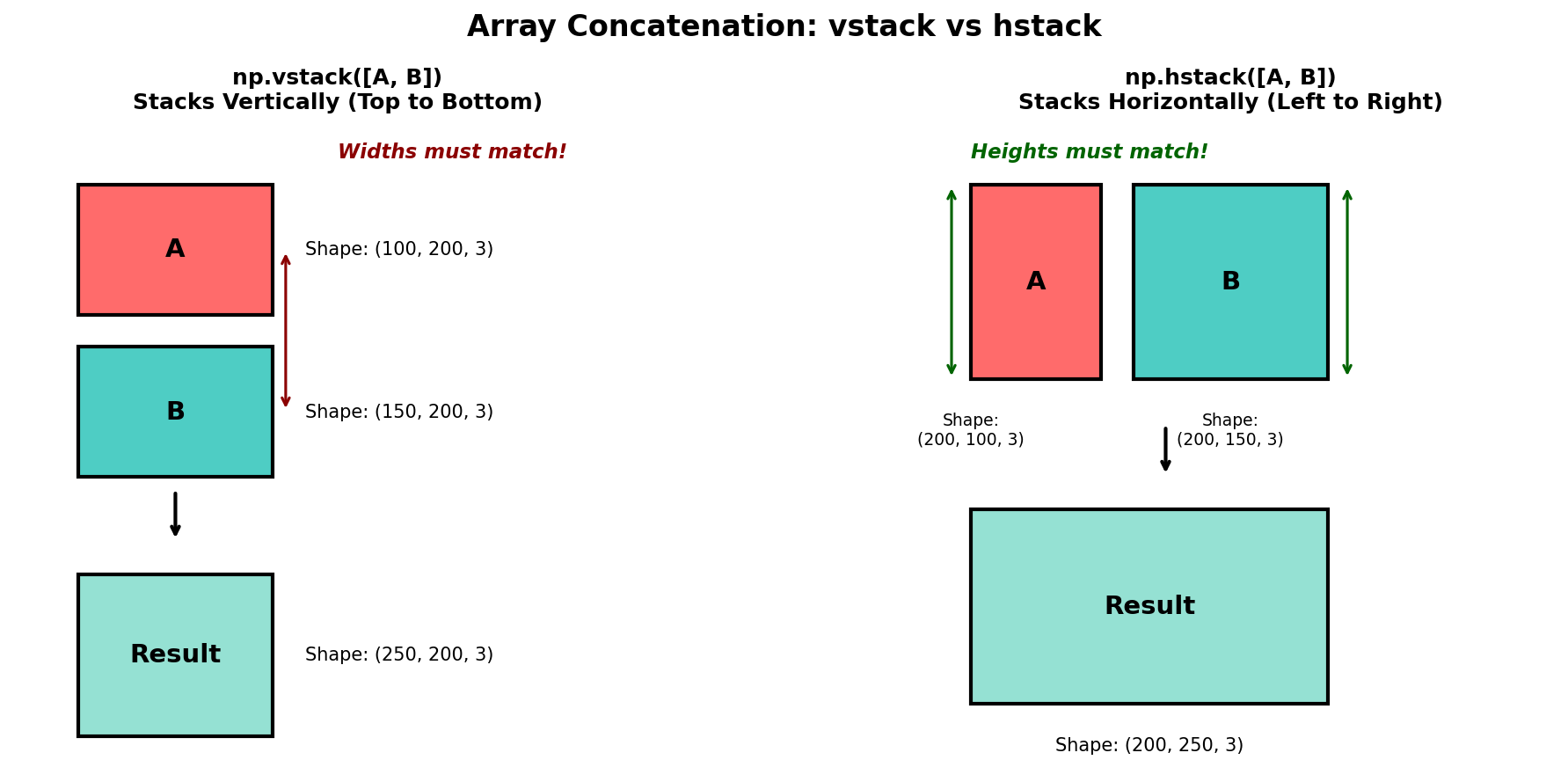
vstack concatenates along axis 0 (height). For RGB images, all inputs must have the same width (and 3 channels):
(h1, W, 3) + (h2, W, 3) → (h1 + h2, W, 3)hstack concatenates along axis 1 (width). All inputs must have the same height:
(H, w1, 3) + (H, w2, 3) → (H, w1 + w2, 3)Two pieces with the same (H, W, 3) shape are stackable both ways — vstack doubles the height, hstack doubles the width [3].
Concept 2 — Compose with hstack first, then vstack
The reliable recipe for any rectangular grid is row-major:
top_row    = np.hstack([a, b])        # row 1
bottom_row = np.hstack([c, d])        # row 2
grid       = np.vstack([top_row, bottom_row])
It works for non-uniform rows too, as long as each row ends up the same total width:
top    = np.hstack([a, b])               # widths: 300 + 300 = 600
bottom = np.hstack([c, d, e])            # widths: 300 + 100 + 200 = 600
grid   = np.vstack([top, bottom])        # ✓ matching widths
The bottom row uses three pieces to match the top row’s two pieces — vstack only cares about the totals.
Concept 3 — Slice + concatenate = puzzle
The whole jigsaw lesson is in two operations: slice the image into pieces with NumPy indexing, reassemble with the stacks.
H, W = image.shape[:2]
mid_y, mid_x = H // 2, W // 2

tl = image[:mid_y, :mid_x]
tr = image[:mid_y, mid_x:]
bl = image[mid_y:, :mid_x]
br = image[mid_y:, mid_x:]

# Reassemble in order
reconstructed = np.vstack([
    np.hstack([tl, tr]),
    np.hstack([bl, br]),
])

# Or shuffle for an artistic puzzle
abstract = np.vstack([
    np.hstack([br, tl]),
    np.hstack([tr, bl]),
])
The shuffle is the artistic move: every piece keeps its content but lands in the wrong cell, and you get the disjointed look of late-Cubist collage from a single source photograph. Hannah Höch built a whole career on this [5].
Exercises
Three exercises in Execute → Modify → Create order: stack two pieces, build a 2×3 grid, then shuffle a real photo into an abstract puzzle.
Stack two pieces both ways
Run exercise1_two_pieces.py from the downloads. The script prints the shapes of pieces A and C, then stacks them once with vstack and once with hstack.
Reflection questions
- After
vstack, which axis grew, and what did the other two axes do? - After
hstack, which axis grew? - A and C both have shape
(133, 300, 3). Which shape property makes both stacking operations valid?
Answers
vstack — axis 0 (height) doubled from 133 to 266. Width stayed at 300; channels stayed at 3. Heights add; the other axes must already match.
hstack — axis 1 (width) doubled from 300 to 600. Height stayed at 133; channels stayed at 3.
Both operations valid — A and C share all their non-channel dimensions. vstack only needs matching widths; hstack only needs matching heights. When both match, both operations are legal — you choose by the orientation you want.
Three grid arrangements
Using the six pieces from the downloads, build these three pictures.
Goals
- Row D + E —
hstackpieces D (133×100) and E (133×200) into a single row. - Column A above C —
vstackpieces A and C into a tall column. - 2×3 grid — top row
A + B, bottom rowC + D + E(use three pieces to match the top row’s width).
Goal 1 — what to expect
row = np.hstack([d, e]) # (133, 300, 3)D and E have the same height (133) but different widths (100 and 200). hstack accepts that; the resulting width is 300.
Goal 2 — what to expect
col = np.vstack([a, c]) # (266, 300, 3)A and C are the same shape; the column doubles height while keeping width.
Goal 3 — what to expect
top    = np.hstack([a, b])              # (133, 600)
bottom = np.hstack([c, d, e])           # (133, 100 + 200 + 300 = 600)
grid   = np.vstack([top, bottom])       # (266, 600)
The bottom row uses three pieces to total the top row’s width of 600 pixels. vstack only cares about the total — any number of pieces is fine inside hstack.
Shuffle a photo into a puzzle
Take any image, slice it into four quadrants, and reassemble them in shuffled order for an abstract puzzle. The constraint: every quadrant must appear exactly once.
import numpy as np
from PIL import Image

image = np.array(Image.open('source_image.png'))
H, W = image.shape[:2]
mid_y, mid_x = H // 2, W // 2

# TODO 1: slice into four quadrants.
# tl = image[..., ...]
# tr = ...
# bl = ...
# br = ...

# TODO 2: reassemble in scrambled order.
#         Each quadrant must appear exactly once.
# scrambled = np.vstack([
#     np.hstack([?, ?]),
#     np.hstack([?, ?]),
# ])

# TODO 3: verify the *non-scrambled* reassembly matches the original.
# correct = np.vstack([np.hstack([tl, tr]), np.hstack([bl, br])])
# assert np.array_equal(image, correct), 'reassembly does not match'

Image.fromarray(scrambled).save('shuffled_puzzle.png')
Hint 1 — quadrant slicing
tl = image[:mid_y, :mid_x]
tr = image[:mid_y, mid_x:]
bl = image[mid_y:, :mid_x]
br = image[mid_y:, mid_x:]
NumPy is [row, col] = [y, x]. The top half is [:mid_y], the bottom half is [mid_y:].
Hint 2 — a scrambled order
scrambled = np.vstack([
    np.hstack([br, tl]),       # bottom-right + top-left in row 1
    np.hstack([tr, bl]),       # top-right + bottom-left in row 2
])
Each quadrant appears exactly once; nothing repeats. The pieces have matching dimensions because they were sliced from a uniform mid-point, so the stacks succeed.
Complete solution
import numpy as np
from PIL import Image

image = np.array(Image.open('source_image.png'))
H, W = image.shape[:2]
mid_y, mid_x = H // 2, W // 2

tl = image[:mid_y, :mid_x]
tr = image[:mid_y, mid_x:]
bl = image[mid_y:, :mid_x]
br = image[mid_y:, mid_x:]

# Verify correct order rebuilds the original
correct = np.vstack([np.hstack([tl, tr]), np.hstack([bl, br])])
assert np.array_equal(image, correct), 'reassembly does not match'

# Artistic shuffle
scrambled = np.vstack([
    np.hstack([br, tl]),
    np.hstack([tr, bl]),
])

Image.fromarray(scrambled).save('shuffled_puzzle.png')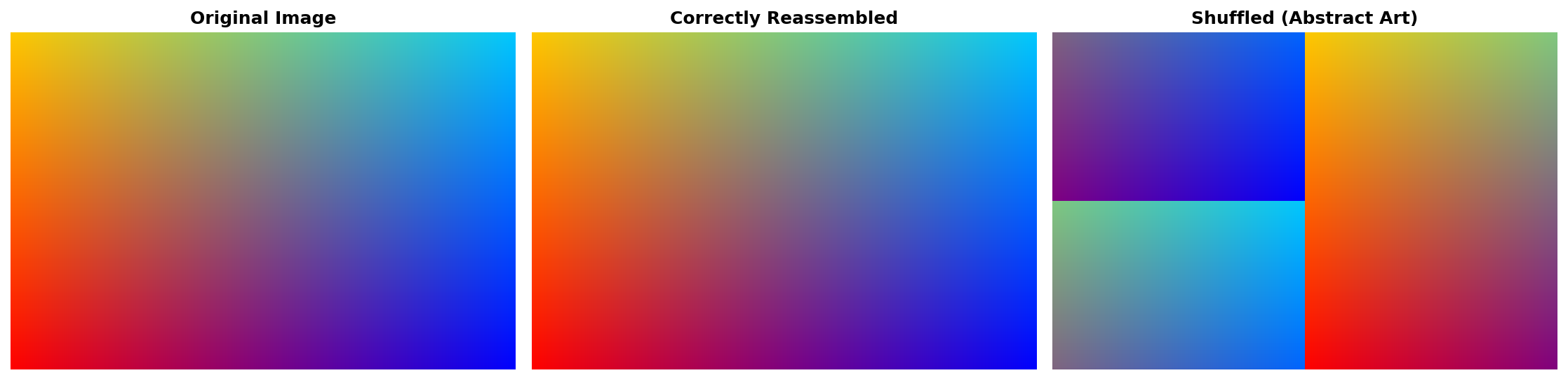
How it works:
- The mid-point slice produces four exactly-equal quadrants (modulo any off-by-one from odd dimensions).
- The “correct” reassembly is the sanity check — if it does not equal the original, the slicing is buggy.
- The scramble is the same
vstack(hstack(...))recipe, just with different lookup order. The resulting array has identical pixel content, only re-tiled.
Make it your own
- Try a 3×3 split. Now there are 9! = 362 880 possible orderings; shuffle randomly with
np.random.shuffleon a list of quadrants and you have a procedurally infinite puzzle gallery. - Rotate each quadrant by 90° before stacking —
np.rot90(piece, k)gives a fresh visual on top of the shuffle. - Insert thin black gutters between the quadrants by
vstacking/hstacking zero-arrays of the appropriate shape, the same way 3.3.1 added a 5-pixel gap.
Downloads
exercise1_two_pieces.py — print + stack exercise2_starter.py — 2×3 grid starter exercise3_create_puzzle_solution.py — shuffle reference source_image.png — input photoSummary
Common pitfalls to avoid
np.hstack(a, b)instead ofnp.hstack([a, b])— the function takes a list, not varargs.- Mixing up the axes —
vstackgrows axis 0 (height),hstackgrows axis 1 (width). - Slicing with
[:H, :W]instead of[0:H, 0:W]— equivalent, but the explicit form is more readable when teaching. - Forgetting that quadrant slicing on an odd-sized image leaves the four pieces with off-by-one widths; pad with one zero column to recover symmetry.
- Comparing with
==on whole arrays instead ofnp.array_equal(a, b)—==is per-element and produces an array, not a scalar.
References
- [1] Harris, C. R., Millman, K. J., van der Walt, S. J., et al. (2020). Array programming with NumPy. Nature, 585, 357–362. doi:10.1038/s41586-020-2649-2
- [2] Szeliski, R. (2006). Image alignment and stitching: A tutorial. Foundations and Trends in Computer Graphics and Vision, 2(1), 1–104. doi:10.1561/0600000009
- [3] NumPy Community. (2024). numpy.vstack. NumPy Documentation. numpy.org/vstack
- [4] NumPy Community. (2024). numpy.concatenate. NumPy Documentation. numpy.org/concatenate
- [5] Lavin, M. (1993). Cut with the Kitchen Knife: The Weimar Photomontages of Hannah Höch. Yale University Press.
- [6] Gonzalez, R. C., & Woods, R. E. (2018). Digital Image Processing (4th ed.). Pearson.