3.2.1 Boolean Masks
Build a 2D boolean array — `True` for *keep*, `False` for *cut* — and use it as the gatekeeper for every per-pixel edit. A circular vignette, a colour swap, and a custom shape are all the same one-line indexing trick.
Overview
The next subtopic — masking and compositing — runs on a single idea: a boolean mask is a 2D array of True/False values, one per pixel, that decides where an operation applies. Where the mask is True, the operation fires; where it is False, the original pixels are left untouched. Every alpha channel, every layer mask in Photoshop, every “select all blue pixels” tool comes down to the same construction [1]. This lesson focuses on the boolean operation itself: build a mask from a geometric condition, apply it with NumPy fancy indexing, and read it as a single composable operator that the rest of the subtopic builds on.
Learning objectives
- Build a 2D boolean mask from a geometric condition (a circle, a rectangle, a vertical band).
- Apply a mask with fancy indexing —
image[mask] = value— and predict which pixels get touched. - Combine multiple masks with
&,|, and~to express AND, OR, and NOT. - Use a colour-channel threshold (
image[:, :, 2] > 180) as a content-aware mask source.
Quick start — a circular vignette
import numpy as np
from PIL import Image

image = np.array(Image.open('bbtor.jpg'))   # any RGB photo will do
h, w = image.shape[:2]

# Grid of pixel coordinates
Y, X = np.ogrid[:h, :w]

# Distance² from the image centre — cheap because we never sqrt
cx, cy = w / 2, h / 2
distance_sq = (X - cx) ** 2 + (Y - cy) ** 2

# Mask: True where the pixel is *outside* the circle
outside = distance_sq > (w * h) / 6

# Blacken every "outside" pixel
image[outside] = 0

Image.fromarray(image).save('mask.png')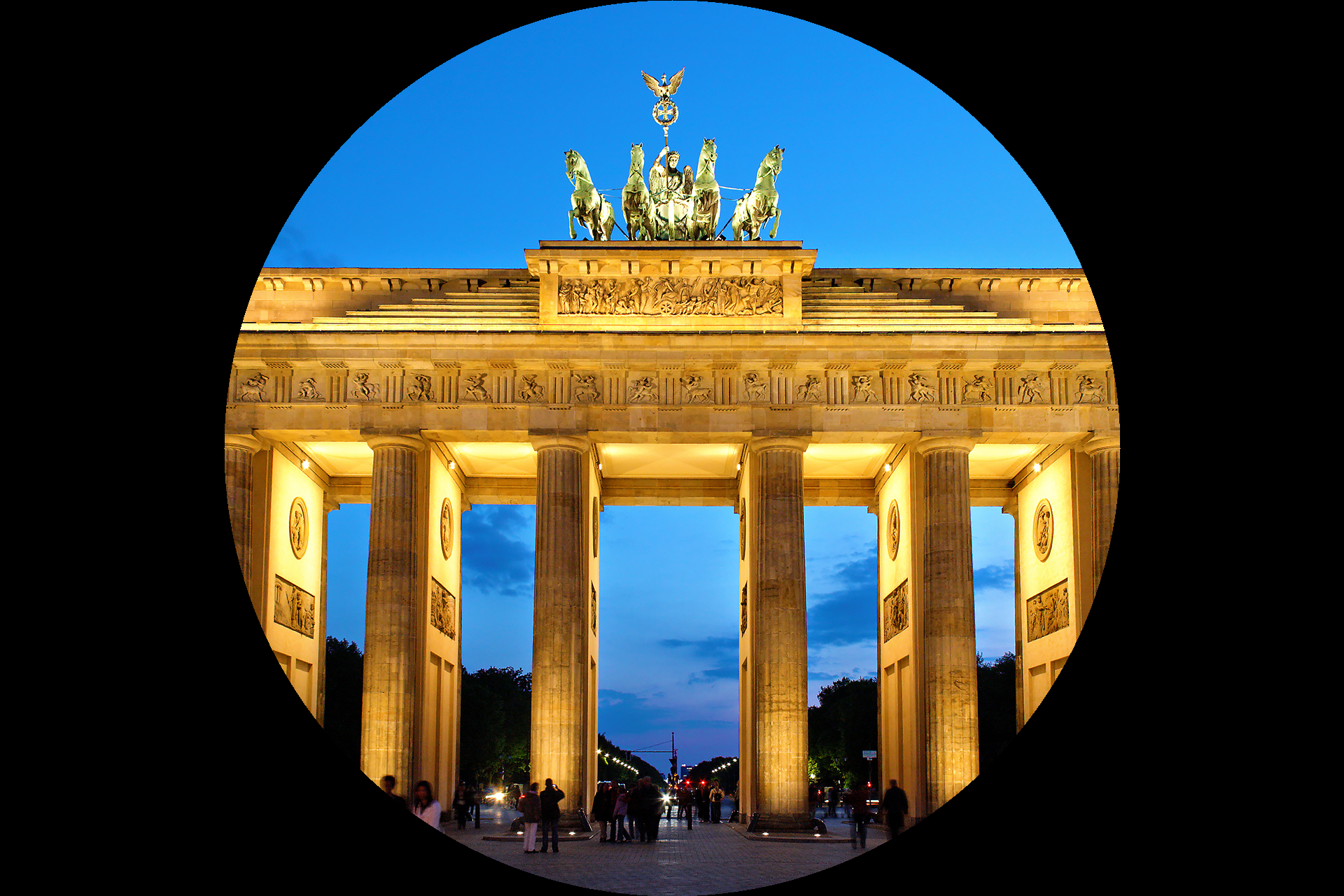
Core concepts
Concept 1 — A mask is a (H, W) boolean array
Every per-pixel operation in this subtopic needs an answer to the same question: should I touch this pixel? The cleanest place to keep that answer is a 2D array with one bool per pixel, called a mask.
mask = some_condition_over_pixel_coordinates # shape (H, W), dtype boolYou build the mask from a vectorised expression — a comparison, a range check, a colour-channel threshold. Anything that produces a (H, W) boolean output is valid. NumPy’s ogrid is the standard way to materialise the coordinate grid:
Y, X = np.ogrid[:h, :w]                # X has shape (1, w), Y has shape (h, 1)
mask = (X - cx) ** 2 + (Y - cy) ** 2 < r_sq    # circle interior, shape (h, w)
The fact that the coordinate inputs to the condition are arrays — not Python loops — is what makes the mask cheap. The whole evaluation runs in vectorised C.
Concept 2 — Applying a mask with fancy indexing
Three patterns recur. All three use the mask as a selector on the left of =.
Solid colour where True.
image[mask] = [255, 0, 0] # everywhere the mask is True → redCopy from another image where True.
image[mask] = other[mask] # everywhere the mask is True → take from otherPer-channel edit.
image[mask, 0] = 0 # zero out the red channel only, where the mask is TrueNotice that the right-hand side never has to match the shape of the masked region — NumPy broadcasts. A 3-element list becomes the colour for every selected pixel; a same-shape other[mask] substitutes pixel-for-pixel.
Concept 3 — Boolean algebra on masks
Two masks combine with the same & | ~ operators you would use on individual booleans. Because the operands are NumPy arrays, the bitwise operators are the correct ones — and/or would short-circuit on the whole array as a single truth value and throw.
inner_circle = (X - cx)**2 + (Y - cy)**2 < r1_sq
outer_circle = (X - cx)**2 + (Y - cy)**2 < r2_sq

ring   = outer_circle & ~inner_circle      # AND NOT — inside outer but not inner
either = outer_circle | top_half_strip     # OR
not_in_circle = ~inner_circle              # negation
The boolean algebra is exactly what lets you build complex masks compositionally — a vignette, a ring, a chequered window, a colour-thresholded patch — without ever leaving NumPy.
Exercises
Three exercises in Execute → Modify → Create order: run the vignette, swap the mask formula, then build a custom shape mask of your own.
Run the circular vignette
Run mask.py from the downloads. The script loads bbtor.jpg, builds the squared-distance mask, and blackens every outside pixel.
Reflection questions
- The threshold is
w * h / 6rather than a tidy radius. Why does that magic number happen to produce a roughly circular crop? - What would
image[~outside] = 0produce instead? - What changes if the mask is shape
(h, w, 3)instead of(h, w)?
Answers
w * h / 6 as a squared radius — the threshold has dimensions of pixels². It corresponds to a radius of sqrt(w*h/6). For a square image it gives a radius of about 41% of the side; for the wide-ish Brandenburg photo it lands at roughly the same fraction, which is why the gate fits cleanly inside the circle. The “magic number” is an empirical pick — the lesson is that one scalar is the only knob you need to tune the vignette size.
~outside instead — the negation; you blacken the inside of the circle, leaving a black disc on the original photograph. Same mask, opposite role.
3D mask — image[3d_mask] = 0 still works, but it now treats each channel pixel as an independently selectable element. If you wanted to zero only the red channel of selected pixels, that is the correct shape; if you wanted to zero whole pixels, a 2D mask is cleaner.
Three mask variations
Edit mask.py to produce these three pictures.
Goals
- Inverse vignette — keep the outside, blacken the centre disc.
- Vertical band — keep a vertical strip down the middle, blacken the sides.
- Two circles — keep the union of two overlapping circles, blacken everything else.
Goal 1 — what to expect
inside = distance_sq < (w * h) / 6
image[inside] = 0
The mask condition flips. Now the central disc is the part that vanishes.
Goal 2 — what to expect
band_half = w // 6
keep_band = (X >= cx - band_half) & (X < cx + band_half)
image[~keep_band] = 0
keep_band is True for a vertical strip; the ~ flips it so the strip stays and the rest goes black.
Goal 3 — what to expect
r_sq = (min(w, h) / 4) ** 2
left  = (X - w/3) ** 2 + (Y - h/2) ** 2 < r_sq
right = (X - 2*w/3) ** 2 + (Y - h/2) ** 2 < r_sq
keep = left | right
image[~keep] = 0
Two circle-interior masks ORed together, then negated for the “everything else” black.
A custom heart mask
Build a heart-shaped mask using one of two routes: an algebraic curve, or two circles plus a triangle. Apply it to any photo so the heart stays full-colour and the rest goes black.
import numpy as np
from PIL import Image

image = np.array(Image.open('bbtor.jpg'))
h, w = image.shape[:2]

# Normalise coordinates so the heart can be tuned in (−1, 1)
Y, X = np.ogrid[:h, :w]
nx = (X - w / 2) / (w / 2)
ny = (Y - h / 2) / (h / 2)
ny = -ny     # flip y so the heart points "up" on screen

# TODO 1: build the heart mask. Two starter routes — pick one.
# Algebraic curve:
#   (x² + y² − 1)³ − x² · y³ < 0  is the inside of a heart.
# Or: two circles for the lobes + a downward triangle for the point.

# TODO 2: blacken everything *outside* the heart.

Image.fromarray(image).save('heart_mask.png')
Hint 1 — the algebraic heart
The cardioid-like curve $(x^2 + y^2 - 1)^3 - x^2 y^3 = 0$ traces a classic heart. Plug arrays into it directly:
heart_inside = (nx**2 + ny**2 - 1) ** 3 - nx**2 * ny**3 < 0Pixels where the left-hand side is negative are inside the heart [3].
Hint 2 — the two-circles version
If you prefer a geometric construction, two lobes plus a triangular bottom work too:
lobe_l  = (nx + 0.35)**2 + (ny - 0.30)**2 < 0.2
lobe_r  = (nx - 0.35)**2 + (ny - 0.30)**2 < 0.2
v_top   = 0.50
v_left  = -0.85
v_right =  0.85
v_bot   = -0.95
# inside a triangle: three half-plane tests AND'd
triangle = (ny > v_bot) & (ny < v_top - 0.4 * np.abs(nx)) & (np.abs(nx) < 0.85)
heart_inside = lobe_l | lobe_r | triangle
Adjust the radii, centres, and triangle slope until the silhouette looks right. The lesson is the same: each lobe and the triangle are independent masks; | glues them.
Complete solution
import numpy as np
from PIL import Image

image = np.array(Image.open('bbtor.jpg'))
h, w = image.shape[:2]

Y, X = np.ogrid[:h, :w]
nx = (X - w / 2) / (w / 2)
ny = -((Y - h / 2) / (h / 2))   # flip y

# Algebraic heart curve
heart_inside = (nx**2 + ny**2 - 1) ** 3 - nx**2 * ny**3 < 0

# Blacken outside
image[~heart_inside] = 0

Image.fromarray(image).save('heart_mask.png')
How it works:
- Normalising
nx, nyto(-1, 1)makes the heart formula independent of image dimensions. - The cubic inequality is evaluated once on the whole grid; the result is the
(h, w)boolean mask. image[~heart_inside] = 0blackens the complement. Swap~heart_insideforheart_insideto invert.
Make it your own
- Replace
image[~heart_inside] = 0withimage[~heart_inside] //= 4to dim the outside rather than nuke it — a soft vignette. - Combine with the wave distortion from 3.1.3: distort the image first, then apply the heart mask. Edge pixels under wrap will look interestingly fragmented.
- Build the mask from
image[:, :, 2] > 200(bright-blue threshold) — a content-aware mask that selects the sky pixels in the original photo.
Downloads
mask.py — vignette starter bbtor.jpg — input photographSummary
Common pitfalls to avoid
- Using Python’s
and/orinstead of&/|— the former raise on whole arrays; only the bitwise operators broadcast. - Building a
(H, W, 3)mask when a(H, W)mask would do — indexing semantics differ in surprising ways. - Forgetting parentheses around chained comparisons:
(X > 100) & (X < 200)is correct;X > 100 & X < 200is parsed asX > (100 & X) < 200and crashes. - Computing
sqrt(d²)when you only need to compare against a radius — squaring the radius and skippingsqrtis faster and numerically cleaner. - Assigning a tuple
image[mask] = (255, 0, 0)— works, but a list[255, 0, 0]is the more conventional NumPy style.
References
- [1] Gonzalez, R. C., & Woods, R. E. (2018). Digital Image Processing (4th ed.). Pearson.
- [2] Akenine-Möller, T., Haines, E., & Hoffman, N. (2018). Real-Time Rendering (4th ed.). CRC Press.
- [3] Weisstein, E. W. (2024). Heart curve. MathWorld — A Wolfram Web Resource. mathworld.wolfram.com/HeartCurve
- [4] Harris, C. R., Millman, K. J., van der Walt, S. J., et al. (2020). Array programming with NumPy. Nature, 585, 357–362. doi:10.1038/s41586-020-2649-2
- [5] NumPy Community. (2024). Boolean array indexing. NumPy Documentation. numpy.org
- [6] Foley, J. D., van Dam, A., Feiner, S. K., & Hughes, J. F. (1990). Computer Graphics: Principles and Practice (2nd ed.). Addison-Wesley.