3.1.3 Nonlinear Distortions
Move past affine: warp an image by *coordinate remapping*. Use sinusoidal, radial, and rotational offsets to build wave, barrel, and swirl distortions, then combine two waves for a wobbly effect.
Overview
The last lesson stayed inside the affine family — straight lines stayed straight. Nonlinear distortions break that rule on purpose: vertical lines become wavy, circles bulge out into fish-eye shapes, and the interior of an image swirls around its centre. The unifying technique is coordinate remapping: rather than transforming the pixels with a matrix, you transform the coordinates with a function, then read the pixel at the new location. The mechanic is the same one used by lens-correction software, by photo-editing filters like “twirl” and “spherize,” and by every CRT-distortion shader [1, 2].
Learning objectives
- Use inverse mapping — for each output pixel, compute where to read from in the input — and explain why it avoids holes.
- Implement wave distortion with a sinusoidal offset, tuning amplitude and frequency independently.
- Recognise barrel and swirl as two flavours of radial remapping that share a polar-coordinate skeleton.
- Combine two perpendicular waves into a wobble effect, picking different frequencies for richer patterns.
Quick start — a horizontal sine wave
import numpy as np
from PIL import Image

# Build a small checkerboard so the distortion is easy to see
size = 400
tile = 50
image = np.zeros((size, size, 3), dtype=np.uint8)
colors = [(255, 100, 100), (100, 100, 255), (100, 255, 100), (255, 255, 100)]
for r in range(size // tile):
    for c in range(size // tile):
        image[r*tile:(r+1)*tile, c*tile:(c+1)*tile] = colors[(r + c) % 4]

# Sine-wave horizontal shift — x depends on y
amplitude = 20
frequency = 3
distorted = np.zeros_like(image)
for y in range(size):
    offset = int(amplitude * np.sin(2 * np.pi * frequency * y / size))
    for x in range(size):
        source_x = (x + offset) % size
        distorted[y, x] = image[y, source_x]

Image.fromarray(distorted).save('wave_distortion.png')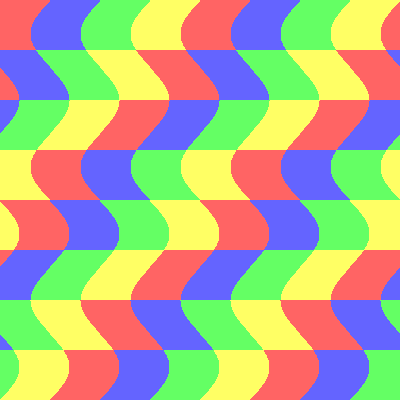
Core concepts
Concept 1 — Inverse mapping
The naive approach to image warping is forward mapping: take each input pixel, compute its new location, and write it there. The problem is rounding — most output positions get written multiple times, and some get written not at all. The result is full of black-pixel holes [3].
The standard fix is inverse mapping: loop over output pixels, and for each one compute the source coordinate to read from. Every output pixel gets a value, by construction. The source coordinate may be non-integer (rounded with int(...)) or out of bounds (wrapped with % size, or clipped with np.clip), but it always exists.
for y in range(height):
    for x in range(width):
        sx = f_x(x, y)     # where to read in the input
        sy = f_y(x, y)
        output[y, x] = source[int(sy) % height, int(sx) % width]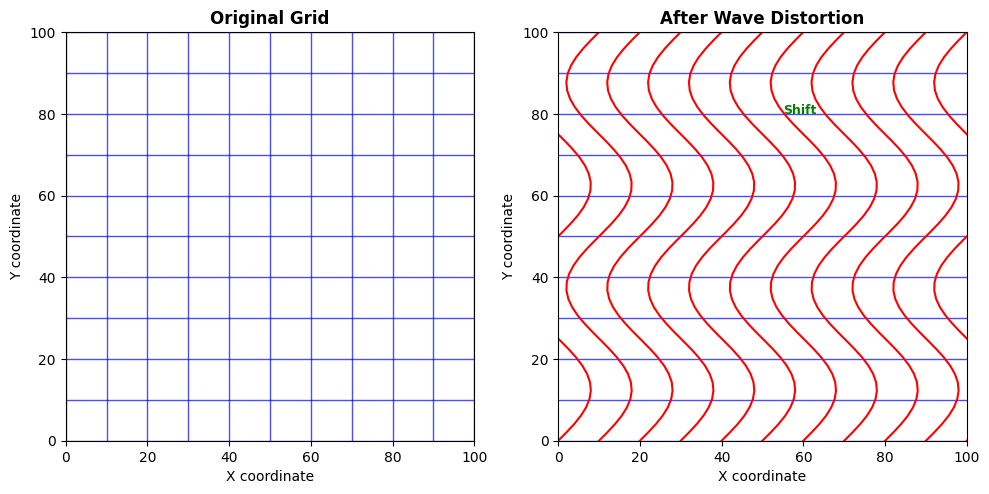
Concept 2 — Wave, barrel, swirl
Three classic remapping formulas cover most of what you will see in image filters.
Wave — add a sinusoidal offset to one axis:
source_x = (x + amplitude * sin(2*pi * freq * y / H)) % WThe y-dependence is what makes vertical edges wavy. Two superposed waves (source_x from y, source_y from x) give the wobble in Exercise 3.
Barrel (fish-eye) — push pixels radially outward, more strongly near the edges:
dx, dy = x - cx, y - cy
r2 = dx*dx + dy*dy
factor = 1 + strength * r2 / max_r2
source_x = cx + dx / factor
source_y = cy + dy / factor
A positive strength produces barrel distortion (image bulges outward, like looking through a glass sphere); a negative strength gives pincushion (image pulls inward at the corners) [4].
Swirl — rotate pixels around the centre by an angle that decreases with radius:
r = sqrt(dx*dx + dy*dy)
theta = atan2(dy, dx)
twist = twist_amount * (1 - r / max_r)
source_x = cx + r * cos(theta - twist)
source_y = cy + r * sin(theta - twist)
Centre pixels spin most; edge pixels barely move. The result is the classic “twirl filter” found in every image editor.
Concept 3 — Out-of-bounds and sampling
Distortions push source coordinates outside the input image. Two policies, both legitimate.
- Wrap with
source_x % width— the image tiles. Good for waves, seamless textures, and the side-of-a-vinyl-record look. Bad for photos: faces wrap onto themselves. - Clip with
np.clip(source_x, 0, width - 1)— out-of-range pixels read from the nearest edge. The edges stretch into bands. Good for photos and lens effects.
Choosing the wrong policy is the most common visual bug in coordinate-remapping code. The wobbling checkerboard wraps cleanly because the input is already periodic; a face under the same wrap policy is going to look unsettling.
Exercises
Three exercises in Execute → Modify → Create order: run a single wave, swap axes/parameters, then build a 2-axis wobble from scratch.
Run the horizontal wave
Run simple_wave_distortion.py from the downloads. Inspect the output and read through the loop body — the whole transformation is three lines.
Reflection questions
- Horizontal lines stay straight; vertical lines become wavy. Why does the formula force that asymmetry?
- What is the role of the
% sizeat the end ofsource_x = (x + offset) % size? - Replace
frequency = 3withfrequency = 6. How many sine cycles do you expect to see?
Answers
Horizontal vs vertical — the offset depends only on y. For a fixed y, every pixel in that row shifts by the same amount, so horizontal lines stay horizontal — they just slide sideways. The sin(2π·freq·y/size) is the only term that changes the shift, and it changes with y, which is exactly why vertical lines (which span many y values) get bent.
% size — wraps source coordinates that would otherwise leave the image. With amplitude = 20, source_x can be -20 or 420 near peaks of the sine; the modulo brings them back into [0, size) so the indexing is legal. Visually you get the seamless tiling at the edges.
Frequency 6 — six cycles of the sine across the image height, double what you saw with frequency = 3. The waves get tighter and visually busier; the amplitude stays the same.
Three variations on one wave
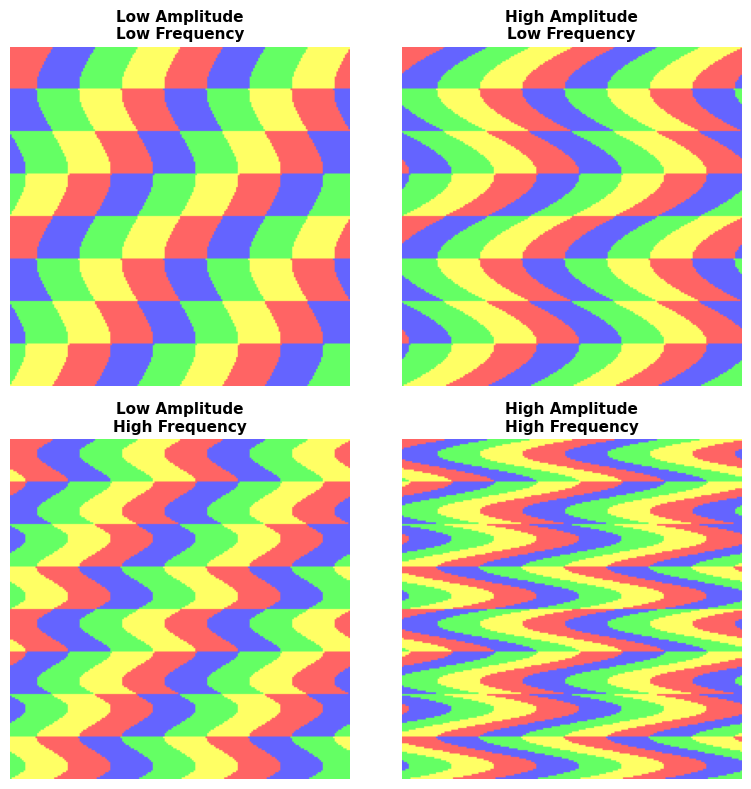
Starting from simple_wave_distortion.py, edit the script to produce each picture.
Goals
- Vertical wave — horizontal lines should ripple, vertical lines should stay straight. Swap which coordinate gets the offset.
- Bigger amplitude — set
amplitude = 40and observe how the wave height grows. - Diagonal wave — offset depends on
x + yinstead ofyalone.
Goal 1 — what to expect
for y in range(size):
    for x in range(size):
        offset = int(amplitude * np.sin(2 * np.pi * frequency * x / size))
        source_y = (y + offset) % size
        distorted[y, x] = image[source_y, x]
offset is now driven by x, and it goes into source_y. Horizontal edges become wavy; vertical edges hold.
Goal 2 — what to expect
amplitude = 40Same wave pattern, twice the displacement. The frequency unchanged means the same number of cycles, but each peak is now 40 pixels away from neutral instead of 20.
Goal 3 — what to expect
offset = int(amplitude * np.sin(2 * np.pi * frequency * (x + y) / size))
source_x = (x + offset) % size
The wave fronts now run diagonally because sin(2π·freq·(x + y)/size) is constant along lines where x + y is constant — those are 45° diagonals.
Two-axis wobble
Combine a horizontal wave (offsets source_x based on y) and a vertical wave (offsets source_y based on x). Use different frequencies for the two waves so the pattern does not repeat trivially.
import numpy as np
from PIL import Image

size = 400
tile = 50
image = np.zeros((size, size, 3), dtype=np.uint8)
colors = [(255, 100, 100), (100, 100, 255), (100, 255, 100), (255, 255, 100)]
for r in range(size // tile):
    for c in range(size // tile):
        image[r*tile:(r+1)*tile, c*tile:(c+1)*tile] = colors[(r + c) % 4]

# TODO 1: pick amplitude + frequency for both axes (different freqs!)
# h_amp, h_freq = ...
# v_amp, v_freq = ...

distorted = np.zeros_like(image)
for y in range(size):
    for x in range(size):
        # TODO 2: compute h_offset (a function of y) and v_offset (a function of x).
        # TODO 3: combine into source_x and source_y, wrap with % size, and copy.
        pass

Image.fromarray(distorted).save('combined_waves.png')
Hint 1 — choose two frequencies
h_amp,  h_freq = 15, 3
v_amp,  v_freq = 15, 4
A 3:4 ratio is non-repeating across one cycle of either axis — that is what makes the pattern visually rich. Equal frequencies produce a simpler, more lattice-like wobble.
Hint 2 — the loop body
h_off = int(h_amp * np.sin(2 * np.pi * h_freq * y / size))
v_off = int(v_amp * np.sin(2 * np.pi * v_freq * x / size))
source_x = (x + h_off) % size
source_y = (y + v_off) % size
distorted[y, x] = image[source_y, source_x]
The horizontal wave contributes to source_x; the vertical wave contributes to source_y. Each wave only depends on the opposite axis.
Complete solution
import numpy as np
from PIL import Image

size = 400
tile = 50
image = np.zeros((size, size, 3), dtype=np.uint8)
colors = [(255, 100, 100), (100, 100, 255), (100, 255, 100), (255, 255, 100)]
for r in range(size // tile):
    for c in range(size // tile):
        image[r*tile:(r+1)*tile, c*tile:(c+1)*tile] = colors[(r + c) % 4]

h_amp, h_freq = 15, 3
v_amp, v_freq = 15, 4

distorted = np.zeros_like(image)
for y in range(size):
    for x in range(size):
        h_off = int(h_amp * np.sin(2 * np.pi * h_freq * y / size))
        v_off = int(v_amp * np.sin(2 * np.pi * v_freq * x / size))
        source_x = (x + h_off) % size
        source_y = (y + v_off) % size
        distorted[y, x] = image[source_y, source_x]

Image.fromarray(distorted).save('combined_waves.png')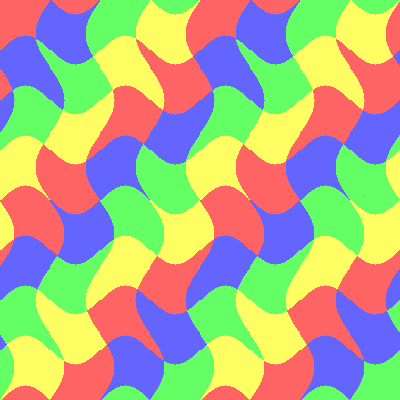
How it works:
- Two independent offsets cooperate: one only reads
y, the other only readsx, so they are mathematically decoupled but combine in the final source coordinate. - The 3:4 frequency ratio is the same idea as the Lissajous figures in 2.3.1 — small-integer non-equal ratios maximise visual interest.
- The wrap (
% size) keeps the edges seamless. Try replacing it withnp.clipand watch the corners turn into stretched bands instead.
Make it your own
- Replace the checkerboard input with a real photo (use
np.array(Image.open('photo.jpg'))) and try wrap vs clip — wrap looks alien on faces. - Add a third wave:
source_x += amplitude * sin(2π · freq · (x + y) / size)for a diagonal ripple on top of the two-axis wobble. - Decay the amplitude with distance from the centre: multiply each offset by
1 - r/r_max. The corners settle while the centre keeps wobbling.
Downloads
simple_wave_distortion.py — horizontal wave starter wave_variations.py — amplitude/frequency grid barrel_distortion.py — fish-eye reference swirl_distortion.py — twirl reference combined_waves_solution.py — Exercise 3 solutionSummary
Common pitfalls to avoid
- Forward-mapping instead of inverse-mapping — the output ends up speckled with holes.
- Forgetting to convert source coordinates to
intbefore indexing — Python list indexing with floats raises; NumPy fancy-indexing with floats silently misbehaves. - Wrap vs clip mix-up — wrapping a photo makes faces fold onto themselves; clipping a tileable texture creates visible edges.
- Plain
(x + offset)without% sizeon an offset that can go negative — Python’s%behaves correctly, but the same code in C-like languages flips signs. - Inflating
amplitudeso much that the wave reads from far past the source image — at some point the pattern is all wraparound.
References
- [1] Wolberg, G. (1990). Digital Image Warping. IEEE Computer Society Press.
- [2] Gonzalez, R. C., & Woods, R. E. (2018). Digital Image Processing (4th ed.). Pearson.
- [3] Szeliski, R. (2022). Computer Vision: Algorithms and Applications (2nd ed.). Springer. szeliski.org/Book
- [4] Brown, D. C. (1966). Decentering distortion of lenses. Photogrammetric Engineering, 32(3), 444–462.
- [5] Foley, J. D., van Dam, A., Feiner, S. K., & Hughes, J. F. (1990). Computer Graphics: Principles and Practice (2nd ed.). Addison-Wesley.
- [6] Harris, C. R., Millman, K. J., van der Walt, S. J., et al. (2020). Array programming with NumPy. Nature, 585, 357–362. doi:10.1038/s41586-020-2649-2