3.1.4 Kaleidoscope Effects
Build an N-fold kaleidoscope by reading every pixel's polar angle, folding it into a single wedge, and mirroring alternate wedges. Then stack three wedge-rings into a mandala.
Overview
A kaleidoscope turns one wedge of pattern into a full circle through two mathematical moves: rotational repetition and mirror reflection. David Brewster built the first physical one in 1816 from two angled mirrors in a brass tube, and the optics of those mirrors are exactly the geometry we will recreate in code [1]. Every pixel asks the same question — what is my polar angle? — and the answer, after folding and mirroring, decides which colour it gets. That single algorithm scales from a clean 6-fold pattern to a multi-ring mandala by varying the wedge count per ring.
Learning objectives
- Convert pixel positions to polar
(radius, angle)withnp.arctan2andnp.sqrt. - Map every angle into a single wedge using integer division by the wedge width, then a modulo.
- Reflect angles in alternating wedges (
wedge - angle_in_wedge) to add mirror symmetry on top of rotation. - Stack rings with different fold counts to compose a multi-symmetry mandala.
Quick start — a 6-fold kaleidoscope
import numpy as np
from PIL import Image

size = 512
center = size // 2
num_folds = 6
wedge_angle = 2 * np.pi / num_folds

# Polar coordinates for every pixel
y, x = np.ogrid[:size, :size]
dx, dy = x - center, y - center
angle = np.arctan2(dy, dx)
radius = np.sqrt(dx * dx + dy * dy)

# Fold all angles into one wedge
angle_pos = angle + np.pi                                # shift to [0, 2π)
wedge_idx = (angle_pos / wedge_angle).astype(int)
angle_in_wedge = angle_pos - wedge_idx * wedge_angle

# Mirror odd-numbered wedges
is_odd = wedge_idx % 2 == 1
angle_mirrored = np.where(is_odd, wedge_angle - angle_in_wedge, angle_in_wedge)

# Procedural colours that depend on the folded angle + radius
r_ch = ((np.sin(angle_mirrored * 3 + radius * 0.05) + 1) * 127).astype(np.uint8)
g_ch = ((np.cos(angle_mirrored * 2 + radius * 0.03) + 1) * 80 + 30).astype(np.uint8)
b_ch = ((np.sin(radius * 0.08) + 1) * 100 + 30).astype(np.uint8)

mask = radius <= center - 10
out = np.zeros((size, size, 3), dtype=np.uint8)
out[mask, 0] = r_ch[mask]; out[mask, 1] = g_ch[mask]; out[mask, 2] = b_ch[mask]

Image.fromarray(out).save('simple_kaleidoscope.png')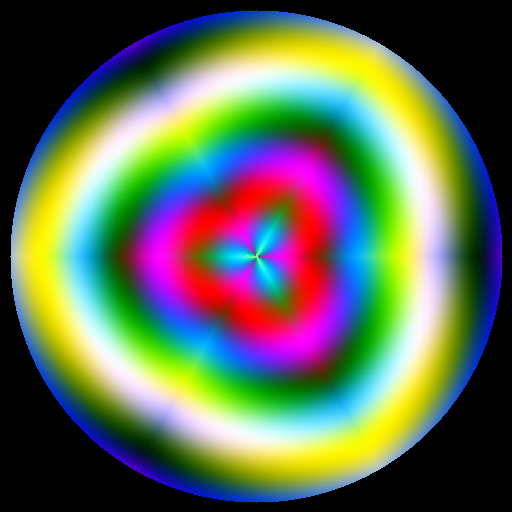
Core concepts
Concept 1 — Polar coordinates everywhere
The first move is to leave the Cartesian world. For every pixel (x, y), you compute the distance from the centre and the angle relative to the centre:
dx, dy = x - center, y - center
radius = np.sqrt(dx*dx + dy*dy)
angle  = np.arctan2(dy, dx)     # in [-π, π]
np.arctan2(dy, dx) is the four-quadrant inverse tangent — unlike arctan(dy / dx), it returns the correct quadrant. The output range is [-π, π]; we shift it to [0, 2π) with + np.pi so the integer division for the wedge index works cleanly [2].
Concept 2 — Folding all angles into one wedge
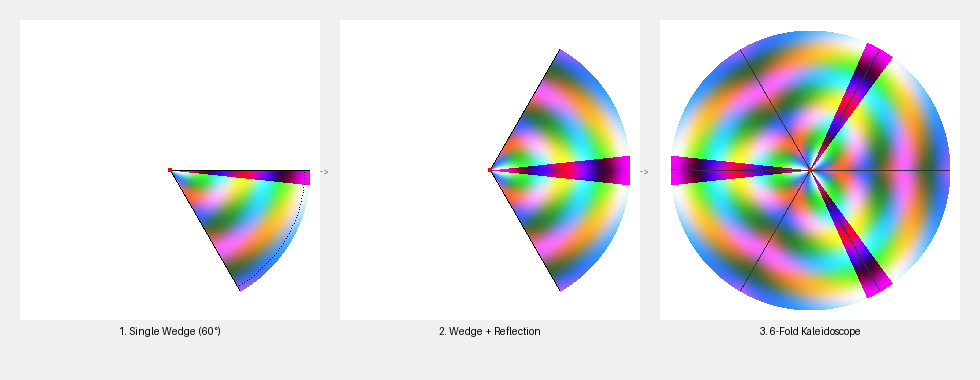
If you want N-fold rotational symmetry, the full circle splits into N wedges of angular width 2π/N. Every angle in the image gets mapped into the first wedge by integer-dividing by the wedge width and subtracting:
wedge_angle = 2 * np.pi / num_folds
wedge_idx = (angle_pos / wedge_angle).astype(int)    # 0..N-1
angle_in_wedge = angle_pos - wedge_idx * wedge_angle # 0..wedge_angle
Now every pixel in the image is described by (angle_in_wedge, radius), and you have N copies of the same wedge stacked around the centre. Sample a colour from those two coordinates and you already have a pinwheel — N-fold rotational symmetry without any explicit rotation [3].
Concept 3 — The mirror trick (alternating reflection)
Pinwheels are only half of a real kaleidoscope. The other half is reflection: in a brass-tube kaleidoscope, two physical mirrors fold the pattern back on itself, so adjacent wedges are mirror images of each other rather than identical copies. The code version is a np.where on the parity of wedge_idx:
is_odd = wedge_idx % 2 == 1
angle_mirrored = np.where(is_odd, wedge_angle - angle_in_wedge, angle_in_wedge)
Even-numbered wedges get the un-reflected angle; odd-numbered wedges get the angle measured from the other edge of the wedge. The effect is bilateral symmetry along every wedge boundary, which is what makes the pattern read as a kaleidoscope rather than a pinwheel [4].
Exercises
Three exercises in Execute → Modify → Create order: run the 6-fold quick start, tune fold counts and palette, then assemble a multi-ring mandala.
Run the 6-fold kaleidoscope
Run simple_kaleidoscope.py from the downloads. The output is the picture in Figure 1.
Reflection questions
- Drop
num_foldsto3. What changes about the wedge size and the pattern complexity? - Set
num_folds = 1. Why does the kaleidoscope effect disappear entirely? - Remove the
is_oddmirror step. What does the pattern look like, and what symmetry has been lost?
Answers
3-fold — wedge width jumps to 120°. The pattern reads as three big slices instead of six fine ones; each slice has more visible detail because the source colour function spans a wider angle range per wedge.
1-fold — wedge_angle = 2π, so every pixel falls in wedge index 0 with angle_in_wedge = angle. No folding happens; you see the raw colour function on a disc. The kaleidoscope effect requires folding, and 1-fold means “no folds.”
No mirror — the result is a pinwheel: every wedge looks identical (just rotated). True kaleidoscopes have bilateral symmetry along each mirror axis; without the np.where, you only get rotational symmetry. Visually, the pattern feels swirly rather than reflective.
Three kaleidoscope variations
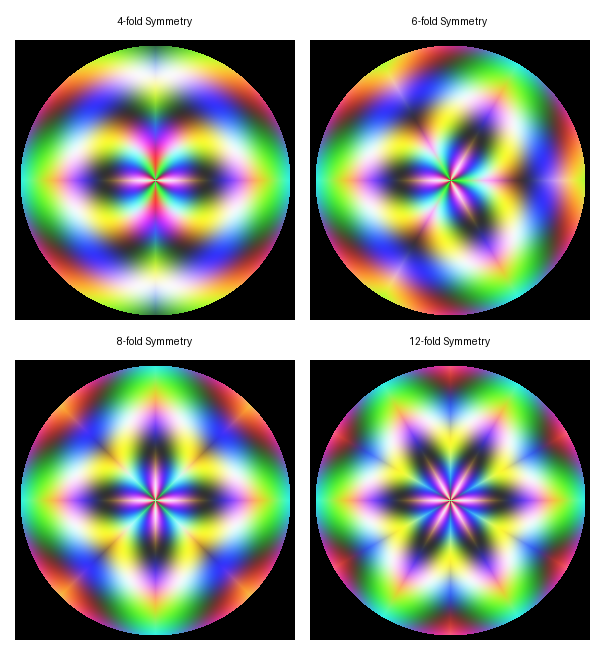
Edit simple_kaleidoscope.py to produce these three pictures.
Goals
- 8-fold pattern — change the fold count.
- Blue-purple palette — drop red, boost blue.
- 12-fold with a smaller disc — increase folds and shrink the circular mask.
Goal 1 — what to expect
num_folds = 8Eight wedges of 45° each. The pattern feels more snowflake-like; finer details emerge because each wedge captures less of the source function.
Goal 2 — what to expect
r_ch = ((np.sin(angle_mirrored * 3 + radius * 0.05) + 1) * 60).astype(np.uint8)
b_ch = ((np.sin(radius * 0.08) + 1) * 127 + 60).astype(np.uint8)
Halving the red multiplier and adding a constant offset on the blue channel shifts the palette toward indigo. The shape and symmetry are untouched.
Goal 3 — what to expect
num_folds = 12
mask = radius <= center - 100
Twelve narrow wedges of 30° each, plus a 100-pixel black border around the disc. The pattern is denser and more mandala-like.
Three-ring mandala
Build a mandala from three concentric rings, each with a different fold count. Inner ring with the highest fold count, middle with medium, outer with the lowest. Each ring keeps the same wedge-fold-mirror algorithm; the only thing that changes between rings is num_folds and the inner/outer radius range.
import numpy as np
from PIL import Image

SIZE = 512
CENTER = SIZE // 2

def ring(num_folds, inner_r, outer_r, color_scheme):
    """Return (ring_pixels, mask). Caller composites into the final canvas."""
    y, x = np.ogrid[:SIZE, :SIZE]
    dx, dy = x - CENTER, y - CENTER
    angle = np.arctan2(dy, dx)
    radius = np.sqrt(dx * dx + dy * dy)

    wedge_angle = 2 * np.pi / num_folds
    angle_pos = angle + np.pi
    wedge_idx = (angle_pos / wedge_angle).astype(int)
    angle_in_wedge = angle_pos - wedge_idx * wedge_angle
    is_odd = wedge_idx % 2 == 1
    angle_m = np.where(is_odd, wedge_angle - angle_in_wedge, angle_in_wedge)

    in_ring = (radius >= inner_r) & (radius < outer_r)

    r_mult, g_mult, b_mult = color_scheme
    ring_pos = (radius - inner_r) / max(outer_r - inner_r, 1)
    r = ((np.sin(angle_m * num_folds + ring_pos * np.pi * 2) + 1) * 100 * r_mult + 30).astype(np.uint8)
    g = ((np.cos(angle_m * (num_folds + 2))                    + 1) * 100 * g_mult + 30).astype(np.uint8)
    b = ((np.sin(ring_pos * np.pi * 3)                          + 1) * 100 * b_mult + 30).astype(np.uint8)

    out = np.zeros((SIZE, SIZE, 3), dtype=np.uint8)
    out[in_ring, 0] = r[in_ring]
    out[in_ring, 1] = g[in_ring]
    out[in_ring, 2] = b[in_ring]
    return out, in_ring

canvas = np.zeros((SIZE, SIZE, 3), dtype=np.uint8)

# TODO 1: choose ring specs (inner_r, outer_r, num_folds, color_scheme)
# rings = [...]

# TODO 2: composite each ring into canvas using its mask
# for spec in rings:
#     r, m = ring(*spec)
#     canvas[m] = r[m]

Image.fromarray(canvas).save('mandala.png')
Hint 1 — ring specs
Three contrasting rings, fold count decreasing outward, distinct palettes:
rings = [
    (12, 0,   60,  (1.0, 0.6, 0.8)),   # inner: 12-fold, pink
    ( 6, 60,  140, (0.5, 0.8, 1.0)),   # middle: 6-fold, blue
    ( 4, 140, 230, (1.0, 0.5, 0.6)),   # outer: 4-fold, coral
]
Each tuple matches the ring(...) signature: (num_folds, inner_r, outer_r, color_scheme).
Hint 2 — composite the rings
The masks are disjoint (no two rings overlap), so a plain overwrite is enough:
for spec in rings:
    pixels, mask = ring(*spec)
    canvas[mask] = pixels[mask]
If you wanted soft edges between rings you would use alpha blending, but the disjoint masks make that unnecessary here.
Complete solution
import numpy as np
from PIL import Image

SIZE = 512
CENTER = SIZE // 2

def ring(num_folds, inner_r, outer_r, color_scheme):
    y, x = np.ogrid[:SIZE, :SIZE]
    dx, dy = x - CENTER, y - CENTER
    angle = np.arctan2(dy, dx)
    radius = np.sqrt(dx * dx + dy * dy)

    wedge_angle = 2 * np.pi / num_folds
    angle_pos = angle + np.pi
    wedge_idx = (angle_pos / wedge_angle).astype(int)
    angle_in_wedge = angle_pos - wedge_idx * wedge_angle
    is_odd = wedge_idx % 2 == 1
    angle_m = np.where(is_odd, wedge_angle - angle_in_wedge, angle_in_wedge)

    in_ring = (radius >= inner_r) & (radius < outer_r)
    r_mult, g_mult, b_mult = color_scheme
    ring_pos = (radius - inner_r) / max(outer_r - inner_r, 1)

    r = ((np.sin(angle_m * num_folds + ring_pos * np.pi * 2) + 1) * 100 * r_mult + 30).astype(np.uint8)
    g = ((np.cos(angle_m * (num_folds + 2))                    + 1) * 100 * g_mult + 30).astype(np.uint8)
    b = ((np.sin(ring_pos * np.pi * 3)                          + 1) * 100 * b_mult + 30).astype(np.uint8)

    out = np.zeros((SIZE, SIZE, 3), dtype=np.uint8)
    out[in_ring, 0] = r[in_ring]
    out[in_ring, 1] = g[in_ring]
    out[in_ring, 2] = b[in_ring]
    return out, in_ring

canvas = np.zeros((SIZE, SIZE, 3), dtype=np.uint8)
rings = [
    (12, 0,   60,  (1.0, 0.6, 0.8)),
    ( 6, 60,  140, (0.5, 0.8, 1.0)),
    ( 4, 140, 230, (1.0, 0.5, 0.6)),
]
for spec in rings:
    pixels, mask = ring(*spec)
    canvas[mask] = pixels[mask]

Image.fromarray(canvas).save('mandala.png')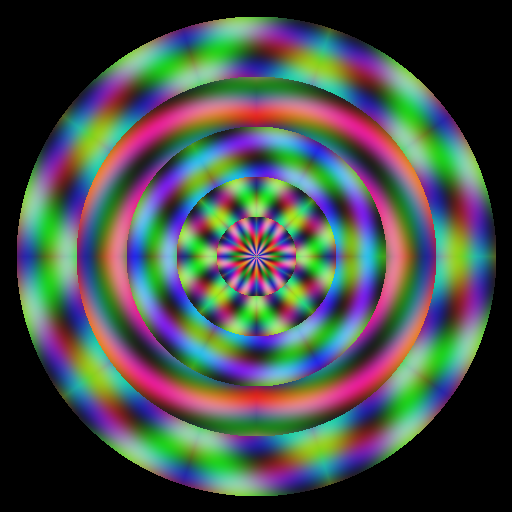
How it works:
ring(...)runs the full fold + mirror computation for every pixel, then a Boolean mask keeps only the pixels inside[inner_r, outer_r).- Pixels outside the ring stay zero. Compositing is a plain
canvas[mask] = pixels[mask]— no blending needed because the masks are disjoint. - Decreasing fold counts outward makes the centre look like a fine star and the edge look like a bold cross. Increasing fold counts outward would do the opposite.
Make it your own
- Animate
num_foldsper ring over time and save 60 frames as a GIF — the mandala morphs through symmetries. - Replace
radius >= inner_rwithradius >= inner_r + 5 * sin(angle * num_folds)for petalled ring boundaries. - Pipe the kaleidoscope through the swirl distortion from 3.1.3 for a folded, twirling pattern.
Downloads
simple_kaleidoscope.py — 6-fold quick start kaleidoscope_variations.py — fold-count comparison mandala_starter.py — Exercise 3 starter mandala_solution.py — Exercise 3 referenceSummary
Common pitfalls to avoid
- Forgetting to shift
np.arctan2output from[-π, π]to[0, 2π)— the wedge index goes negative and indexing breaks. - Casting
wedge_idxwithint()instead of.astype(int)— works for a scalar but crashes on the NumPy array. - Skipping the
is_oddmirror — you get a pinwheel (rotation only), not a kaleidoscope. - Sampling the colour function from
(x, y)instead of(angle_mirrored, radius)— the symmetry is lost; the colour ignores the fold. - Forgetting the circular mask — the rectangular canvas corners show un-folded artefacts.
References
- [1] Brewster, D. (1858). The Kaleidoscope: Its History, Theory, and Construction (2nd ed.). John Murray.
- [2] NumPy Community. (2024). numpy.arctan2. NumPy Documentation. numpy.org
- [3] Weyl, H. (1952). Symmetry. Princeton University Press.
- [4] Hargittai, I., & Hargittai, M. (2009). Visual Symmetry. World Scientific.
- [5] Gonzalez, R. C., & Woods, R. E. (2018). Digital Image Processing (4th ed.). Pearson.
- [6] Molnár, V. (1974). Toward aesthetic guidelines for paintings with the aid of a computer. Leonardo, 7(3), 185–189. doi:10.2307/1572906