3.3.5 Delaunay Triangulation
Use `scipy.spatial.Delaunay` to wire a cloud of points into a clean triangular mesh whose triangles avoid sliver shapes, then sample the source image at each triangle's centroid to render a low-poly version of the original.
Overview
A Delaunay triangulation connects a point cloud into triangles such that no point sits inside any other triangle’s circumcircle. The constraint is elegant: out of the many ways to triangulate the same point set, this one maximises the smallest angle across all triangles — slivers are avoided and the mesh feels visually balanced [1]. Borrowed by graphics from finite-element meshing, Delaunay is now the standard triangulation for terrain generation, low-poly art, and the “facets” filter in every photo app. Boris Delaunay published the theorem in 1934; scipy.spatial.Delaunay packages it into one constructor call [2, 3].
Learning objectives
- State the circumcircle property and explain why it produces well-shaped triangles.
- Compute a triangulation with
scipy.spatial.Delaunay(points)and read out its.simplicesindex array. - Sample colours from an image at each triangle’s centroid to render a low-poly facet image.
- Compare point-distribution strategies — random, jittered grid, edge-weighted — for different artistic effects.
Quick start — triangulate 50 points
import numpy as np
import matplotlib.pyplot as plt
from scipy.spatial import Delaunay

rng = np.random.default_rng(42)
points = rng.random((50, 2)) * 400

tri = Delaunay(points)

fig, ax = plt.subplots(figsize=(7, 7))
ax.triplot(points[:, 0], points[:, 1], tri.simplices,
           color='steelblue', linewidth=0.8)
ax.plot(points[:, 0], points[:, 1], 'o', color='coral', markersize=6)
ax.set_aspect('equal'); ax.axis('off')
plt.savefig('simple_delaunay.png', dpi=150, bbox_inches='tight')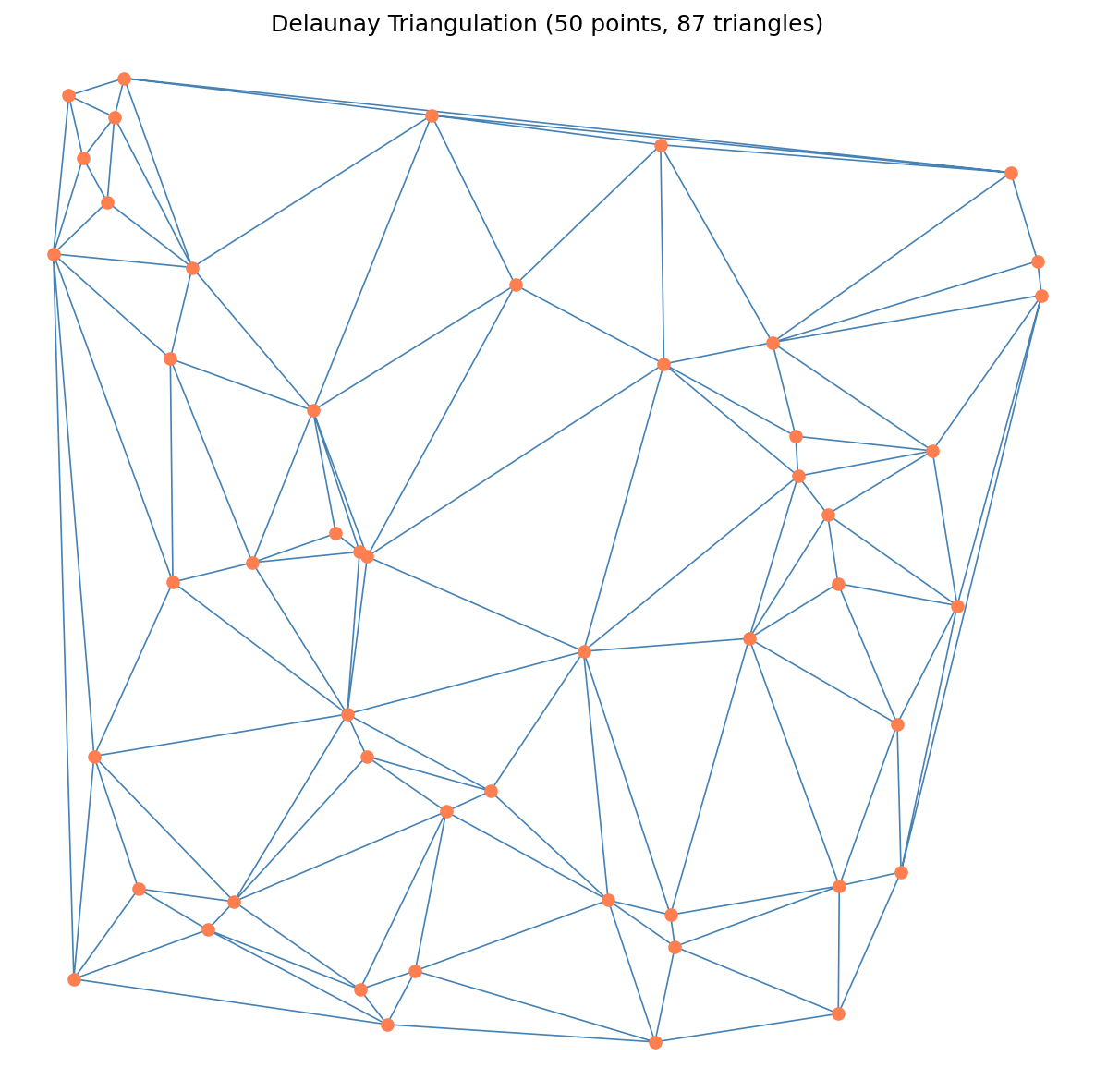
Core concepts
Concept 1 — The circumcircle property
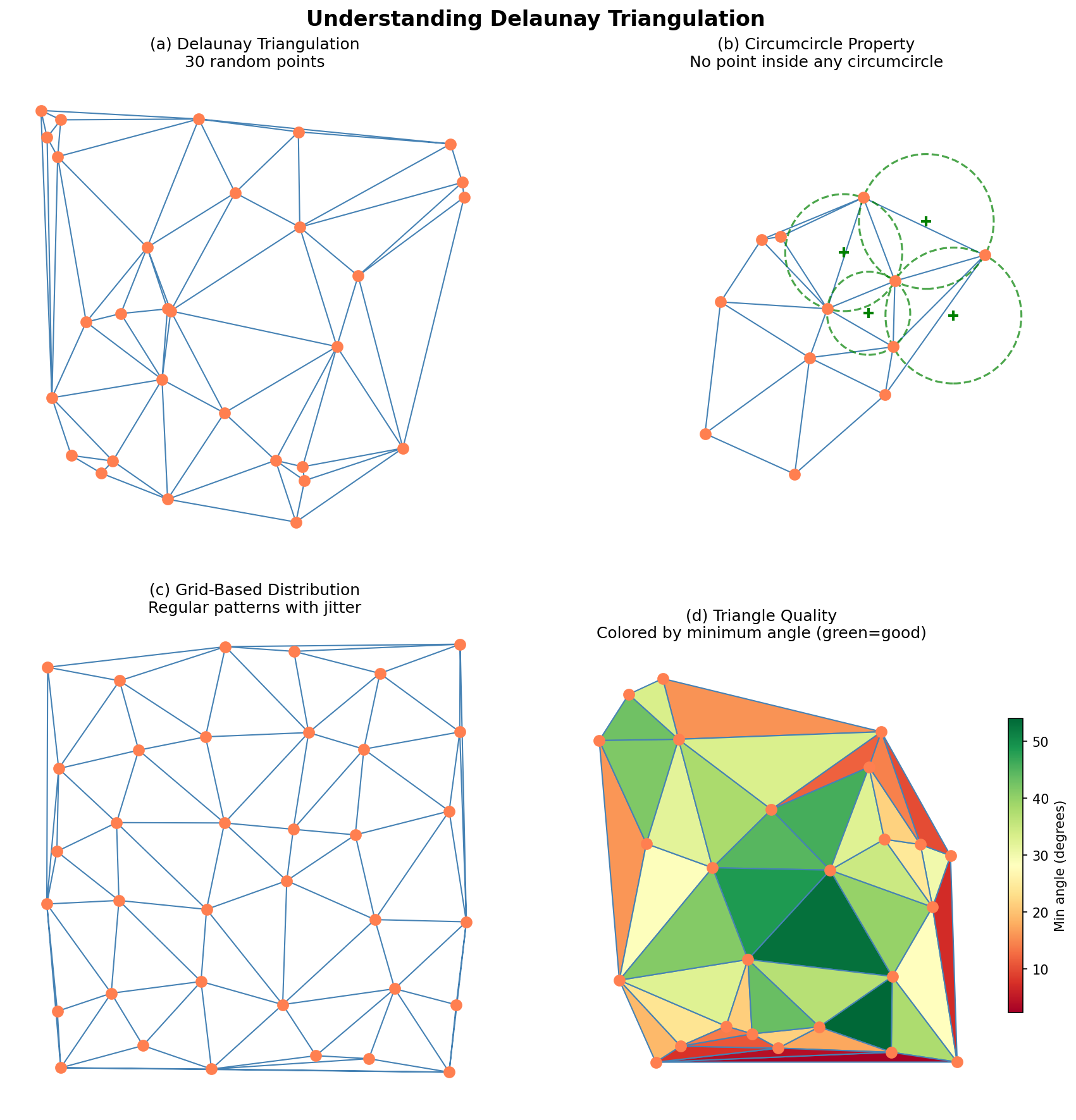
Given a point cloud P, the Delaunay triangulation of P is the unique triangulation in which no point of P sits inside any triangle’s circumcircle (the unique circle passing through the triangle’s three vertices) [4]. Equivalently — and this is the property practitioners actually care about — Delaunay maximises the minimum angle over all triangles. There are no long thin slivers; every triangle is reasonably “fat.”
Why does that matter? Three reasons:
- Numerical stability — finite-element solvers, interpolation, gradient estimation all blow up on slivers.
- Visual balance — a mesh full of fat triangles looks intentional; one full of slivers looks broken.
- Mesh quality — Delaunay is the closest you get to “good triangles” without picking points yourself.
Concept 2 — Indexing into tri.simplices
tri.simplices is the canonical Delaunay output: a (num_triangles, 3) array of integer indices into your original point array. The first triangle has vertices points[tri.simplices[0]], the second has points[tri.simplices[1]], and so on. Two common operations:
# Pull out the three vertex coordinates for triangle k
triangle_k = points[tri.simplices[k]]      # shape (3, 2)

# Iterate over all triangles
for simplex in tri.simplices:
    vertices = points[simplex]              # (3, 2)
    centroid = vertices.mean(axis=0)        # (2,)
    ...
This index-then-look-up pattern is exactly the same one used by Warhol’s palette indexing in 3.3.1 — store integer references, fetch the data separately. It is also how OBJ, glTF, and every other indexed-mesh file format works.
Concept 3 — Centroid sampling for low-poly art
Once you have triangles, painting them by colour-sampling a source image is the “low-poly art” technique:
def triangle_colour(source, vertices):
    centroid = vertices.mean(axis=0)
    cx = int(np.clip(centroid[0], 0, source.shape[1] - 1))
    cy = int(np.clip(centroid[1], 0, source.shape[0] - 1))
    return source[cy, cx] / 255.0           # NB: image indexing is [y, x]
Centroid sampling is the cheapest variant — one pixel lookup per triangle. Better-looking versions average all pixels inside the triangle (use matplotlib.path.Path to test inclusion), but the centroid is enough for the geometric mosaic look [5].
The image gets rendered through matplotlib.collections.PolyCollection, which paints filled polygons in one call:
from matplotlib.collections import PolyCollection
triangles = [points[s] for s in tri.simplices]
colours   = [triangle_colour(source, points[s]) for s in tri.simplices]
ax.add_collection(PolyCollection(triangles, facecolors=colours, edgecolors='none'))
ax.set_xlim(0, W); ax.set_ylim(H, 0) # flip y so image-down stays downExercises
Three exercises in Execute → Modify → Create order: run the wireframe, try different distributions, then render a low-poly image from a procedural source.
Run the wireframe triangulation
Run simple_delaunay.py from the downloads. Look at the output.
Reflection questions
- The script generates 50 points and produces 87 triangles. Where does that number come from?
- Why are no triangles long and thin?
- What happens at the edge of the point cloud — how are border triangles bounded?
Answers
87 triangles from 50 points — for points in general position on the plane, the Delaunay triangulation has approximately 2N - 2 - K triangles, where K is the number of points on the convex hull. With 50 points and a hull of size ~11, that comes out near 87. The formula 2N - K - 2 is exact when there are no degeneracies [1].
No slivers — Delaunay’s optimality criterion specifically maximises the smallest angle. Any triangulation with a sliver triangle could be improved by an edge flip, so the algorithm flips until no improvement is possible.
Border triangles — the triangulation only fills the convex hull of the points. Outside the hull there is nothing. Border triangles touch the hull boundary; for a rectangular image you append the four corners as extra points to make the hull cover the whole frame.
Three point-distribution strategies
Edit simple_delaunay.py to try three different distributions of the 50 points. Replot each.
Goals
- Jittered grid — start from a 7×7 grid of points and add small random offsets.
- Edge-weighted — bias the random points toward the borders by
rng.beta(0.5, 0.5, (50, 2))and rescaling. - Add canvas-corner anchors — append
[[0, 0], [400, 0], [400, 400], [0, 400]]to your random points so the hull covers the full square.
Goal 1 — what to expect
gx, gy = np.meshgrid(np.linspace(0, 400, 7), np.linspace(0, 400, 7))
points = np.column_stack([gx.ravel(), gy.ravel()])
points += rng.normal(0, 5, size=points.shape)
A near-uniform triangulation with roughly equal triangle sizes — almost regular, but enough jitter to break up the obviously gridded look.
Goal 2 — what to expect
points = rng.beta(0.5, 0.5, size=(50, 2)) * 400The Beta(0.5, 0.5) distribution piles probability mass near 0 and 1 — points cluster on the edges. The interior is sparse; the borders have fine triangulation.
Goal 3 — what to expect
points = np.vstack([points, [[0, 0], [400, 0], [400, 400], [0, 400]]])The triangulation now fills the entire 400×400 square. Without the corners, the convex hull stopped short of the canvas borders, leaving uncovered regions.
Low-poly art from a procedural source
Build a procedural sunset image (gradient + sun + accent circle), generate a triangulation with corner+edge anchors, and render the low-poly version.
import numpy as np
import matplotlib.pyplot as plt
from matplotlib.collections import PolyCollection
from scipy.spatial import Delaunay

W, H = 400, 400
rng = np.random.default_rng(42)

# TODO 1: build a procedural source image (H, W, 3) uint8 with a sunset gradient
#         and a sun-like circle. See hint for one approach.

# TODO 2: sample 150 random points, then append the 4 corners and 4 edge midpoints.

# TODO 3: compute the Delaunay triangulation.

# TODO 4: per triangle: sample the centroid colour from the source.

# TODO 5: render with PolyCollection; flip the y-axis to match image coords.

plt.savefig('lowpoly.png', dpi=150, bbox_inches='tight', pad_inches=0)
Hint 1 — procedural sunset
y, x = np.ogrid[:H, :W]
source = np.zeros((H, W, 3), dtype=np.uint8)
source[..., 0] = np.clip(255 - y * 0.4, 0, 255)
source[..., 1] = np.clip(100 + np.sin(x * 0.02) * 80, 0, 255)
source[..., 2] = np.clip(50 + y * 0.5, 0, 255)

# Add a sun in the upper portion
dist = np.sqrt((x - W // 2) ** 2 + (y - H // 3) ** 2)
sun = dist < 80
source[sun] = [255, 200, 80]
Hint 2 — points + anchors
points = rng.random((150, 2)) * [W, H]
corners = np.array([[0, 0], [W, 0], [W, H], [0, H]])
edges   = np.array([[W/2, 0], [W/2, H], [0, H/2], [W, H/2]])
points  = np.vstack([points, corners, edges])
The 8 extra points guarantee the hull covers the full canvas.
Hint 3 — render with PolyCollection
tri = Delaunay(points)

def tri_colour(simplex):
    verts = points[simplex]
    cx, cy = verts.mean(axis=0)
    cx = int(np.clip(cx, 0, W - 1)); cy = int(np.clip(cy, 0, H - 1))
    return source[cy, cx] / 255.0

triangles = [points[s] for s in tri.simplices]
colours   = [tri_colour(s)   for s in tri.simplices]

fig, ax = plt.subplots(figsize=(8, 8))
ax.add_collection(PolyCollection(triangles, facecolors=colours, edgecolors='none'))
ax.set_xlim(0, W); ax.set_ylim(H, 0); ax.set_aspect('equal'); ax.axis('off')
Complete solution
import numpy as np
import matplotlib.pyplot as plt
from matplotlib.collections import PolyCollection
from scipy.spatial import Delaunay

W, H = 400, 400
rng = np.random.default_rng(42)

y, x = np.ogrid[:H, :W]
source = np.zeros((H, W, 3), dtype=np.uint8)
source[..., 0] = np.clip(255 - y * 0.4, 0, 255)
source[..., 1] = np.clip(100 + np.sin(x * 0.02) * 80, 0, 255)
source[..., 2] = np.clip(50 + y * 0.5, 0, 255)

dist = np.sqrt((x - W // 2) ** 2 + (y - H // 3) ** 2)
source[dist < 80] = [255, 200, 80]

points = rng.random((150, 2)) * [W, H]
corners = np.array([[0, 0], [W, 0], [W, H], [0, H]])
edges   = np.array([[W/2, 0], [W/2, H], [0, H/2], [W, H/2]])
points  = np.vstack([points, corners, edges])

tri = Delaunay(points)

def tri_colour(simplex):
    verts = points[simplex]
    cx, cy = verts.mean(axis=0)
    cx = int(np.clip(cx, 0, W - 1)); cy = int(np.clip(cy, 0, H - 1))
    return source[cy, cx] / 255.0

triangles = [points[s]   for s in tri.simplices]
colours   = [tri_colour(s) for s in tri.simplices]

fig, ax = plt.subplots(figsize=(8, 8))
ax.add_collection(PolyCollection(triangles, facecolors=colours, edgecolors='none'))
ax.set_xlim(0, W); ax.set_ylim(H, 0); ax.set_aspect('equal'); ax.axis('off')
plt.savefig('lowpoly.png', dpi=150, bbox_inches='tight', pad_inches=0)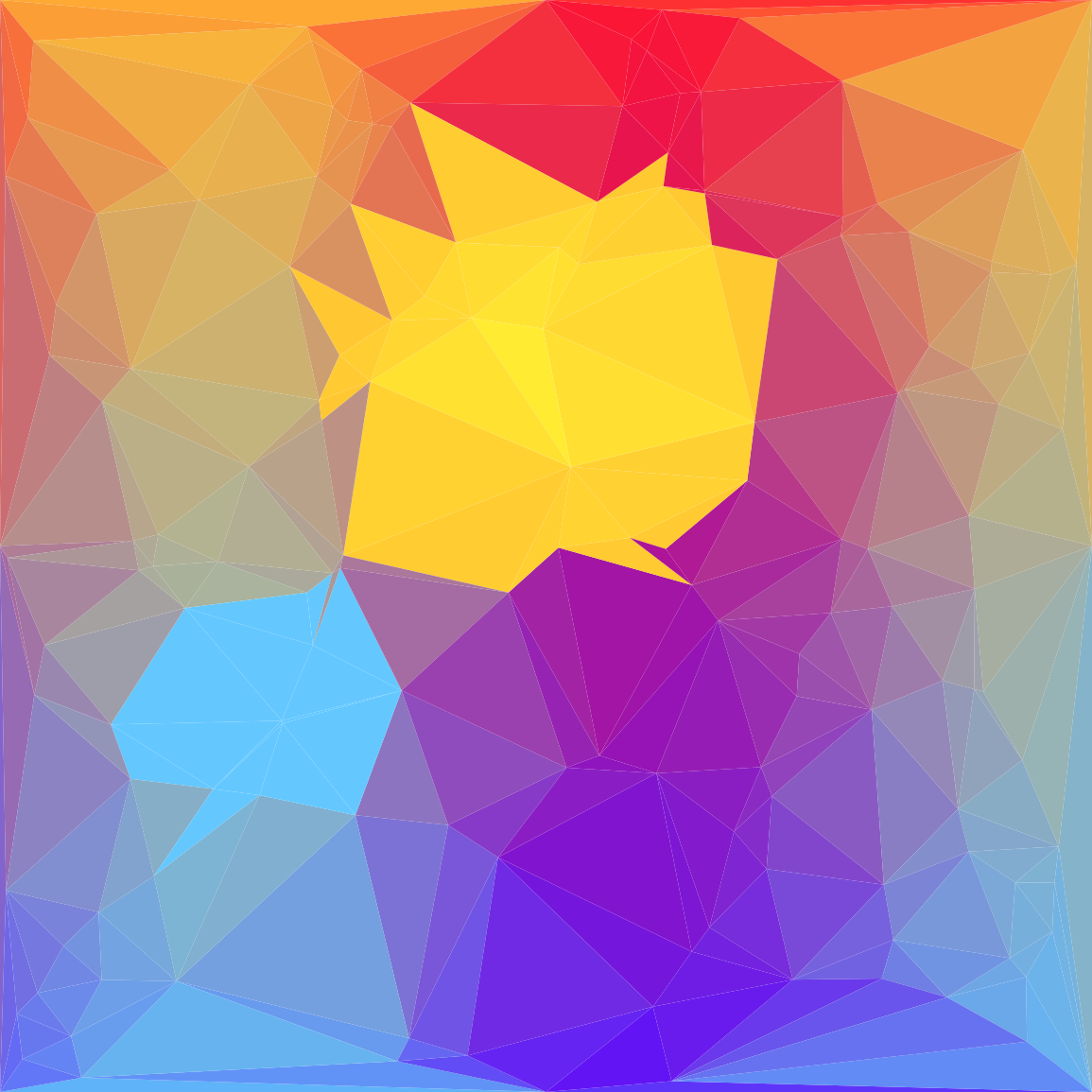
How it works:
- The source image is a normal NumPy array; nothing about Delaunay sees the pixels directly.
- Per-triangle centroid sampling picks one colour per triangle. The colour is a function of only the centroid, so adjacent triangles can be very different colours even if the underlying gradient is smooth.
PolyCollectionis matplotlib’s batch polygon renderer — one call paints all triangles at their respective colours.
Make it your own
- Replace centroid sampling with average sampling — use
matplotlib.path.Path(triangle).contains_pointsto find the pixels inside each triangle and take their mean colour. Slower but visually closer to the source. - Bias point placement by image gradient — sample more points where the source has sharp edges, fewer where it is smooth. Photo apps do this for “smart” low-poly conversion.
- Render the wireframe on top of the colour fill (
edgecolors='white') for a stained-glass look. Drop the alpha (alpha=0.6) to layer it on top of the original image.
Downloads
simple_delaunay.py — wireframe quick start colored_triangulation.py — randomly coloured triangles lowpoly_art_starter.py — Exercise 3 starter lowpoly_art_solution.py — Exercise 3 referenceSummary
Common pitfalls to avoid
- Forgetting corner anchors — the convex hull leaves border regions uncovered.
- Indexing the source as
source[cx, cy]instead ofsource[cy, cx]— NumPy images are[row, col]. - Passing the vertices (
points[s]) to a function expecting indices (s) or vice versa. - Plotting without
ax.set_ylim(H, 0)— the picture renders upside-down because matplotlib defaults to y-up. - Sampling colours as
source[cy, cx]withoutnp.clip— points can land just outside the image bounds and crash the indexing.
References
- [1] Aurenhammer, F., Klein, R., & Lee, D.-T. (2013). Voronoi Diagrams and Delaunay Triangulations. World Scientific.
- [2] Delaunay, B. (1934). Sur la sphère vide. Bulletin de l’Académie des Sciences de l’URSS, Classe des Sciences Mathématiques et Naturelles, 6, 793–800.
- [3] SciPy Community. (2024). scipy.spatial.Delaunay. SciPy Documentation. docs.scipy.org
- [4] de Berg, M., Cheong, O., van Kreveld, M., & Overmars, M. (2008). Computational Geometry: Algorithms and Applications (3rd ed.). Springer.
- [5] Edelsbrunner, H. (2001). Geometry and Topology for Mesh Generation. Cambridge University Press.
- [6] Hunter, J. D. (2007). Matplotlib: A 2D graphics environment. Computing in Science & Engineering, 9(3), 90–95. doi:10.1109/MCSE.2007.55