3.3.3 Hexpanda — Hexbin Image Filter
Turn an image into a sparse `(x, y, intensity)` table with pandas, then aggregate it into a hexagonal density plot. The result reads as an impressionist mosaic of the original photograph.
Overview
Hexagonal binning is a tool from statistical graphics: every data point gets dropped into the nearest hexagonal cell, and each cell is coloured by how many points it caught. Originally Dan Carr designed it in 1987 to render scatter plots of millions of points without saturating the canvas [1]. The clever filter trick is to flip that pipeline backwards — treat every dark pixel of a photograph as a data point, sample a fraction of them, and plot the result with pandas.DataFrame.plot.hexbin. The picture comes back as a hex-mosaic version of the original, with detail abstracted into density and edges turned into honeycomb seams [2]. This is a short lesson that bridges NumPy image work to the pandas/matplotlib ecosystem you will use throughout Modules 7 and 14.
Learning objectives
- Convert a grayscale image into an
(x, y, intensity)DataFrame usingunstack+reset_index. - Invert pixel values so dark image regions map to high-density hexagons.
- Tune
gridsizeto trade detail for abstraction in the hexbin output. - Swap the matplotlib colormap (
Greys,viridis,plasma,Blues) to change the visual mood.
Quick start — the hexpanda
import pandas as pd
import matplotlib.pyplot as plt
import numpy as np
from PIL import Image

# Grayscale + invert so dark → high value
pixels = np.array(Image.open('panda.png').convert('L'))
inverted = 255 - pixels

# Pixel grid → long-format DataFrame (x, y, intensity)
df = pd.DataFrame(inverted).unstack()             # (x, y) → intensity Series
df = df[df > 0].reset_index()                     # drop background, become flat
df.columns = ['x', 'y', 'intensity']
df['y'] = -df['y']                                # flip to maths y-up

# Sample 25% for an airier mosaic, then hexbin
sample = df.sample(len(df) // 4, random_state=0)

fig, ax = plt.subplots(figsize=(8, 8))
sample.plot.hexbin(x='x', y='y', gridsize=30, cmap='Greys', ax=ax)
ax.set_aspect('equal'); ax.axis('off')
plt.savefig('hexpanda.png', bbox_inches='tight', dpi=120)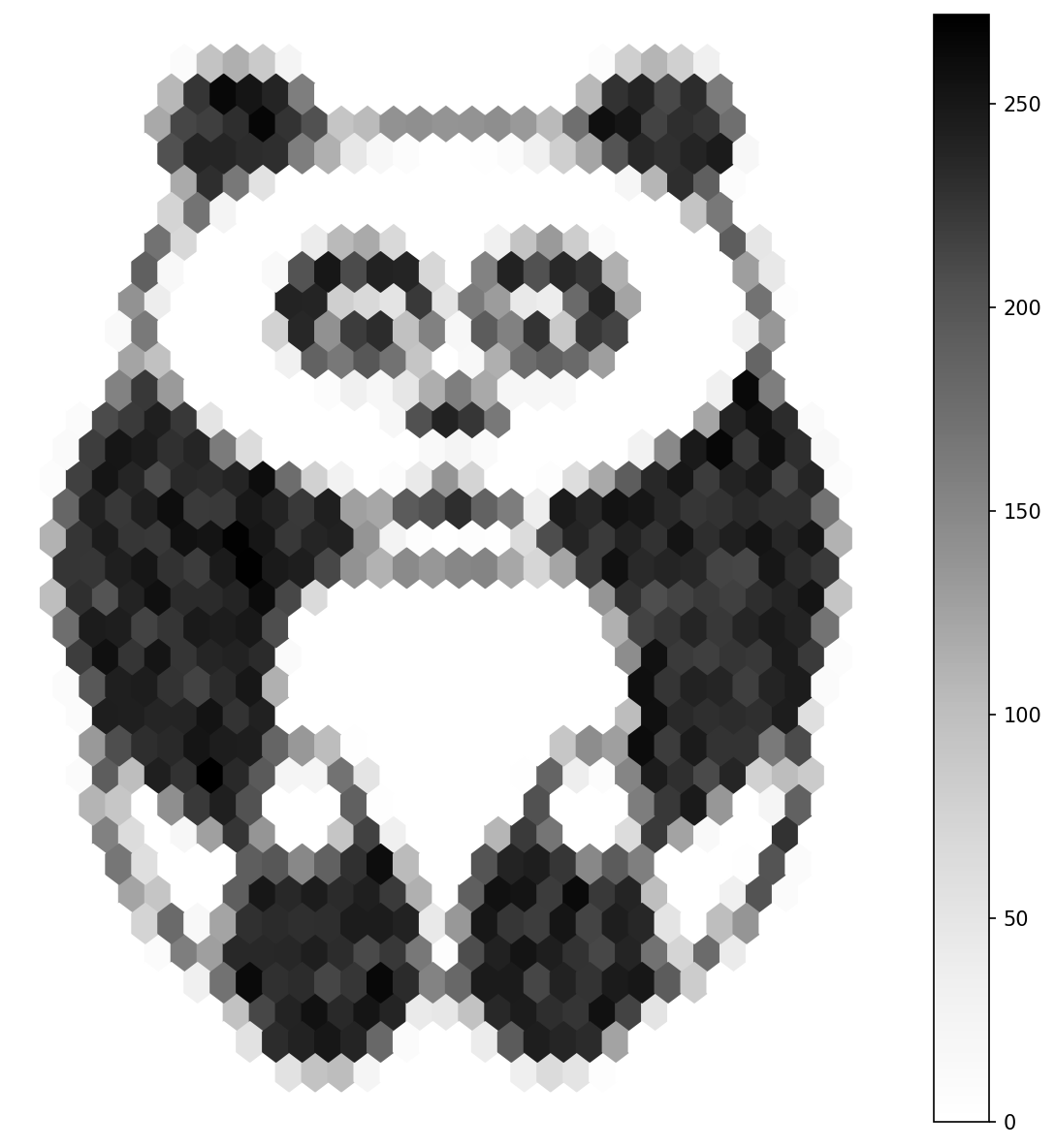
Core concepts
Concept 1 — From pixel grid to long-format DataFrame
The hexbin renderer wants a list of (x, y) points, not a 2D image. The cleanest way to turn an image into that list is the unstack + reset_index pandas idiom:
df = pd.DataFrame(inverted)           # rows = y, columns = x
df = df.unstack()                     # MultiIndex Series: (x, y) → intensity
df = df[df > 0].reset_index()         # drop zeros, flatten to columns
df.columns = ['x', 'y', 'intensity']pd.DataFrame(inverted)treats the NumPy 2D array as a table; row index becomes y, column index becomes x..unstack()turns the table into a Series with a two-level index — one level per axis.df[df > 0]filters out the background pixels (originally white; inverted to zero)..reset_index()promotes the two index levels into ordinary columns.
The output is the long-format table hexbin wants: one row per surviving pixel, three columns named x, y, intensity [3].
Concept 2 — Sampling for an impressionist density
Plotting every surviving pixel would faithfully reconstruct the image; sampling some of them is what makes the output feel like a mosaic rather than a copy:
sample = df.sample(len(df) // 4, random_state=0) # 25% of the pixelsSampling does two things at once. It cuts plotting time (millions of points become a few hundred thousand), and it introduces visual stochasticity — the hex cells now reflect a random subset of the source, so they speak of density rather than coverage. The artistic move is to undersample heavily; the analytic move is to keep more of the data.
The random_state=0 argument fixes the random seed so the output is reproducible. Drop it and every run produces a slightly different mosaic.
Concept 3 — gridsize is the abstraction knob
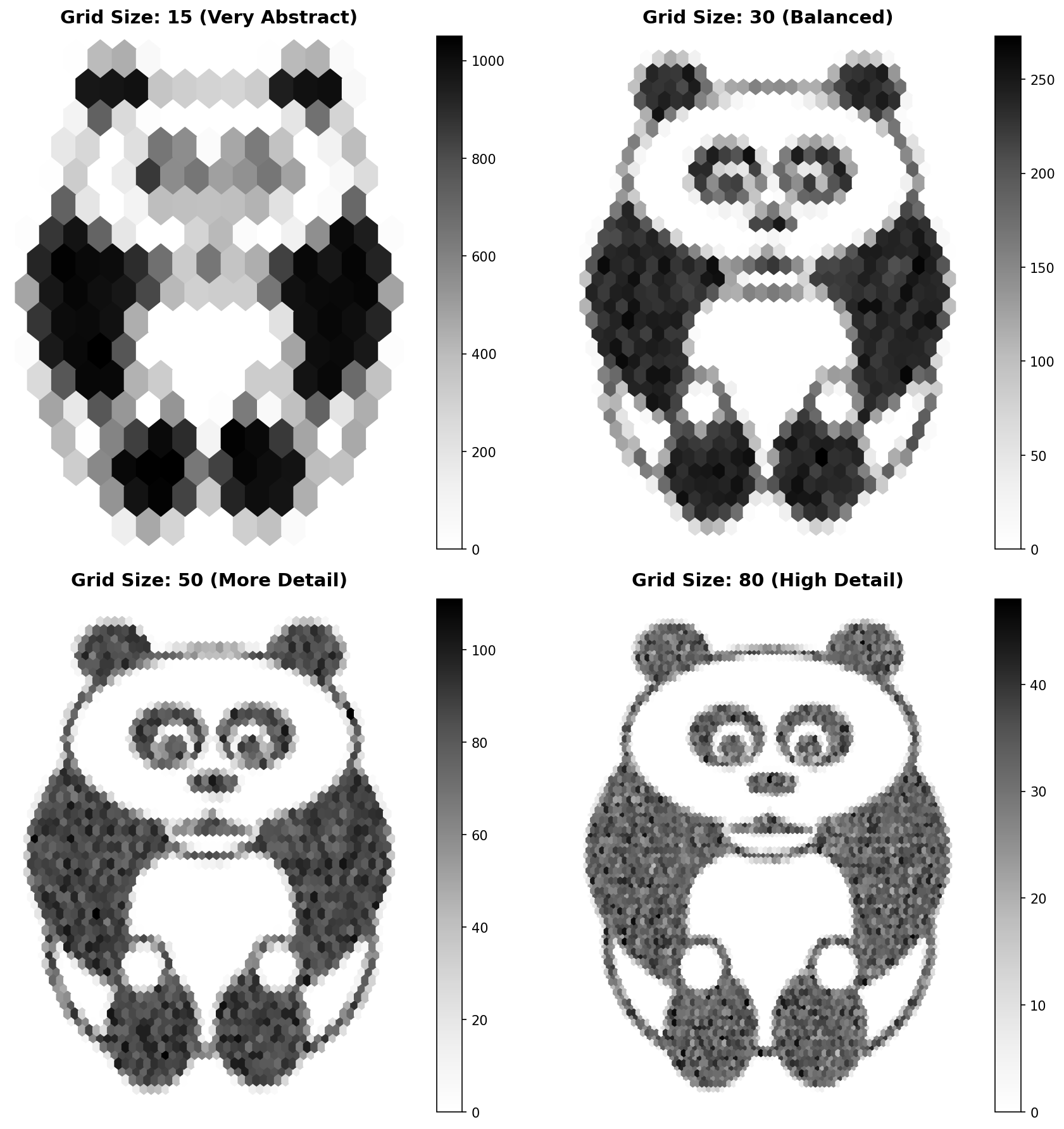
A gridsize=30 hexbin lays down 30 hexagons across the x-axis. Smaller values give bigger hexagons (more abstract); larger values give smaller hexagons (more detail). The choice is almost entirely artistic [4]:
gridsize=15— large hexes; the picture reads as a few abstract blobs.gridsize=30— middle ground; subject is recognisable.gridsize=60— small hexes; the picture starts to look like the original through frosted glass.
Exercises
Three exercises in Execute → Modify → Create order: run the hexpanda, swap gridsize and cmap, then build a hexbin from a procedural gradient.
Run the hexpanda
Run hexpanda.py from the downloads. Inspect the saved PNG.
Reflection questions
- Why are the panda’s eyes — sharp features in the original — almost invisible in the hexbin output?
- The darkest hexes lie where the darkest pixels live in the original. Why does inverting the image before the pipeline produce that mapping?
- Try setting
sample_fraction = 1(no sampling). What changes in the output, and what stays the same?
Answers
Eyes lost to hexagons — the eyes are small pupils with a high local intensity. They span only one or two hex cells, so the aggregation cannot resolve them as distinct features. The hex pixel where each eye lives is dark, but it is no darker than the surrounding fur, because the surrounding fur also contains many dark inverted pixels.
Inversion → dark = many — inverted = 255 - pixels flips bright (255) to zero and dark (0) to 255. After df[df > 0], only the originally dark pixels survive — they become the “data points.” Areas that were bright in the original drop out entirely, so they cannot contribute density to the hexbin.
No sampling — all 400 000ish surviving pixels are plotted. The hexes get darker overall because each one catches roughly four times as many points. The mosaic effect remains; only the contrast changes.
Three artistic edits
Edit hexpanda.py to produce three pictures.
Goals
- Detail bump — change
gridsize=30togridsize=60; preserve more of the panda’s features. - Abstract bump — change
gridsize=30togridsize=15; turn the panda into impressionist blobs. - Warm palette — keep
gridsize=30but switchcmap='Greys'tocmap='plasma'.
Goal 1 — what to expect
sample.plot.hexbin(x='x', y='y', gridsize=60, cmap='Greys', ax=ax)Smaller hex cells; the ears, eyes, and nose come back into focus. The mosaic still reads as abstracted, but the subject is unmistakable.
Goal 2 — what to expect
sample.plot.hexbin(x='x', y='y', gridsize=15, cmap='Greys', ax=ax)Big hexes — about 15 across the canvas. The panda becomes a Cubist arrangement of light and dark shapes. Without prior knowledge of the input, you might not identify the subject.
Goal 3 — what to expect
sample.plot.hexbin(x='x', y='y', gridsize=30, cmap='plasma', ax=ax)Same density data, completely different palette — dark purple for low-density hexes, bright yellow for the high-density cells where the dark parts of the panda fall.
Hexbin of a gradient
Replace the panda with a procedurally generated gradient image. Run the same pipeline and plot the result with gridsize=25 and cmap='viridis'.
import pandas as pd
import matplotlib.pyplot as plt
import numpy as np

H, W = 200, 200

# TODO 1: build a 2D gradient where intensity = row + col,
#         scaled to 0..255 (uint8). Use np.indices for the (row, col) grid.

# TODO 2: convert to the long DataFrame using the same unstack + reset_index pipeline.

# TODO 3: sample ~50% of the pixels and plot.hexbin with gridsize=25, cmap='viridis'.

plt.savefig('gradient_hexbin.png', bbox_inches='tight', dpi=120)
Hint 1 — diagonal gradient
row, col = np.indices((H, W))
gradient = ((row + col) / ((H - 1) + (W - 1)) * 255).astype(np.uint8)
row + col is constant along anti-diagonals — that is what produces the linear “top-left to bottom-right” colour ramp.
Hint 2 — reuse the pipeline
The pandas conversion is exactly the same as the panda’s. The only thing that changes is the source array name:
df = pd.DataFrame(gradient).unstack().reset_index()
df.columns = ['x', 'y', 'intensity']
df['y'] = -df['y']
You can drop the [df > 0] filter because every pixel of the gradient is non-zero.
Complete solution
import pandas as pd
import matplotlib.pyplot as plt
import numpy as np

H, W = 200, 200

row, col = np.indices((H, W))
gradient = ((row + col) / ((H - 1) + (W - 1)) * 255).astype(np.uint8)

df = pd.DataFrame(gradient).unstack().reset_index()
df.columns = ['x', 'y', 'intensity']
df['y'] = -df['y']

sample = df.sample(len(df) // 2, random_state=42)

fig, ax = plt.subplots(figsize=(8, 8))
sample.plot.hexbin(x='x', y='y', gridsize=25, cmap='viridis', ax=ax)
ax.set_aspect('equal'); ax.axis('off')
plt.savefig('gradient_hexbin.png', bbox_inches='tight', dpi=120)
How it works:
np.indices((H, W))returns two(H, W)arrays — row index and column index — sorow + colis a 2D diagonal ramp.- The pandas pipeline is identical to the panda’s; you have proven the filter is shape-agnostic.
cmap='viridis'shows the gradient as a green-yellow ramp; the hexagons line up across the diagonal because that is where the points are densest.
Make it your own
- Replace
row + colwithnp.hypot(row - H//2, col - W//2)— a radial gradient. The hexbin should now show concentric rings. - Try a noise source:
np.random.randint(0, 256, (H, W)). The hexbin becomes nearly uniform — exactly what you expect when the input has no spatial structure. - Pipe a photo (not the panda) through the same pipeline. The colour photographs need
Image.open(...).convert('L')to flatten to one channel first.
Downloads
hexpanda.py — quick-start script hexbin_comparison.py — gridsize grid colormap_variations.py — cmap variations panda.png — input photoSummary
Common pitfalls to avoid
- Skipping the inversion — bright pixels dominate; the subject vanishes.
- Forgetting
df['y'] = -df['y']— the output is upside-down because matplotlib’s y-axis points up while image y-axis points down. - Calling
df.sample(N)withN > len(df)— pandas raisesValueError. Usemin(N, len(df))or a fraction. - Choosing a colormap that is hard for colourblind viewers —
viridis,plasma,cividisare perceptually uniform and safe;Greysis always fine. gridsizetoo small (single-digit) — the hexagons swallow the entire image and the output is just a few coloured blobs.
References
- [1] Carr, D. B., Littlefield, R. J., Nicholson, W. L., & Littlefield, J. S. (1987). Scatterplot matrix techniques for large N. Journal of the American Statistical Association, 82(398), 424–436. doi:10.2307/2289444
- [2] Hunter, J. D. (2007). Matplotlib: A 2D graphics environment. Computing in Science & Engineering, 9(3), 90–95. doi:10.1109/MCSE.2007.55
- [3] McKinney, W. (2010). Data structures for statistical computing in Python. Proceedings of the 9th Python in Science Conference, 51–56.
- [4] Wilkinson, L. (2005). The Grammar of Graphics (2nd ed.). Springer.
- [5] Hales, T. C. (2001). The honeycomb conjecture. Discrete & Computational Geometry, 25(1), 1–22. doi:10.1007/s004540010071
- [6] Harris, C. R., Millman, K. J., van der Walt, S. J., et al. (2020). Array programming with NumPy. Nature, 585, 357–362. doi:10.1038/s41586-020-2649-2